
ClickUp vs Monday.com vs Notion: The Best Project Management Tools for Fast-Scaling Tech Startups
The Series A Crunch: When Spreadsheets Go to Die
You know the exact moment the wheels start vibrating on the wagon. You just closed your seed round or cracked $2M in ARR. The engineering team is growing from four guys in a Slack channel to three distinct squads. Marketing is spinning up complex product-led growth campaigns. Suddenly, that beautiful, scrappy Google Sheet you used to track features feels like a digital landmine. One accidental keystroke by a junior designer and your entire product roadmap vanishes into the cloud storage ether.
Scaling a tech startup is less about brilliant ideas and more about surviving organizational physics. As your headcount doubles, communication complexity doesn't just double; it grows exponentially. Information gets trapped in silos. Engineers build things product managers never authorized. Marketing launches campaigns for features that are still broken in staging.
To survive this phase without losing your sanity, you need a single source of truth. Enter the heavyweights: ClickUp, Monday.com, and Notion.
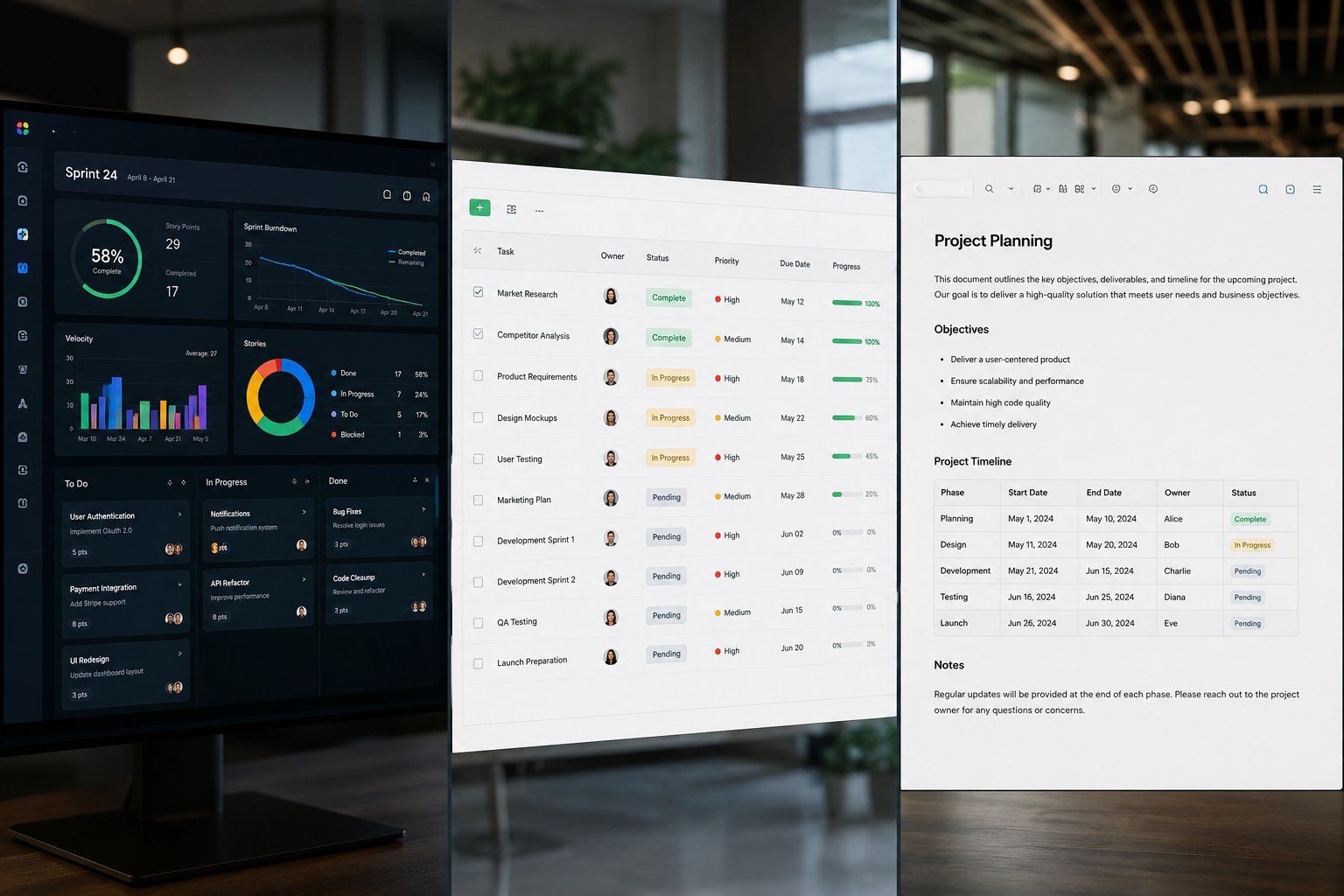
These three platforms dominate the modern startup tech stack, yet they approach work from radically different philosophies. ClickUp wants to be your everything app, packing every feature imaginable under one roof. Monday.com operates like an enterprise-grade visual database with sleek automation engines. Notion approaches productivity as a blank canvas, letting you build custom internal wikis and flexible data tables from scratch.
At SaasBonus, we spend all day poking, prodding, and breaking software to see how it holds up under real operational pressure. Let's skip the marketing fluff and dissect which of these tools will actually keep your startup from imploding during your next growth spurt.
The Core Philosophies: Three Different Ways to Run a Business
Before diving into specific features, we must understand the core DNA of each tool. Software shape-shifts your culture. The tool you choose will subtly dictate how your team communicates and executes every day.
ClickUp: The Hyper-Customizable Swiss Army Knife
ClickUp is built for power users. Its foundational thesis is simple: you shouldn't have to jump between five different tools to get work done. It crams tasks, docs, goals, whiteboards, chat, and time tracking into a single workspace.
For a fast-scaling startup, this all-in-one approach is incredibly attractive. You can map out high-level OKRs, link them directly to sprint backlogs, track developer hours, and write API documentation without changing browser tabs. However, that massive feature set comes with a steeper learning curve. ClickUp gives you total control over your environment, but if you don't set strict architectural guardrails early on, your workspace can quickly transform into a labyrinth.
Monday.com: The Clean, High-Velocity Execution Engine
Monday.com views the world through structured data and visual timelines. It doesn't try to be your document editor or your casual team chat room. Instead, it focuses on helping teams build highly visible, bulletproof workflows.
Everything in Monday revolves around 'Boards'—incredibly polished, colorful, grid-based sheets that act like spreadsheets on steroids. It is designed to be intuitive from minute one. Your non-technical team members—like recruiters, growth marketers, and customer success reps—will find Monday remarkably approachable. The platform shines when you need to track linear processes, visualize resource allocations, and automate repetitive operational steps.
Notion: The Connected Knowledge Workspace

Notion treats work as a living document. It started life as a wiki and text editor before evolving into a relational database powerhouse. In Notion, everything is a page, and every page can house infinite nested layers of text, media, and structured tables.
For tech startups that value documentation, asynchronous communication, and clean knowledge management, Notion is unmatched. It lets you contextualize your tasks right next to your product spec sheets, company mission statements, and brand guidelines. Instead of checking a sterile task list, your team works inside rich documents that explain why something is being built, not just what needs to be done.
ClickUp vs Monday.com vs Notion: The Ultimate Comparison Matrix
| Feature/Metric | ClickUp | Monday.com | Notion |
|---|---|---|---|
| Core Strength | Feature-rich task management & custom workflows | Visual execution & cross-department processes | Document curation & connected databases |
| Learning Curve | Steep; requires an admin to set up properly | Low to moderate; very intuitive UI | Low for basics, high for advanced formulas |
| Agile/Sprint Fit | Excellent; native sprint points, backlogs & charts | Good; customizable through boards and timelines | Moderate; works for basic tracking, lacks native charts |
| Customization | Unlimited custom fields, views, and hierarchies | Highly customizable columns, views, and dashboards | Total canvas freedom; structural building blocks |
| Automation Power | Robust internal rules, triggers, and external webhooks | Top-tier visual automation builder; highly reliable | Basic automation triggers; relies heavily on third-party integrations |
| Speed & UX | Can feel heavy or sluggish when heavily customized | Extremely snappy, fast UI updates | Fast for text, can lag with massive relational databases |
Feature Showdown: Where the Rubber Meets the Road
To figure out which tool belongs in your operational stack, we need to analyze how they perform in the trenches of day-to-day startup life.
1. Task Management and Agile Workflows
If you are running an engineering team using Scrum or Kanban, your project management tool must handle epic tracking, sprint backlogs, velocity charts, and bug reports without breaking a sweat.
- ClickUp wins the pure task management category for technical teams. It features a strict five-level hierarchy: Workspace, Spaces, Folders, Lists, and Tasks. This structure is a godsend for product managers. You can create a dedicated Space for Engineering, set up Folders for distinct products, and use Lists for individual sprint cycles. ClickUp offers native features for sprint points, burndown charts, cumulative flow diagrams, and direct GitHub/GitLab integrations. It feels closest to Jira, but without the corporate depression that usually accompanies Jira deployments.
- Monday.com handles sprints well, but you have to build the environment yourself using boards. You can create a master board for your product roadmap, use status columns to track development stages, and group items by current sprints. It is visually beautiful and makes it easy for leadership to see project statuses at a glance. However, if your engineering team relies heavily on native velocity tracking and deeply nested subtasks, Monday's flat board architecture can start to feel restrictive.
- Notion can run a Kanban board easily. You can set up a product roadmap database, switch to a board view, and drag cards from 'Backlog' to 'In Progress.' But because Notion treats tasks as documents, it lacks native agile features. There are no built-in burndown charts or automatic sprint velocity calculations. You can build these systems using complex database formulas and rollups, but you will spend a lot of time playing system architect instead of shipping code.
2. Automation and Workflow Optimization
Startups scale by automating manual work. If an operations manager spends three hours a week manually moving tasks from one stage to another or pinging people on Slack for status updates, you are losing money.
- Monday.com possesses the most elegant, human-readable automation builder on the market. It uses a clean recipe format: 'When Status changes to Done, move item to Archive Board and notify Team Lead.' It is incredibly stable and handles high volumes of automated tasks without lagging. Setting up cross-board automation is a breeze, making it simple to link a sales pipeline board directly to an onboarding project board.
- ClickUp offers equally powerful automation engines, allowing you to trigger actions based on custom field updates, task priorities, or deadline movements. You can also integrate external webhooks directly into your automations. The only downside is the interface; managing dozens of active automations inside ClickUp's busy menus can feel overwhelming compared to Monday's clean visual builder.
- Notion has introduced native database automations, allowing you to update page properties or trigger Slack notifications when a page is edited. While useful for simple status updates, it cannot match the complex conditional logic found in Monday or ClickUp. If you want Notion to handle heavy operations, you will need to stitch it together with external automation platforms like Make or Zapier.
3. Knowledge Management and Documentation
A startup's institutional knowledge is its competitive advantage. When you bring on three new engineers in a single month, their onboarding speed depends entirely on how well your docs are organized.
- Notion is the undisputed champion of knowledge management. The entire platform is built around text blocks, making it incredibly easy to spin up internal wikis, engineering design docs, customer support runbooks, and HR policies. Its global search functionality allows you to find specific phrases hidden deep inside nested pages instantly. Because tasks can live inside documents, your team can review the technical specification sheet and check off their deliverables within the exact same page workspace.
- ClickUp features a built-in document tool called ClickUp Docs. It functions similarly to Google Docs or Notion, allowing for real-time collaborative editing, nested pages, and direct task embedding. It is a solid addition that prevents you from needing a separate wiki tool. That said, it lacks the elegant typographic flow, block-level flexibility, and database-linking capabilities that make Notion feel like a natural extension of your brain.
- Monday.com offers Monday Workdocs, which works fine for collaborative brainstorming sessions or quick meeting notes. However, it is fundamentally an add-on feature. You wouldn't want to try building a comprehensive, multi-department corporate knowledge base inside Monday. It simply isn't what the platform was built to do.
The Real-World Verdict: Scenario-Based Analysis
No software exists in a vacuum. The right choice depends on your business model, team structure, and immediate operational bottlenecks.
Scenario A: The Hardcore B2B SaaS Startup
- Profile: 15 employees, heavy engineering focus, rapid product cycles, running two-week agile sprints.
- The Winner: ClickUp
- Why: When your primary challenge is translating complex product requirements into working code while keeping bugs at bay, ClickUp provides the necessary technical scaffolding. Its hierarchy lets you isolate development environments from marketing initiatives while maintaining high-level executive dashboards. The direct engineering integrations mean your developers can close out tasks directly from their terminal using git commit messages, keeping them focused and productive.

Scenario B: The Fast-Growing Marketplace or Product-Led Growth Team
- Profile: 40 employees, heavy operations, marketing-driven growth, massive cross-functional execution needs.
- The Winner: Monday.com
- Why: When your primary challenge is coordinating non-technical workflows—like influencer onboarding, content production calendars, partner pipelines, and performance marketing assets—Monday.com is bulletproof. The visual transparency prevents tasks from falling through the cracks, and the low learning curve ensures that new hires across marketing, sales, and HR can adopt the tool within their first 48 hours without feeling overwhelmed.
Scenario C: The Asynchronous, Remote-First Innovation Lab
- Profile: 10 employees, distributed worldwide, heavy emphasis on deep work, product design, and thorough documentation.
- The Winner: Notion
- Why: If your team relies on thoughtful, long-form writing rather than rapid-fire instant messaging, Notion is your home base. It eliminates the need for endless status sync meetings because the historical context, product reasoning, and task status all live harmoniously inside the same collaborative documents. It allows a small, highly autonomous team to build an incredibly organized internal operating system.
Implementation Blueprints: Setting Up for Scalability
Whichever platform you choose, the biggest point of failure isn't the software itself—it's how you launch it. Poorly structured project management tools quickly degenerate into expensive digital graveyards. Use these blueprints to set up your chosen system for long-term scalability.
The ClickUp Blueprint: Guardrails and Governance
If you choose ClickUp, your biggest enemy is feature creep inside your own workspace.
- Appoint a Single Workspace Architect: Do not give every user permission to create new Spaces or Folders. Designate one person (usually a Head of Operations or Product Manager) to maintain the structural layout.
- Turn Off Unnecessary ClickApps: ClickUp allows you to toggle features like time tracking, mind maps, and tags on or off for individual spaces. Turn off everything you don't immediately need to keep the user interface clean.
- Standardize Custom Fields: Establish universal definitions for fields like 'Priority,' 'Drop Date,' and 'Owner.' If every department creates their own versions of these fields, your cross-platform reporting will break down.
The Monday.com Blueprint: Cross-Board Connectivity
To get the most value out of Monday, you must move beyond isolated tracking lists and leverage its database-like relational capabilities.
- Build a Master Portfolio Dashboard: Create high-level overview dashboards that pull key metric rows from your individual engineering, marketing, and operations boards. This gives leadership a real-time health check without forcing them to dig through daily tasks.
- Map Out Dependency Automation: Utilize Monday's timeline view to map clear dependencies. Set up automations so that if an engineering task gets delayed by four days, the dependent marketing design phase automatically shifts its calendar deadlines accordingly.
- Utilize Standardized Status Columns: Keep your status label terminology uniform across all department boards (e.g., sticking to 'Stuck,' 'Working on it,' and 'Done') to ensure clean global filtering.
The Notion Blueprint: The Relational Engine
If you use Notion for project management, do not just build simple, disconnected text tables. You need to leverage its master database structure.
- Create One Master Tasks Database: Create one massive, centralized database for every single task in the company. Use a 'Department' select tag to filter them out.
- Build a Master Projects Database: Create a separate database for high-level initiatives (e.g., 'Launch Q3 Referral Program'). Link the Master Tasks database to the Projects database using a Relational property.
- Roll Up Context: Create customized dashboards for individual employees by pulling filtered views of the master database onto their personal home pages. This keeps team members focused solely on their specific deliverables while preserving the interconnected data architecture behind the scenes.
The Cost of Scaling: Pricing vs Practicality
Let's talk numbers. Startup budgets are tight, and software costs add up quickly as headcount expands. You need to calculate not just what you will pay today for five users, but what your bill will look like when you scale to fifty.
- ClickUp: Offers an incredibly generous free tier, followed by their Unlimited plan ($7/user/month billed annually) and Business plan ($12/user/month billed annually). From a pure feature-per-dollar perspective, ClickUp offers the highest economic value for early-stage companies.
- Monday.com: Operates on a unique seat-package model, requiring you to purchase user access in fixed team tiers (3 seats, 5 seats, 10 seats, etc.). Their Standard plan ($9/user/month billed annually) and Pro plan ($19/user/month billed annually) make it the most expensive option of the three, but the time saved via its robust internal automation engine often offsets the higher price tag.
- Notion: Offers a Business plan ($15/user/month billed annually), but their Plus plan ($8/user/month billed annually) handles the vast majority of early startup needs perfectly. If you are already planning to pay for a company wiki tool like Confluence or Guru, consolidation onto Notion can save you thousands of dollars annually across your entire tech stack.
Final Thoughts: Stop Overthinking and Start Executing
At the end of the day, there is no perfect project management software. The best system is the one your team actually updates consistently.
If your startup is drowning in technical debt, messy sprints, and broken developer roadmaps, head over to ClickUp and take advantage of its rigid, feature-rich engineering hierarchies. If your operational workflows are breaking, departments aren't communicating, and your non-technical team members are losing track of deliverables, choose Monday.com for its visual clarity and reliable automation power. If your company lacks clear documentation, your onboarding is a mess, and you want to foster an aligned, asynchronous work culture, build out your workspace inside Notion.
Pick the tool that matches your team's unique operational style, set up clear structural guardrails, and then get back to what actually matters: building a great product that your customers love.




