
Automate B2B Lead Scoring with Clay & HubSpot (Setup)
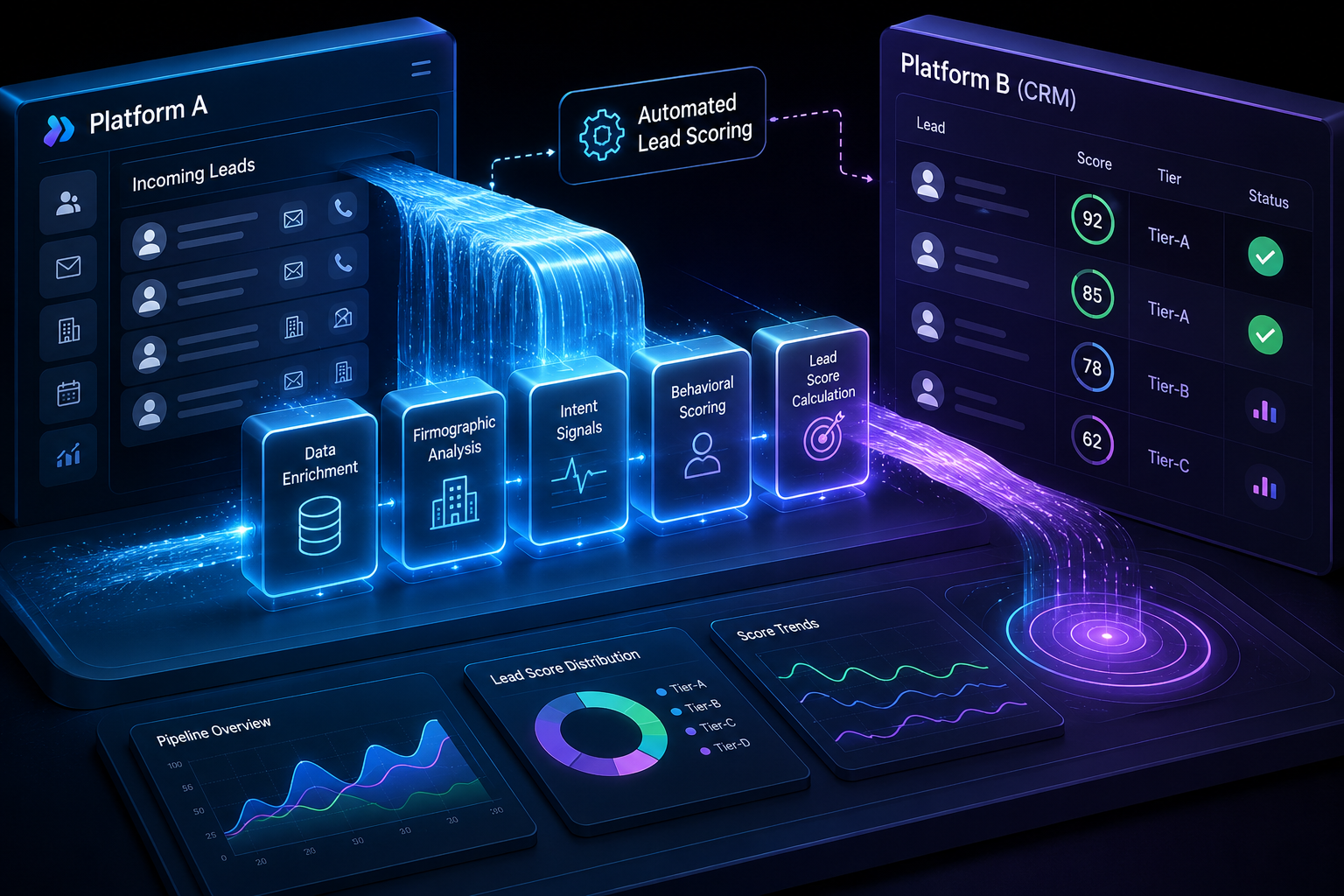
Standard lead scoring in modern B2B sales is fundamentally broken. Most growth teams rely on static CRM criteria—like assigning 10 points for downloading an ebook or 5 points for opening an email—which rewards accidental clicks while ignoring actual buying power.
To automate B2B lead scoring effectively between Clay and HubSpot, you must decouple data enrichment from CRM storage. Clay acts as an external intelligence engine that aggregates multi-source firmographic, technographic, and intent signals, calculates a dynamic score based on strict Ideal Customer Profile (ICP) parameters, and syncs only high-value, enriched scores back into HubSpot properties.
This setup prevents CRM database bloat, saves thousands of dollars in unused contact storage fees, and ensures your account executives only spend time on accounts with genuine propensity to buy. Below is the exact step-by-step blueprint to build, test, and scale a Clay-to-HubSpot lead scoring engine.
Why Traditional HubSpot Lead Scoring Falls Short
HubSpot is a world-class CRM, but its native lead scoring system (HubSpot Score) operates under two major constraints: single-source data limitations and credit consumption costs.
When a prospect submits a basic form, HubSpot captures their name, email, and whatever details they manually entered. If that prospect typed in a generic Gmail address or skipped optional fields like company headcount and technology stack, HubSpot’s native scoring tool has zero visibility into who that person actually is. It cannot score what it cannot see.
| Process Layer | Data Inputs | Scoring Mechanics | Revenue Impact |
|---|---|---|---|
| Traditional CRM Scoring | Basic form metadata, email opens, page views | Static point additions based on passive engagement | High volume of unqualified contacts alerting sales |
| Clay + HubSpot Engine | Multi-provider waterfall (Apollo, PDL, BuiltWith, LinkedIn) | Dynamic ICP fit formula with real-time AI normalization | Precise pipeline routing and zero wasted rep hours |
Furthermore, adding enterprise enrichment add-ons across thousands of unverified leads inside HubSpot rapidly inflates your monthly software costs. Clay solves this by serving as an intermediate enrichment layer. Instead of paying premium per-contact rates to enrich every unqualified domain that hits your landing page, Clay runs conditional waterfall lookups across 75+ data providers—such as Apollo, People Data Labs, LinkedIn, Ocean.io, and BuiltWith—only spending data credits when predefined criteria are met.
The Difference: Static vs. Dynamic Signal Scoring
Static scoring measures activity, whereas dynamic signal scoring measures fit and intent.
- Static CRM Scoring: Adds 20 points because someone visited your pricing page three times. (Problem: They could be a student, a competitor, or a job applicant).
- Dynamic Signal Scoring (Clay + HubSpot): Evaluates if the visitor is a Vice President of Operations at a venture-backed SaaS company with 50 to 200 employees, actively hiring for software engineers, and using AWS. If yes, it tags them as an A-Tier Lead and alerts sales immediately.
Core Prerequisites for the Integration
Before building the workflow, verify that you have administrative access and the following permissions across both platforms:
- A Clay Account: Pro tier or higher (required to access Webhooks and multi-step conditional enrichment workflows).
- A HubSpot Account: Operations Hub or Sales Hub (Pro or Enterprise recommended for custom property automation and workflow triggers).
- HubSpot Personal Access Token or Admin OAuth: Required to establish a secure API connection between Clay and HubSpot.
- Defined ICP Rules: A clear, documented breakdown of target job titles, company size bands, geographic constraints, and tech stack requirements.
Step 1: Define Your B2B Scoring Matrix
Do not open Clay until you have mapped your scoring formula. A robust scoring framework balances three distinct tiers of data: Firmographics, Technographics, and Behavioral Intent.
| Data Category | Signal Examples | Scoring Impact | Data Source in Clay |
|---|---|---|---|
| Firmographics | Company headcount (50-500), Annual Revenue ($10M+), Target Region (North America / EU) | Core Gatekeeper (+30 pts / Disqualify) | Apollo, LinkedIn Company Data, Harmonic |
| Technographics | Uses Salesforce, installed HubSpot Pixel, runs Google Ads | Strategic Alignment (+20 pts) | BuiltWith, Wappalyzer |
| Persona / Role | VP Level, Seniority = Executive, Function = Sales Ops / Marketing | Buyer Power (+25 pts) | People Data Labs, Sales Navigator |
| Hiring Signals | Currently hiring for 3+ DevOps Engineers, opened a new office | Growth Signal (+15 pts) | PredictLeads, Google Jobs API via Clay |
| Engagement | Filled out demo form, visited pricing page 2x in 24 hours | High Intent (+10 pts) | HubSpot Native Form Trigger |
Setting Up Disqualification Rules
An essential part of automated lead scoring is immediate disqualification. You do not want your sales reps calling students, freelancers, or job seekers. In your matrix, assign a Hard Zero or Disqualified flag for:
- Personal email domains (gmail.com, yahoo.com, hotmail.com).
- Target headcount below 10 or above 10,000 (if targeting mid-market).
- Non-target geographic locations where your legal team cannot contract.
- Competitor domain names.

Step 2: Build the Trigger from HubSpot to Clay
To score leads in real time, Clay needs to know the exact moment a new contact enters HubSpot or reaches a specific lifecycle stage.
Method A: HubSpot Webhooks (Recommended for Speed)
- Log in to your HubSpot portal and navigate to Automation > Workflows.
- Create a contact-based workflow triggered when a new form submission occurs or when a contact is created.
- Add an action step: Send Webhook.
- Set the HTTP method to POST.
- In Clay, create a new table, choose Import Data via Webhook, and copy the unique Webhook URL generated by Clay.
- Paste this URL into your HubSpot workflow webhook action and turn the workflow on.
The real-time HTTP POST payload transmits raw contact metadata from HubSpot directly into Clay's dynamic intake table for immediate processing.
Method B: Native Clay HubSpot Integration (Batch / Scheduled)
If you prefer to enrich leads in batches (e.g., every hour or daily) rather than triggering real-time webhooks, set up the native integration:
- Open a new table in Clay.
- Click Add Source > HubSpot.
- Authenticate your account and select Contacts.
- Define filter views (e.g., Lead Status = Uncontacted AND Create Date = Today).
Step 3: Configure the Clay Enrichment Waterfall
Once the primary contact payload (Email, First Name, Last Name, Company Name, Domain) lands in Clay, configure your enrichment waterfall. A waterfall queries provider A; if provider A returns empty fields, it automatically queries provider B, ensuring maximum data coverage at minimum cost.
- Query Primary Enrichment Provider: The incoming domain hits Apollo to pull headcount, industry, and corporate headquarters.
- Evaluate Data Completeness: If Apollo returns complete firmographics, Clay skips additional queries. If headcount or revenue fields remain empty, the workflow moves to the fallback layer.
- Query Secondary Provider: Clay automatically routes the domain to People Data Labs to fill missing attributes.
- Query Tertiary Specialized Provider: For remaining empty records, Clay queries Ocean.io or LinkedIn Company Enrichment before finalizing the contact row.
1. Corporate Email Verification & Domain Extraction
Use Clay’s built-in formula column to extract the domain from the contact's email address. Filter out free domains using a simple regex pattern or Clay’s Is Free Email Provider enrichment block. If Is Free Email = True, halt further paid enrichment and assign a base score of 0.
2. Firmographic & Technographic Waterfall
For valid business domains, trigger a firmographic lookup:
- Primary Lookup: Apollo (Queries company size, industry, revenue, headquarters).
- Fallback Lookup: People Data Labs or LinkedIn Company Enrichment.
- Technographic Enrichment: Run a BuiltWith query inside Clay to verify if the target domain uses specific software tools (e.g., checking if they run React, Marketo, or Shopify).
3. Job Title Normalization
B2B job titles are messy. A contact might list their title as Growth Hacker, Marketing Wizard, or VP of Demand Gen. Use Clay's native AI column (powered by Claude or OpenAI) to normalize job titles into standardized job functions and seniority levels.
Example Prompt inside Clay AI Column:
"Analyze the job title in column {{Title}}. Normalize it into one of these seniorities: Executive, VP, Director, Manager, Individual Contributor. Normalize the function into: Marketing, Sales, Engineering, Operations, Finance, or Other. Return output as valid JSON with keys: seniority and function."
Step 4: Write the Formula Column for Dynamic Scoring
With company size, technographics, normalized title, and regional data enriched, add a Formula Column in Clay to calculate the total score.
Here is an example JavaScript formula logic inside Clay:
javascript let score = 0;
// 1. Employee Count Scoring const headcount = parseInt(step2_firmographics.employee_count) || 0; if (headcount >= 50 && headcount <= 500) { score += 35; // Target sweet spot } else if (headcount > 500 && headcount <= 2000) { score += 20; } else if (headcount < 20) { score -= 50; // Too small }
// 2. Seniority Scoring const seniority = step3_normalized.seniority; if (seniority === 'Executive' || seniority === 'VP') { score += 30; } else if (seniority === 'Director') { score += 20; } else if (seniority === 'Manager') { score += 10; }
// 3. Tech Stack Match const techStack = step2_technographics.technologies || []; if (techStack.includes('Salesforce') || techStack.includes('HubSpot')) { score += 20; }
// 4. Final Grade Assignment let grade = 'C'; if (score >= 70) { grade = 'A'; } else if (score >= 40) { grade = 'B'; }
return { total_score: Math.max(0, score), lead_grade: grade };
This formula evaluates all enrichment outputs in real time, outputs an integer score (e.g., 85), and assigns an overarching letter grade (A, B, C, or Disqualified).

Step 5: Sync Scores and Intelligence Back to HubSpot
Now that Clay has computed the score and tier, send those values back to HubSpot to empower your sales and marketing teams.
Creating Custom Properties in HubSpot
Inside HubSpot, navigate to Settings > Properties > Contact Properties and create the following custom fields:
- Clay Lead Score (Number field)
- Clay Lead Tier (Dropdown: Tier A, Tier B, Tier C, Disqualified)
- Clay Enrichment Summary (Multi-line text field—useful for pasting bullet points of key insights directly onto the contact record for sales reps)
- Clay Tech Stack (Multiple checkboxes or text area)
Setting Up the Export Action in Clay
In your Clay table, select Export > HubSpot:
- Select Update Existing Contact (mapped via Email Address).
- Map the calculated Clay values to your newly created custom HubSpot properties:
- Formula Score -> Clay Lead Score
- Formula Grade -> Clay Lead Tier
- Normalized Seniority -> Seniority Level
- Enriched Employee Count -> Number of Employees
- Set an export condition: Run export only when the scoring formula execution is completed.
Step 6: Create Automated Routing Rules in HubSpot
With enriched scores flowing from Clay into HubSpot, build internal automation to act on those scores immediately.
| Lead Tier | Qualification Criteria | Automated HubSpot Actions |
|---|---|---|
| Tier A (Score 70+) | Perfect ICP match, target seniority, validated tech stack | Set status to New, round-robin assign to AE, dispatch instant Slack alert |
| Tier B (Score 40-69) | Moderate headcount match, secondary job title | Assign to BDR for semi-automated cadence, enroll in mid-funnel campaign |
| Tier C / Disqualified (<40) | Freelancer, non-target region, or generic email | Exclude from outbound sales, enroll in automated educational email sequence |
Automated Workflows to Build:
- Tier A Leads (Score 70+):
- Automatically assign contact ownership to an Account Executive via round-robin.
- Send a real-time Slack or Microsoft Teams alert to the sales channel with the enriched summary.
- Create a high-priority task for immediate phone or personalized email outreach.
- Tier B Leads (Score 40-69):
- Assign to a Business Development Rep (BDR) for semi-automated cadence enrolling.
- Add to targeted mid-funnel marketing campaigns.
- Tier C / Disqualified Leads (Score <40):
- Exclude from active sales outreach.
- Enroll in automated educational email nurture drips.
- Suppress from expensive retargeting ad custom audiences.
Real-World Case Study: SaaS Lead Velocity Transformation
Consider a B2B SaaS business receiving 1,200 inbound form fills monthly. Prior to automating lead scoring with Clay and HubSpot, sales reps manually reviewed every single lead, researching company sizes on LinkedIn one by one.
The Before & After Metrics
| Metric | Manual HubSpot Process | Automated Clay + HubSpot Engine |
|---|---|---|
| Time to First Outreach | 14 Hours | 3 Minutes |
| Rep Capacity Wasted on Unqualified Leads | ~40% | <2% |
| Data Enrichment Cost Per Contact | $0.80 (Flat rate across all leads) | $0.12 (Waterfall optimization) |
| Pipeline Conversion Rate | 3.2% | 8.7% |
By pushing raw contacts through Clay’s waterfall enrichment first, the company disqualified 450 personal email addresses and micro-businesses without paying for deep technographic lookups. The sales team focused exclusively on the top 250 Tier-A prospects, increasing outbound booking rates while saving hundreds of hours of manual labor.
Common Pitfalls to Avoid
When connecting Clay and HubSpot for automated scoring, avoid these common implementation mistakes:
1. Over-Complicating the Initial Scoring Formula
Do not start with 50 different variables. Begin with a simple 4-variable score (Headcount, Geography, Seniority, Tech Stack). Run it for two weeks, gather feedback from sales reps, and refine the weighting before adding complex signals like buyer intent or job listing keywords.
2. Overwriting Manual CRM Edits
In your HubSpot integration settings inside Clay, ensure you do not overwrite properties if a sales rep has manually updated them. Set updates to occur only when the CRM field is blank or managed exclusively by system properties.
3. Infinite Webhook Loops
If you set up a HubSpot workflow that triggers on contact updates, and Clay updates that same contact, you risk creating an infinite loop. Always trigger webhooks based on specific property changes (e.g., Create Date is Known AND Clay Lead Score is Unknown).
Scale Your Pipeline Engine with Saasbonus
Automating your B2B lead scoring with Clay and HubSpot turns a chaotic CRM into a high-precision pipeline engine. By leveraging external waterfalls, normalizing titles with AI, and syncing only structured scores back to your CRM, you eliminate administrative overhead and empower your sales team to focus on closing deals.
If you are evaluating modern growth stacks, exploring sales automation platforms, or looking for the best deals on SaaS tools to power your go-to-market workflows, visit Saasbonus. We provide unbiased, hands-on software comparisons, benchmarks, and practical guides to help you build a profitable, scalable software stack.




