
Automate B2B Prospecting Using Clay and Smartlead
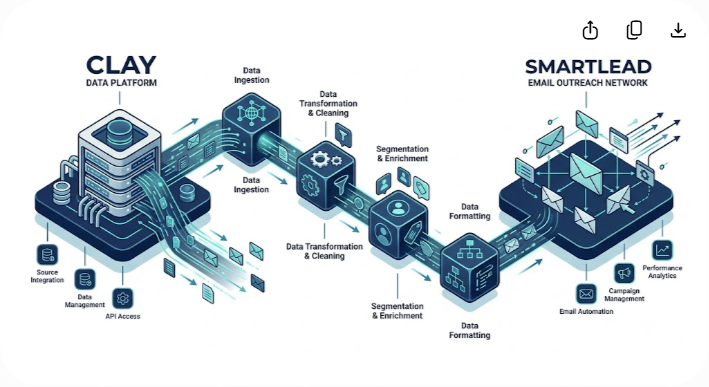
Automating your B2B prospecting using Clay and Smartlead allows you to source prospects, enrich contact records across dozens of vendors, write personalized emails with AI, and land directly in primary inboxes at scale.
If your sales team spends twenty minutes per prospect pulling LinkedIn profiles, cross-referencing company news, guessing email patterns, and drafting custom icebreakers, your pipeline is losing time and revenue. Scaling outbound no longer requires choosing between generic mass blasts and painstaking manual research.
Here is the exact blueprint to configure, enrich, and run an automated Clay-to-Smartlead outbound engine that books qualified meetings reliably.
Why Clay + Smartlead Is the Modern Outbound Standard
Traditional sales teams often struggle to balance sending volume with message relevance. Mass email sequencers send generic templates to low-quality lists, resulting in low response rates and burned sending domains. Manual account-based outreach achieves higher response rates, but a single rep can rarely research and contact more than thirty target accounts a week.
Pairing Clay with Smartlead solves this trade-off. Clay acts as the data hub—sourcing leads, running waterfall enrichment, and using large language models (LLMs) to construct relevant copy. Smartlead operates as the delivery network—managing rotating sending mailboxes, maintaining domain health, and delivering messages reliably.
Stack Comparison
| Feature | Legacy Sales Sequencer (Single Database) | Clay + Smartlead Stack |
|---|---|---|
| Data Enrichment | Single internal database | Multi-vendor waterfall across 75+ data sources |
| Personalization | Simple static variables ({{firstName}}) | LLM logic using live web scraping and company news |
| Sending Infrastructure | Single domain or limited inboxes | Multi-domain, multi-mailbox rotation with auto warm-up |
| Data Verification | Periodic static updates | Real-time email verification before sending |
| Credit Efficiency | Pay per reveal regardless of accuracy | Waterfall logic that charges only on verified hits |
Step 1: Set Up Infrastructure to Protect Deliverability
Before creating an enrichment workflow in Clay, establish dedicated sending infrastructure. Never send cold outreach from your primary corporate domain (yourcompany.com). Spam complaints on outbound campaigns can damage internal email deliverability for your entire company.
Domain and Mailbox Configuration
Purchase 3 to 5 secondary domains similar to your main brand (such as getyourcompany.com or tryyourcompany.com). Set up 2 to 3 user mailboxes per domain. With 3 secondary domains, you will operate 6 to 9 distinct sending mailboxes.
Keep daily volume conservative: limit outreach to 30–40 cold emails per mailbox per day.
Mandatory DNS Security Records
Configure three essential DNS records for every secondary domain:
- SPF (Sender Policy Framework): Designates which mail servers may send email for your domain.
- DKIM (DomainKeys Identified Mail): Adds a cryptographic signature verifying message integrity.
- DMARC (Domain-based Message Authentication, Reporting, and Conformance): Dictates how receiving servers handle unauthenticated mail. Start with a policy of p=none before moving to p=quarantine or p=reject.
Warm Up Inboxes in Smartlead

Connect your mailboxes to Smartlead and enable the automated warm-up network immediately. Let new domains warm up for 14 to 21 days before launching live outreach. Keep warm-up running quietly in the background to sustain sender reputation.
Step 2: Source High-Intent Prospects in Clay
Outbound automation relies heavily on targeting quality. Clay offers several ways to source prospects directly or import external lists.
Sourcing Channels
- Clay Native Databases: Use 'Find People' and 'Find Companies' to query records by job title, headcount growth, geography, and industry.
- Sales Navigator Imports: Export targeted LinkedIn Sales Navigator lists using web scrapers or extensions, then upload the CSV into Clay.
- Intent and Tech Stack Signals: Identify companies hiring for specific roles, or filter teams using complementary software tools via BuiltWith enrichment in Clay.
Define Precise ICP Filters
Avoid overly broad queries like 'Marketing Executives in North America'. Refine your parameters:
- Company Size: 20 to 250 employees
- Titles: Chief Marketing Officer, VP of Marketing, Head of Growth
- Location: Target operating regions
- Exclusions: Automatically suppress current customers, active sales deals, and non-target sectors
Step 3: Implement Waterfall Email Enrichment
No single data provider offers complete email coverage. Relying on a single vendor leaves up to 40% of your addressable market unreachable.
Clay addresses this through Waterfall Enrichment. The platform queries multiple providers sequentially. If Provider A returns no verified result, Clay moves to Provider B, then Provider C, charging credits only when a valid match is found.
Recommended Waterfall Order
- Work Email Search (Datagma / Prospex / Icypeas): Search primary B2B databases.
- Secondary Provider (Dropcontact): Find missing addresses with strong coverage in North America and Europe.
- Pattern and Catch-All Search (Hunter / Findymail): Identify complex pattern structures and catch-all setups.
- Verification Step (Debounce / ZeroBounce): Run every found email through a dedicated validation step in Clay to filter out invalid addresses, spam traps, and risky records.
This sequence routinely achieves an 80–85% verified email match rate while keeping campaign bounce rates under 2%.
Step 4: Add Contextual AI Personalization
Prospects easily recognize generic variables (Hi {{firstName}}, I saw you work at {{companyName}}). Use Clay's native integrations with Anthropic Claude or OpenAI models to perform live research and write concise, relevant copy.
Extract Homepage Value Statements
Use Clay's Scrape Website action to pull text from a prospect's homepage or product page. Pass that raw copy to an LLM prompt:
Prompt: 'Summarize what this company offers in 6 words or less using plain, lowercase English. Avoid marketing terms like transform, revolutionize, or seamless.'
Research Recent Signals
Search Google for recent news using "{{companyName}}" + press release OR news. Synthesize results with an LLM prompt:
Prompt: 'Review the search text. If there is a clear company announcement from the past 6 months, write a 1-sentence note to {{firstName}}. If no distinct news exists, return NULL.'
Apply Conditional Rules
Create conditional logic columns in Clay to route prospects to specific message templates based on enriched traits:

- Company is hiring sales reps: Focus message on rep onboarding speed.
- Uses HubSpot CRM: Focus message on CRM data synchronization.
- Standard profile: Route to core value proposition.
Step 5: Sync Clay to Smartlead via Direct Node or Webhook
Once your Clay table is enriched, verified, and personalized, push the lead records directly to Smartlead.
Direct Smartlead Integration
- In your Clay table, select Add Column > Integrations > Smartlead.
- Choose Add Campaign Lead.
- Enter your Smartlead API key (located under Settings > API Keys in Smartlead).
- Select the target Smartlead Campaign ID.
- Map Clay columns to Smartlead fields:
- email -> Email
- firstName -> First Name
- companyName -> Company Name
- custom_opening_line -> Custom Line 1
- value_prop_summary -> Custom Line 2
Webhook Sync
To send leads to Smartlead continuously as soon as they pass verification:
- Copy the Campaign Webhook URL inside Smartlead.
- Add an HTTP API / Webhook column in Clay.
- Set a run rule: Trigger only when Email Status = Valid.
- Map the JSON payload to post contact fields in real time.
Step 6: Configure Campaign Sequences in Smartlead
Structure your sequence inside Smartlead to emphasize clarity, brevity, and low-friction calls to action.
Sample 4-Touch Sequence
- Email 1 (Day 1): Specific Hook
- Subject: quick question re: {{companyName}}
- Body: Open with your personalized Clay line. Follow with two sentences explaining how you solve a specific problem relevant to their role. End with a soft question: 'Open to taking a look at a brief video?'
- Email 2 (Day 4): Case Metric Thread
- Subject: Re: quick question re: {{companyName}}
- Body: Share a short outcome metric achieved for a peer company. Keep the note under 75 words.
- Email 3 (Day 8): Secondary Angle
- Subject: New idea for {{companyName}}
- Body: Address a secondary challenge related to their tech stack or operational growth.
- Email 4 (Day 14): Soft Sign-off
- Subject: Re: quick question re: {{companyName}}
- Body: Acknowledge that timing might not align today, and offer a helpful resource for future reference.
Turn click tracking OFF in Smartlead. Disabling open-tracking pixels helps prevent security filters from flagging your messages as promotional.
Syncing Replies to Your CRM
Automating email delivery requires an equally efficient process for handling incoming replies.
Smartlead's Master Inbox centralizes responses across all mailboxes. You can configure webhook triggers for Reply Categorized as Interested to instantly create deal records in HubSpot, Salesforce, or Pipedrive via Zapier or Make. Ensure Smartlead automatically pauses outreach to any prospect or company domain as soon as a reply is detected.
Outbound Setup Blueprint
- Build Infrastructure: Set up secondary domains, configure SPF/DKIM/DMARC, and warm mailboxes in Smartlead for 14–21 days.
- Source Prospects: Build ICP queries in Clay or import targeted Sales Navigator lists.
- Enrich and Verify: Run multi-provider email waterfalls and verify all addresses before sending.
- Generate Copy: Use web scraping and LLMs in Clay to write concise, contextual icebreakers.
- Sync to Campaign: Connect your Clay table to Smartlead via API or Webhook with mapped dynamic fields.
- Route Inquiries: Wire Smartlead reply webhooks to your CRM to notify account executives immediately.
Common Pitfalls to Avoid
- Complex AI Outputs: Writing long, convoluted AI sentences can sound unnatural. Keep AI outputs brief, clear, and focused on business context.
- Skipping Verification: Sending to unverified contacts causes bounce rates to rise above 3%, which damages domain reputation.
- Uncleaned Company Names: Sending emails with unformatted names like 'Acme Solutions Inc LLC' reveals automated templates. Use Clay formulas to clean company names to 'Acme'.
- High Initial Sending Volume: Increasing volume too quickly on new domains triggers spam filters. Increase sending volume gradually over several weeks.
Build Your Sales Engine
Automating B2B prospecting using Clay and Smartlead replaces repetitive manual research with a reliable outbound system. By combining multi-vendor enrichment, targeted AI messaging, and distributed sending infrastructure, your sales team can focus on conducting meetings and closing deals.
To explore detailed software analysis, teardowns, and growth stack guides, visit Saasbonus.




