
Automate Inbound Demo Scheduling with Chili Piper (2026 Guide)
Why Traditional Inbound Demo Scheduling Kills B2B Conversion Rates
If a qualified prospect fills out your 'Request a Demo' form and has to wait four hours for an SDR to send a calendar link, your conversion rate drops by up to 80%. B2B buyers operate in high-intent micro-moments. When they decide to evaluate software, they want a meeting locked in immediately, while the problem they are trying to solve is top of mind.
The traditional inbound demo workflow is fundamentally broken. A prospect submits a Webflow or HubSpot form. The form payload hits a CRM like Salesforce, sits in a lead queue, waits for an SDR to review the company size and location, gets manually assigned, and triggers an automated email containing a static booking link. By the time the prospect sees that email, they have already requested a demo from two competitors who answered faster.
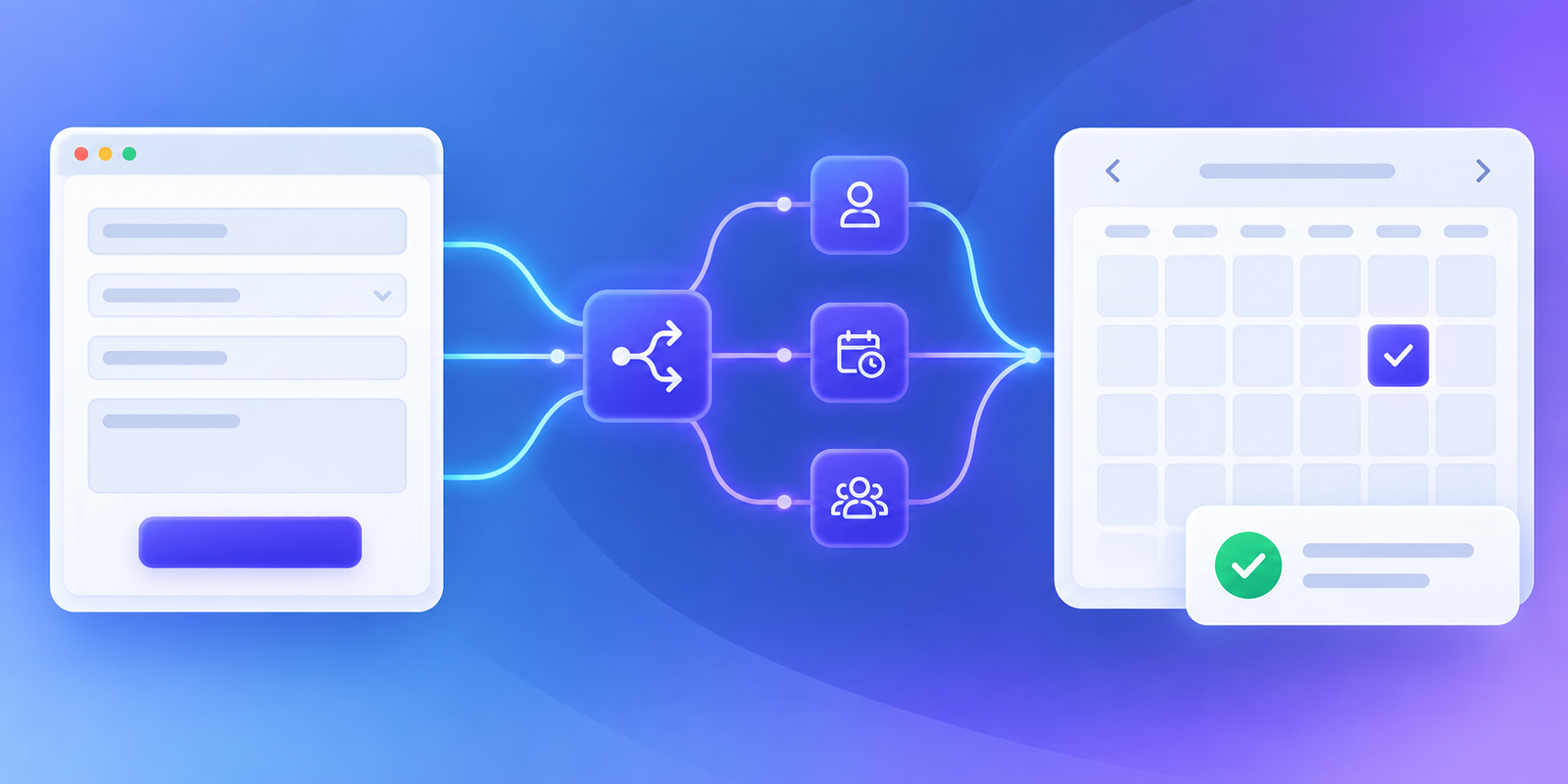
Automating inbound demo scheduling using Chili Piper eliminates every manual middle step. By embedding real-time routing logic directly into your existing marketing forms, Chili Piper evaluates lead data instantly, checks territory and account ownership rules in your CRM, qualifies the prospect on the spot, and displays the assigned sales representative's live calendar directly on the thank-you screen. The result is a seamless transition from form fill to confirmed meeting in under ten seconds.
Core Mechanics: How Chili Piper Automates Inbound Scheduling
Chili Piper does not replace your web forms or your CRM. Instead, it acts as an intelligent traffic control layer between your web frontend, your enrichment engine, and your sales team's calendars. Understanding this pipeline helps growth marketers and sales operations managers configure clean workflows without creating data sync conflicts.
1. Form Capture and Payload Interception
When a prospect clicks 'Submit' on your web form (HubSpot, Marketo, Pardot, Typeform, or custom HTML), Chili Piper's JavaScript snippet intercepts the event. Before the page redirects, Chili Piper grabs the form field inputs—such as work email, company size, country, and job title.
2. Real-Time Data Enrichment and Matching
Chili Piper instantly cross-references the email domain against your CRM records. If the domain matches an existing Account or active Opportunity, Chili Piper pulls the designated Account Executive (AE) or Customer Success Manager (CSM) owner. If it is a brand-new lead, Chili Piper routes the data to enrichment tools like Clearbit or ZoomInfo in milliseconds to fill in missing qualification attributes.
3. Rule Evaluation (Qualification & Routing Logic)
Using predefined rules inside Chili Piper Router, the incoming payload is evaluated:
- Disqualification: If company size is under 10 employees, route to a self-serve video page or nurture sequence.
- Matched Account Routing: If the account belongs to Enterprise Rep Sarah, route directly to Sarah's calendar.
- Round-Robin Assignment: If the lead is net-new SMB, assign the lead to the next available rep in the SMB round-robin queue, accounting for timezone availability and working hours.
4. Direct Calendar Rendering (Concierge)
If the lead is qualified, Chili Piper presents an interactive calendar pop-up directly over the form confirmation screen. The prospect selects an open time slot, receives an instant calendar invitation with a video conference link (Zoom, Google Meet, or Microsoft Teams), and the event details automatically write back to Salesforce or HubSpot.
Step-by-Step Guide: Setting Up Chili Piper for Inbound Scheduling

Setting up Chili Piper requires coordination between Sales Operations and your Marketing Webmaster. Follow this step-by-step workflow to launch your automated inbound scheduling engine.
Step 1: Connect CRM and Calendar Integrations
Before creating routing rules, authenticate your core revenue stack within Chili Piper settings.
- Navigate to Integrations in the Chili Piper admin portal.
- Authorize your primary CRM (Salesforce or HubSpot CRM) using an admin integration account.
- Connect your team's Google Workspace or Microsoft Office 365 calendar suites.
- Connect your video conferencing platform (Zoom, Google Meet, or Teams) so unique meeting links generate automatically for every scheduled call.
Step 2: Configure Workspace Teams and Round-Robin Pools
Divide your sales representatives into functional teams based on your Go-To-Market (GTM) strategy.
- Create team workspaces for SMB Sales, Mid-Market Sales, and Enterprise Sales.
- Assign reps to their respective pools and set weightings if needed (for example, giving onboarding reps a lower weight than veteran AEs).
- Enable strict round-robin rules to prevent distribution bias, ensuring meetings are distributed fairly based on completed calls rather than just sent invites.
Step 3: Build Qualification and Routing Queues
Define clear logic trees inside Chili Piper Router. Queues determine who gets assigned what lead.
text Inbound Form Submitted ? ??? Is Company Size > 500? ??? YES ??? Route to Enterprise Round-Robin ? ??? Is Company Size 50-499? ?? YES ??? Route to Mid-Market Round-Robin ? ??? Is Existing Account Owner Assigned? ??? YES ??? Route to Assigned AE Calendar ? ??? Is Company Size < 50? ???? YES ??? Route to Self-Serve Demo Page (Disqualified)
Step 4: Embed Chili Piper JavaScript on Your Website
To trigger the Concierge calendar pop-up upon form submission, add the Chili Piper JavaScript snippet to your site or via Google Tag Manager.
javascript // Example Chili Piper Concierge Trigger Snippet ChiliPiper.scheduling("your_company_account", "your_router_workspace", { formId: "inbound_demo_form", // DOM ID of your form domElement: "#demo-form-container", title: "Thanks! Select a time below for your custom product tour." });
Ensure your web forms have proper field mapping tags so Chili Piper correctly reads attributes like [email], [company_size], and [country].
Step 5: Configure CRM Field Mapping and Auto-Creation
Configure how Chili Piper updates your CRM when a booking occurs:
- Set Lead/Contact status to 'Meeting Booked'.
- Auto-create an Activity/Event record attached to the Lead, Contact, and Account.
- Map custom Chili Piper tracking fields (such as Router Name, Meeting Type, and Booking Time Delay) for full attribution reporting.
Chili Piper vs. Traditional Scheduling Tools for Inbound Sales
Many growth teams wonder why they cannot simply use Calendly or basic form redirects for inbound demo scheduling. While basic scheduling tools work well for outbound outreach or one-on-one calendar sharing, they lack native routing, real-time CRM account-matching, and form-level qualification capabilities necessary for complex B2B inbound flows.
| Feature / Metric | Manual SDR Routing | Standard Calendar Links (Calendly) | Chili Piper Concierge |
|---|---|---|---|
| Speed to Lead | 1 to 24 Hours | Instant (if redirect works) | Real-time (< 10 seconds) |
| Form-Level Qualification | Manual inspection | None (anyone with link can book) | Native field-level rules |
| CRM Account Ownership Matching | Manual lookup in CRM | Requires complex third-party tools | Native real-time CRM lookup |
| Inbound Form Conversion Rate | 25% - 35% of form fills | 40% - 50% of form fills | 65% - 85% of form fills |
| No-Show Rate | High (25% - 35%) | Moderate (15% - 25%) | Low (10% - 15%) |
| Lead Redistribution on No-Show | Manual reassignment | Manual reassignment | Automated round-robin credit |
5 Common Inbound Scheduling Pitfalls (And How to Fix Them)
Even with a powerful automation engine like Chili Piper, poor configuration can lead to drop-offs, scheduling conflicts, or frustrated reps. Here is how to avoid the most frequent sales operations mistakes.

1. Over-Complicating Form Qualification Rules
Asking prospects for 12 different form fields just to feed your routing engine creates massive form friction. Keep form fields minimal (Name, Work Email, Company Size, Country). Use clear enrichment tools behind the scenes to append secondary details like industry or annual revenue automatically.
2. Ignoring Timezone and Working-Hour Overlaps
If a prospect in London fills out a form at 10 AM GMT, but your assigned Mid-Market rep is based in San Francisco, showing open calendar slots based on the rep's local timezone means displaying times past midnight for the prospect. Always enable Chili Piper's dynamic timezone detection so prospects see availability rendered strictly in their local time.
3. Failing to Handle Disqualified Leads Gracefully
Never leave a disqualified lead hanging on a blank screen or show a hard error message. If a lead does not meet your minimum criteria for a live AE demo, redirect them instantly to a pre-recorded product tour, an interactive product sandbox, or a high-converting webinar registration page.
4. Forgetting Lead Re-Assignment on Meeting No-Shows
When an inbound prospect fails to show up for a meeting, your CRM round-robin counts can get skewed. Set up Chili Piper's automated no-show tracking rule: if an AE marks an event as 'No-Show', Chili Piper automatically restores the rep's round-robin queue credit and triggers an automated re-engagement email with a single-click reschedule button.
5. Neglecting Mobile-Optimized Calendar Views
Over 30% of B2B software research happens on mobile devices. If your calendar pop-up requires horizontal pinch-to-zoom on a smartphone, prospects will abandon the booking flow. Test your Chili Piper modal across multiple mobile viewport sizes to ensure tap targets and time picker slots remain easy to interact with.
Advanced Strategies to Maximize Inbound Conversion Rates
Once your base Chili Piper setup is live, implement these advanced optimization strategies to squeeze extra pipeline performance out of your inbound funnels.
Strategy 1: Route Qualified Leads directly to SDR vs. AE based on Deal Complexity
For transactional products with short sales cycles, routing inbound leads directly to Account Executives yields the fastest path to closed-won revenue. However, for enterprise deals with deal sizes exceeding $50k ARR, routing to a dedicated Senior Inbound SDR first allows for deeper discovery before occupying valuable AE calendar slots.
Strategy 2: Implement Instant Phone Callback (Concierge Live)
Chili Piper offers a feature called Concierge Live that goes beyond calendar booking. If a highly qualified lead submits a form during business hours, Chili Piper can initiate an instant phone call or live video room connecting the prospect with an available sales rep in under 30 seconds while the prospect is still active on your landing page.
Strategy 3: Dynamic Buffer Times and Preparation Windows
Prevent rep burnout and poorly prepared discovery calls by configuring dynamic buffer rules inside Chili Piper. Set a mandatory 15-minute preparation window before any inbound meeting so sales reps have sufficient time to review account intelligence, review the prospect's website, and prep personalized discovery questions.
Measuring Success: Key Metrics to Track in Sales Operations
To prove the ROI of your inbound demo scheduling automation, track these four core performance metrics before and after implementing Chili Piper:
- Form-to-Meeting Conversion Rate: Percentage of users who complete your demo form and successfully select a time slot on the calendar. Target benchmark: 65% or higher.
- Average Speed to Lead: Total elapsed time from form click to confirmed calendar invitation. Target benchmark: Under 30 seconds.
- Demo Hold Rate (Show-Up Rate): Percentage of booked meetings that actually take place as scheduled. Target benchmark: 85% - 90%.
- Inbound Pipeline Velocity: Days taken for an inbound lead to move from initial form submission to a validated pipeline opportunity. Automating scheduling typically compresses this cycle by 3 to 7 days.
Final Verdict: Is Chili Piper Worth It for Your Growth Stack?
Automating inbound demo scheduling is no longer a luxury for enterprise revenue teams—it is a core expectation for modern B2B buyers. If your website generates more than 30 qualified demo requests per month, the revenue leakage caused by manual scheduling, slow follow-up, and missed meetings far outweighs the software cost of Chili Piper.
By uniting instant form interception, dynamic enrichment, CRM territory matching, and friction-free calendar booking, Chili Piper ensures every high-intent inbound prospect converts into a booked meeting before they leave your site.
Looking to audit your sales stack or discover independent hands-on reviews of the best sales automation and B2B software tools? Explore comprehensive reviews, teardowns, and comparison guides at Saasbonus to build your ultimate revenue engine.




