
Automate SaaS Churn Recovery: PostHog & Customer.io
The Core Playbook for PostHog & Customer.io Churn Recovery
Most SaaS churn recovery strategies fail because they trigger too late. Waiting until an account hits 'Canceled' or until a credit card fails forces your marketing team to rely on desperate exit surveys and last-ditch discount codes. To reliably cut voluntary churn by 15% to 30%, you must detect feature decay inside your application using PostHog and instantly trigger automated, personalized outreach via Customer.io weeks before a cancellation event occurs.
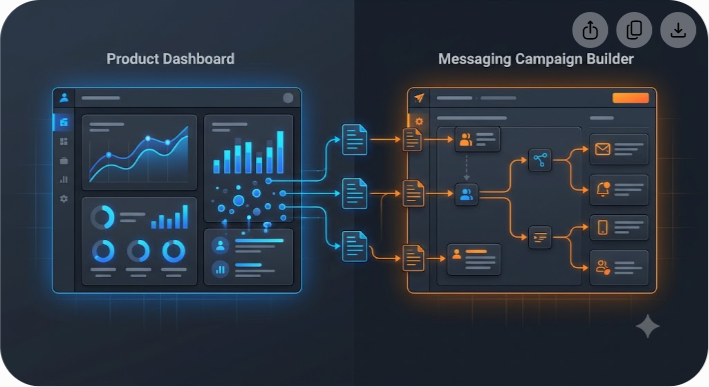
Here is how the architecture functions at high velocity:
- PostHog captures behavioral telemetry (e.g., dropping weekly active sessions, declining usage of core value features, or visiting the billing page multiple times).
- PostHog Cohorts or Webhooks instantly group or notify users who exhibit those churn risk vectors.
- Customer.io Data Pipelines sync user attributes and events in near real-time.
- Customer.io Campaigns execute targeted multichannel messaging (in-app messages, email sequences, or Slack notifications to Customer Success) designed to solve the user's specific friction point.
By uniting product-led analytics with event-driven lifecycle communication, you replace generic drip campaigns with context-aware retention workflows. Let's walk through building this exact system step-by-step.
Understanding the Two Flavors of SaaS Churn
Before wiring pipelines, you must distinguish between the two distinct categories of SaaS churn: voluntary and involuntary. Each requires a completely different technical remedy.
Voluntary Churn
Voluntary churn happens when a customer deliberately decides to stop using your software. They cancel their subscription, downgrade to a free tier, or simply let their account go dormant. The root causes usually trace back to inadequate onboarding, unperceived value, missing feature sets, or unresolved UX bugs.
- Primary Indicator: Declining activity over a 14-day to 30-day window.
- The Recovery Mechanism: Behavioral intervention powered by PostHog event tracking and targeted re-engagement campaigns inside Customer.io.
Involuntary Churn
Involuntary churn occurs when a user's subscription lapses due to payment failure without explicit intent from the customer. Expired credit cards, strict bank fraud filters, insufficient funds, or outdated billing contacts account for 20% to 40% of all SaaS revenue loss.
- Primary Indicator: Stripe or Chargebee payment processing failure hooks (invoice.payment_failed).
- The Recovery Mechanism: Automated dunning workflows, dynamic updating portals, and urgency-driven email/SMS sequences triggered directly in Customer.io.
While involuntary churn requires airtight dunning logic, voluntary churn demands deep product analytics. Combining PostHog and Customer.io gives you coverage across both fronts.
Why PostHog and Customer.io Are the Ultimate Retention Stack
Many growth teams attempt to build churn recovery using only their customer relationship management (CRM) tool or an email marketing service. However, traditional CRMs lack granular event-level context, while standard email tools lack real-time product behavioral triggers.
Pairing PostHog with Customer.io bridges this gap without requiring custom backend microservices or complex data warehouses like Snowflake.
The Role of PostHog
PostHog serves as your product intelligence layer. It sits directly inside your web app, mobile application, or backend services, tracking every click, page view, API call, and feature interaction. Key capabilities include:
- Dynamic Cohorts: Automatically grouping users whose event frequency drops below defined statistical baselines.
- Session Replays: Visualizing where high-risk users experience bugs or friction right before leaving.
- Custom Actions & Trends: Quantifying the exact threshold where usage decay converts into cancellation.
The Role of Customer.io
Customer.io acts as your automated messaging orchestrator. Unlike simple email autoresponders, Customer.io processes continuous event streams and executes state-based workflows.
- Event-Driven Workflows: Branching user paths based on immediate behavioral feedback (e.g., 'If user opened email AND clicked link BUT did not complete setup event within 48 hours, branch to SMS').
- Multichannel Reach: Pushing messaging across email, web push, mobile push, in-app banners, and outgoing webhooks to internal systems like Slack or HubSpot.
- Liquid Templating: Dynamically populating messages with the exact names of features the user stopped using.
| Capability | PostHog | Customer.io | Unified System Benefit |
|---|---|---|---|
| User Behavioral Tracking | Advanced | Basic (via Data Pipeline) | Captures granular event streams directly inside the application |
| Dynamic User Segmentation | Real-time Behavioral Cohorts | Segment Rules & Attributes | Instantly identifies declining engagement without manual exports |
| Automated Messaging | None (Analytics only) | Multichannel (Email, In-App, Push) | Delivers personalized messages at the exact moment of intervention |
| Internal Alerting | Webhooks to Slack/Discord | Webhooks & Team Emails | Notifies Customer Success representatives when high-ARR accounts decay |
| Session & UX Analysis | Full Replay & Heatmaps | None | Lets product teams inspect UX blockers causing customer drop-off |

Architecture Overview: How Data Flows Between Tools
Understanding the data bridge between PostHog and Customer.io ensures high data hygiene and minimizes latency. There are two primary integration patterns you can deploy:
Pattern A: Direct PostHog Data Pipeline Destination (Recommended)
PostHog includes native Data Pipeline destinations that can stream mapped events and person properties directly into Customer.io's API. When a user performs an event in your web application, PostHog logs it and instantly mirrors that event payload to Customer.io.
To pass data between systems, your application sends events to the PostHog JavaScript SDK. PostHog's Data Pipeline destination forwards those events directly to Customer.io's Track API, which immediately updates user profiles and triggers active campaign workflows.
Pattern B: Webhook-Driven Micro-Interventions
For time-critical interventions—such as a user visiting the /settings/billing/cancel page—you can bypass standard polling intervals by using PostHog Action Webhooks. PostHog fires an immediate HTTP POST request to a Customer.io Webhook Trigger Endpoint, instantly enrolling that specific user in a churn recovery campaign within milliseconds.
Step-by-Step Setup: Building the Automated Churn Recovery System
Now, let me walk you through the actual implementation process, from initial tracking configuration to live campaign execution.
Step 1: Identify Key Leading Indicators of Churn
Do not start by tracking everything. Identify 3 to 5 core behavioral signals that reliably indicate a customer is heading toward cancellation. Typical churn triggers in SaaS include:
- Core Feature Inactivity: The user hasn't executed your primary value action (e.g., 'Exported Report', 'Sent Invoice', or 'Created Workflow') in the last 14 days.
- Frequency Decay: Weekly active days drop from 4 days/week down to 1 day/week over a rolling 21-day window.
- Cancellation Intent: Visiting the cancellation route (/account/cancel) or clicking 'Manage Subscription' without completing a downgrade.
- Seat Utilization Drop: A workspace manager removes 30% or more of their active team seats.
Step 2: Configure Event and User Tracking in PostHog
Ensure your web or mobile app uses PostHog's SDK to identify users with persistent identifiers (distinct_id) and track value-driving events.
When a user logs in, identify them clearly:
javascript posthog.identify( 'user_12345', { email: 'user@example.com', plan_tier: 'Growth_Annual', arr_value: 1200, team_seats_occupied: 4 } );
Track critical features with meaningful event properties:
javascript posthog.capture('dashboard_created', { dashboard_type: 'Sales_Analytics', widget_count: 8 });
Step 3: Define Dynamic Churn Cohorts in PostHog
Navigate to People -> Cohorts in your PostHog workspace. Create a dynamic cohort named At-Risk: Core Feature Inactivity (14 Days).
Set the behavioral criteria:
- User performed event dashboard_created 0 times in the last 14 days.
- AND User performed event user_logged_in at least 1 time in the last 14 days (verifying the account is not completely abandoned, but experiencing feature disengagement).
- AND Person Property plan_tier does not equal Free.
PostHog continuously re-evaluates this cohort. As users drop off in activity, they enter the cohort; as soon as they resume activity, PostHog automatically removes them.
Step 4: Sync PostHog Data to Customer.io
To sync these segments to Customer.io, set up the official PostHog destination:
- Go to Data Pipeline -> Destinations in PostHog.
- Search for Customer.io and select it.
- Paste your Customer.io Site ID and API Key (generated under Customer.io Account Settings -> API Credentials).
- Map your user attributes (email, plan_tier, created_at, arr_value).
- Enable the sync setting for Cohort Membership updates.
Once configured, when a user enters the At-Risk cohort in PostHog, PostHog updates an attribute on the corresponding Customer.io profile (e.g., cohort_at_risk_feature_decay = true).
Step 5: Build the Automated Workflow in Customer.io
Log into Customer.io and navigate to Campaigns -> Create Campaign. Name the campaign Retention: Feature Decay Re-engagement.
Campaign Trigger Configuration
- Trigger Type: Segment-Based.
- Condition: User joins segment At-Risk: Core Feature Inactivity (defined where attribute cohort_at_risk_feature_decay equals true).
Workflow Branching and Logic
Execute campaign logic using a structured sequence:

- Trigger: The user joins the At-Risk segment in Customer.io.
- Buffer: The workflow waits 1 hour to prevent firing on transient errors.
- Evaluation: Customer.io evaluates arr_value to determine account tier.
- Branch A (High Value, ARR >= $1,000): Customer.io fires an internal webhook to your Customer Success Slack channel (#cs-alerts). The workflow waits 3 days, checks if the core action was performed, and creates a high-priority CS call task if activity is still missing.
- Branch B (Standard Value, ARR < $1,000): Customer.io sends a personalized email containing a feature video guide. The workflow waits 3 days, checks if the core action was performed, and triggers an in-app offer banner if the account remains inactive.
3 Tactical Playbooks You Can Implement Right Away
Here are three practical workflows you can set up using PostHog and Customer.io to target specific churn vectors.
Playbook 1: The 'Billing Page Lurker' Intervention
- The Trigger Signal: A paying customer visits the /settings/billing page twice in 48 hours AND clicks the 'Cancel Subscription' button, but closes the browser modal before confirming.
- PostHog Setup: Create an Action for Visited Billing Cancel Page.
- Customer.io Action: Fire a Webhook trigger immediately. If the user is on an annual plan or high ARR tier, do not send a discount code right away. Instead, send a direct, plain-text email from the Head of Product:
Subject: Quick question about [Company_Name] Hi {{customer.first_name}}, I noticed you were looking around our billing settings earlier today. I wanted to reach out directly to see if you ran into a bug or if our software isn't delivering what you expected when you signed up. If there is something specific broken or missing for your team, reply directly to this email. I read every response.
This soft approach prompts high-value enterprise users to voice complaints directly rather than quietly leaving.
Playbook 2: Onboarding Stagnation Recovery
- The Trigger Signal: A user signs up, invites team members, but fails to complete the core setup event within 72 hours of account creation.
- PostHog Setup: Create a Cohort defined as Signup Date < 3 days ago AND Team Invites > 0 AND Core Setup Event = 0.
- Customer.io Action: Trigger a 2-step lifecycle outreach sequence:
- Step 1 (Day 3): Send an email featuring a 60-second video walkthrough showing how to complete the exact setup step.
- Step 2 (Day 5): If the setup event remains unperformed, display an In-App Banner when they log in: 'Need help setting up integration? Book a 10-minute live call with our engineering team.'
Playbook 3: Involuntary Churn Dunning Workflow
- The Trigger Signal: Stripe/Chargebee emits invoice.payment_failed due to an expired card or insufficient funds.
- Data Route: Connect Stripe webhooks directly into Customer.io's Data Pipelines.
- Customer.io Action: Execute an urgent 14-day grace period sequence:
- Day 1: Send a neutral transactional email notifying them that the payment failed, including a direct 1-click credit card update link (hosted securely via Stripe Billing Portal).
- Day 4: Push an In-App Message displaying an sticky banner across the top of the SaaS platform: 'Your subscription renewal failed. Update payment details to retain access to your data.'
- Day 10: Send a high-urgency email warning that account access will revert to read-only status in 96 hours.
Advanced Tracking: Measuring Recovery Success with Funnels
An automated churn recovery pipeline is incomplete if you cannot measure its ROI. You need to prove that users who enter your re-engagement campaigns actually resume core platform usage and stay subscribed long term.
Building the Funnel in PostHog
Navigate to Insights -> Funnels in PostHog. Construct a retention funnel with the following progression:
- Step 1: User enters cohort At-Risk: Core Feature Inactivity.
- Step 2: User receives Customer.io event email_delivered (Name: Retention: Feature Decay Re-engagement).
- Step 3: User performs event user_clicked_email_link.
- Step 4: User performs core action dashboard_created within 7 days of receiving the message.
By tracking this conversion rate over time, you can evaluate whether your copy, video tutorials, or CS interventions are successfully bringing dormant users back into your core value loop.
| Funnel Step | Conversion Metric | Sample Volume | Step Conversion |
|---|---|---|---|
| 1. Joined At-Risk Cohort | Base Population | 100 Accounts | 100% |
| 2. Email Delivered | Delivery Success | 98 Accounts | 98.0% |
| 3. Clicked Link | Engagement Rate | 34 Accounts | 34.7% |
| 4. Re-engaged Core Event | Successful Recovery | 19 Accounts | 55.8% (19.0% total) |
Calculating Net Revenue Saved
To present your results to management, translate your conversion funnel into ARR recovered:
$$ ext{Net Revenue Saved} = ( ext{Total At-Risk Accounts} imes ext{Recovery Rate}) imes ext{Average ARR per Account}$$
If your pipeline identifies 200 high-risk accounts per month with an average ARR of $1,200, and your PostHog + Customer.io sequences successfully re-engage 15% of them, your automated pipeline preserves $36,000 in annual recurring revenue every single month.
Common Pitfalls to Avoid in Churn Automation
Even experienced growth marketers can make mistakes when configuring automated churn recovery. Avoid these common traps:
1. Over-messaging High-Risk Users
If a user is frustrated by bugs or lack of value, hitting them with four emails, two push notifications, and daily pop-ups will accelerate cancellation rather than prevent it. Ensure your Customer.io frequency limits allow no more than one automated churn email per 7 days.
2. Failing to Exclude Users with Open Support Tickets
Never send an automated re-engagement email asking 'How is your experience going?' to a customer who currently has an open, unresolved ticket in Zendesk or Help Scout. Map your helpdesk status into Customer.io as a user attribute (open_support_ticket = true) and suppress churn recovery emails while tickets remain open.
3. Relying Exclusively on Discounts
Offering a 20% discount the moment someone stops using a feature trains your user base to degrade their own engagement artificially to get cheaper pricing. Focus your initial outreach on education, UX assistance, and account support. Offer discounts only as a final resort for price-sensitive self-serve segments during explicit cancellation flows.
How Saasbonus Accelerates Your Retention Stack
Selecting, integrating, and optimizing your analytics and lifecycle marketing stack can take months of technical iteration. At Saasbonus, we provide independent, hands-on evaluations of software tools, API infrastructure, and growth platforms to help you choose the right stack the first time.
Whether you are evaluating whether PostHog fits your compliance needs versus Mixpanel, or comparing Customer.io against alternative platforms like Klaviyo or Userlist, explore our deep-dive software comparisons and exclusive SaaS deals to scale your retention operations efficiently.
Final Checklist: Launching Your Churn Recovery Pipeline
Before enabling your campaigns in production, verify your setup against this operational checklist:
- [ ] PostHog Identify Calls Verified: User distinct_id, email, and plan tier properties are populated accurately across all SDK implementations.
- [ ] Core Event Tracking Live: Key value-generating actions are accurately captured with property metadata.
- [ ] PostHog Cohorts Tested: Manually check user profiles within your At-Risk cohorts to confirm they reflect true inactive accounts.
- [ ] Customer.io Data Mapping Confirmed: Ensure attributes synced from PostHog populate correctly in Customer.io user profiles.
- [ ] Suppression Rules Applied: Exclude users with open support tickets, recent cancellation requests, or active manual outreach sequences.
- [ ] PostHog Funnel Created: Set up tracking steps to measure email receipt through to feature re-engagement.




