
Automated Usage Billing with Stripe & Lago: Setup Guide
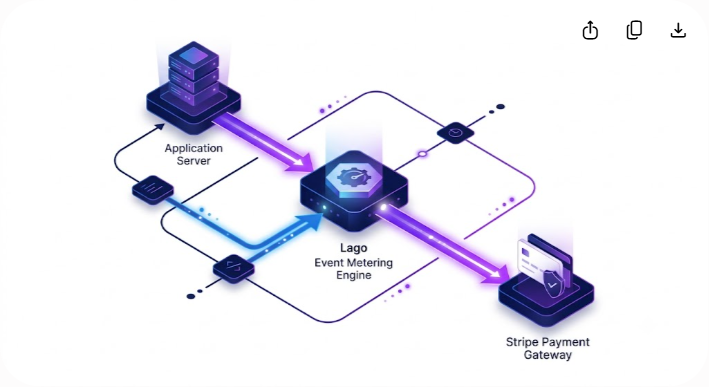
The Core Architecture: Why Decouple Stripe from Usage Metering?
Setting up usage-based billing directly inside Stripe works well until your product scales past basic unit counters. While Stripe handles credit card processing, merchant accounts, and global tax compliance flawlessly, its native usage billing mechanics force developers into rigid patterns. If you need complex event aggregation, real-time balance tracking, pre-paid credit burn-down, or multi-attribute pricing tiers (such as charging based on gigabytes processed plus compute hours plus API region), building directly on Stripe API endpoints quickly turns into custom infrastructure debt.
To build a scalable usage-based pricing model, you must decouple your metering engine from your payment gateway.
Lago serves as the open-source meter aggregation and billing engine. It ingests high-volume user activity via events, aggregates those events according to customized metrics (e.g., sum, max, unique count), calculates the monetary total based on your pricing plan, and generates an invoice. Stripe then acts as the execution layer—processing the credit card payment, handling ACH transfers, and managing localized payment methods.
The decoupled workflow moves sequentially through five core layers:
- Application Events: Your backend service captures user activity and sends an event payload to Lago.
- Lago Ingestion API: Receives the raw high-volume payload and validates its unique transaction ID for idempotency.
- Meter Aggregation Engine: Applies aggregation rules (such as SUM, MAX, or COUNT) over the billing cycle.
- Plan Pricing Calculator: Converts raw aggregated usage metrics into currency line items based on your defined tiers.
- Stripe Payment Gateway: Receives the finalized invoice from Lago, charges the customer's payment method, and syncs status back to your app.
By placing Lago between your product and Stripe, you protect your application from Stripe's API rate limits on usage records, gain the ability to backfill or recalculate usage metrics retroactively, and prevent vendor lock-in with your payment processor.
Stripe vs. Lago: Division of Responsibilities
Before writing code, you must establish a clear boundary between which platform handles each part of the billing lifecycle. Mixing these responsibilities leads to duplicate charges, out-of-sync invoice statuses, and race conditions during payment collection.
| Billing Responsibility | Handled by Stripe | Handled by Lago | Why This Split Works |
|---|---|---|---|
| Payment Method Storage | Yes | No | Keeps your infrastructure PCI-compliant by storing raw card tokens strictly in Stripe. |
| High-Volume Event Ingestion | No | Yes | Lago handles thousands of events per second without hitting payment gateway rate limits. |
| Usage Aggregation Rules | No | Yes | Lago natively supports complex aggregation (sum, max, unique count, weighted formulas). |
| Subscription State & Plans | Partial | Yes | Lago defines the billing logic, grace periods, free tiers, and overage calculations. |
| Invoice Generation | Syncs from Lago | Yes | Lago calculates line items; Stripe issues the finalized financial ledger for payment. |
| Payment Collection & Payouts | Yes | No | Stripe charges the customer's card, handles dunning, and remits funds to your bank. |
| Tax Engine Integration | Yes (Stripe Tax) | Syncs | Stripe Tax or TaxJar attaches to the invoice at the moment payment is collected. |
By enforcing this division, Lago acts as the single source of truth for how much your product was used, while Stripe remains the single source of truth for money collected and payment methods.
Prerequisites and Infrastructure Setup
To complete this integration, you need administrative access to both your Stripe dashboard and a running instance of Lago (either Lago Cloud or a self-hosted Docker cluster).
Required Keys and Credentials
- Stripe Secret Key: Located in your Stripe Dashboard under Developers > API Keys (starts with sk_test_ or sk_live_).
- Stripe Webhook Signing Secret: Generated when you register Lago's endpoint in your Stripe Dashboard (starts with whsec_).
- Lago API Key: Found in your Lago Dashboard under Settings > API Keys.
- Lago Webhook URL: Provided by your application to listen for invoice and subscription events triggered by Lago.
Step 1: Link Stripe to Lago
- Open your Lago Dashboard and navigate to Integrations.
- Click on Stripe and select Connect.
- Input your Stripe Secret Key into the configuration panel.
- Enable Sync Customers if you want Lago to automatically register new customer profiles in Stripe upon creation.
- Copy the Webhook URL displayed in Lago's Stripe integration tab.
- Open your Stripe Dashboard, navigate to Developers > Webhooks, click Add Endpoint, paste the copied URL, and subscribe to the following core payment events:
- customer.subscription.created / updated / deleted
- payment_intent.succeeded / payment_intent.payment_failed
- invoice.paid / invoice.payment_failed
Step-by-Step Implementation Guide
Setting up automated usage billing requires configuring four sequential layers: defining billable metrics, creating pricing plans, syncing customer objects, and ingesting application events.
1. Define Billable Metrics in Lago
A Billable Metric tells Lago how to process incoming raw events. For instance, if you run a vector database platform, you might track two separate metrics: total storage in gigabytes (evaluated as a maximum value over time) and vector search queries (evaluated as a count over time).
In your Lago Dashboard (or via the Lago API), construct your metric:
- Code: vector_queries (this unique string is passed in your application payload).
- Aggregation Type: COUNT (or SUM, MAX, UNIQUE_COUNT depending on your resource metric).
- Field Name: query_count (the specific JSON field inside your event payload containing the numerical value).
2. Create the Pricing Plan
Once your metrics are registered, construct a Plan inside Lago that defines how those metrics translate into money:
- Navigate to Plans > Create a Plan.
- Set the basic interval (e.g., Monthly, Billed in Arrears).
- Add a Base Fee (e.g., $49/month platform fee, billed in advance).
- Add a Usage Component linking to your vector_queries metric:
- Choose your tiering strategy: Standard (Flat rate per unit), Graduated (Tiered pricing per volume block), or Package (x dollars per 1,000 units).
- Example Tier: 0 to 10,000 queries = $0.00; 10,001 to 1,000,000 queries = $0.0002 per query.
3. Sync Customer Entities Between Systems
Every customer in your application must share a unified identity across your app database, Lago, and Stripe. Create the customer in Lago first, passing the Stripe customer token if it already exists, or allowing Lago to trigger customer creation in Stripe.
Here is how to create a linked customer profile using the Lago Node.js SDK:
javascript import { Client } from '@lago-golang/lago-nodejs';
const lago = new Client({ apiKey: process.env.LAGO_API_KEY });
async function createBillingCustomer(user) { const response = await lago.customers.createCustomer({ customer: { external_id: user.id, // Your app's internal user ID name: user.companyName, email: user.email, billing_configuration: { payment_provider: 'stripe', sync_with_provider: true, // Automatically creates the customer in Stripe }, }, });
return response.data.customer; }
When sync_with_provider is enabled, Lago calls Stripe's /v1/customers API, receives the resulting cus_XXXXXXXXXXXXXX token, and attaches it internally. Any charges or invoices generated for this Lago customer will automatically route to that specific Stripe entity.
4. Implement Event Ingestion in Your Application Engine
Your application core must push activity events to Lago whenever a user consumes a billable resource. To ensure high availability and sub-millisecond response times for your end users, never send usage events synchronously within the main HTTP request loop. Wrap your event generation inside an asynchronous task queue (such as Redis BullMQ, Sidekiq, or Celery).
Mandatory Event Properties
- transaction_id: A unique string generated for every distinct event (UUID v4). Lago uses this key to enforce idempotency. If your queue retries a failed job, Lago discards duplicate transaction_id payloads to prevent double-billing.
- external_customer_id: The user ID matching your Lago customer record.
- code: The billable metric code (vector_queries).
- timestamp: UNIX timestamp (in seconds) when the consumption occurred.
- properties: A JSON dictionary containing the numerical units consumed.
Below is an example of an asynchronous ingestion worker in Python:
python import os import uuid import time from lago_python_client.client import Client from lago_python_client.models import Event
lago_client = Client(api_key=os.environ.get("LAGO_API_KEY"))
def record_api_usage(user_id: str, queries_count: int):
Construct an idempotent event model
event = Event( external_customer_id=str(user_id), code="vector_queries", transaction_id=str(uuid.uuid4()), timestamp=int(time.time()), properties={ "query_count": queries_count } )
try:
Dispatch to Lago ingestion API
response = lago_client.events.create(event) return response except Exception as e:
Log to error tracker; queue will retry with the SAME transaction_id
print(f"Failed to ingest usage event for user {user_id}: {str(e)}") raise e
Handling Event Deduplication and Idempotency
In a distributed system, network hiccups and queue retries mean events will occasionally be delivered more than once. If your ingestion system does not handle deduplication, a transient infrastructure failure could artificially double your customer's usage metrics.
Lago enforces idempotency at the event level through the transaction_id field. When Lago receives an event payload:
- It checks its cache for the incoming transaction_id.
- If the transaction_id is unique within a 45-day window, Lago accepts the event (202 Accepted), stores it in its time-series engine, and updates the aggregated meter.
- If the transaction_id has already been processed, Lago acknowledges receipt (200 OK or 202 Accepted) but silently drops the duplicate payload from aggregation calculations.
Production Best Practice for Transaction ID Generation
Instead of generating a random UUID, construct a deterministic transaction key whenever possible based on the underlying domain action.
For example, if you bill for batch data exports, concatenate the database job ID and the timestamp step:

transaction_id = f"export_{job_id}_{batch_index}"
If your queue retries batch_index 4, the transaction ID remains identical, guaranteeing that Lago counts the batch exactly once regardless of how many times your background worker retries the API call.
Credit Balances, Pre-paid Tiers, and Real-time Limits
Many SaaS architectures require a hybrid model combining pre-paid credits with post-paid overages. For example, a generative AI platform might grant users $50 in monthly credits upon renewing their base subscription, then charge $0.03 per image generation once those credits hit $0.
Lago handles pre-paid credits natively through Wallets and Vouchers, bypassing the need to write complex credit-deduction queries in your production database.
The balance execution flow operates in six structured steps:
- Subscription Trigger: The recurring subscription renews, issuing a $50 credit wallet balance to the customer.
- Event Ingestion: Usage events enter Lago in real time as the user consumes app resources.
- Balance Evaluation: Lago checks whether the active credit wallet balance is greater than $0.
- Wallet Deduction: If credits remain, Lago deducts the monetary value directly from the wallet balance.
- Overage Accumulation: Once the wallet hits $0, Lago shifts to accumulating open line items for the current billing cycle.
- Invoice Generation: At cycle end, Lago generates a Stripe invoice charging only the net overage amount.
How to Implement a Pre-paid Credit Wallet
- Create a Wallet for the customer in Lago via API, specifying either a monetary value ($50.00) or a custom point conversion (5,000 tokens).
- As usage events flow in, Lago automatically deducts the calculated cost from the active Wallet balance first.
- Once the Wallet balance reaches zero, Lago shifts to accumulating open line items on the customer's current billing cycle draft invoice.
- At the end of the billing cycle, Lago closes the draft invoice, attaches only the overage amount, and instructs Stripe to charge the customer's credit card for the remainder.
Querying Current Usage for In-App Paywalls
To enforce rate limits or display "Current Spend" inside your SaaS dashboard, query Lago's current_usage endpoint directly:
javascript async function getCustomerCurrentUsage(externalCustomerId) { const usage = await lago.customers.getCustomerCurrentUsage({ externalCustomerId: externalCustomerId, planCode: 'pro_monthly' });
console.log('Total open spend this month:', usage.data.customer_usage.total_amount_cents); return usage.data.customer_usage; }
Webhook Lifecycle and Edge Cases
When automating billing, handling edge cases—such as failed credit card charges, mid-cycle subscription upgrades, and delayed webhook delivery—is what separates a fragile setup from a production-ready infrastructure.
End-of-Cycle Invoice Generation Flow
At the end of a billing period (e.g., midnight on the 1st of the month), the following automated sequence takes place:
- Lago Seals the Period: Lago stops aggregating new events into the expiring billing cycle and calculates final totals for all usage meters.
- Invoice Finalization: Lago generates a finalized draft invoice containing itemized charges (base fee, tier breakdown, overages, discounts).
- Stripe Sync: Lago sends the invoice details to Stripe via API, creating a matching Stripe Invoice object attached to the corresponding cus_XXXXXXXXXXXXXX profile.
- Payment Attempt: Stripe triggers its internal payment collection workflows, charging the customer's default payment method (via Credit Card, ACH, or SEPA).
- Webhook Confirmation: Stripe emits invoice.paid or invoice.payment_failed back to your application and Lago.
- State Synchronization: Lago marks the invoice status internally as paid. Your application grants or revokes product access based on the payment status.
Handling Failed Payments and Dunning
If Stripe receives a card_declined response from the card network:
- Do not modify usage metrics inside Lago. The usage occurred and remains valid historical debt.
- Allow Stripe's automated dunning process (Smart Retries) to attempt recovery over a set period (e.g., 3, 5, and 7 days).
- Listen for the invoice.payment_failed webhook in your main application service. When received, flag the user's account in your database as past_due and display a payment update banner inside your UI.
- If all Stripe recovery retries fail, Stripe emits customer.subscription.deleted or marks the invoice as uncollectible. Catch this webhook to downgrade the customer to a read-only tier or freeze their API access key.
Common Pitfalls and How to Avoid Them
Over years of helping SaaS engineering teams implement usage billing, we regularly observe four recurring design mistakes during initial integration:
1. Sending Synchronous Event API Requests
- The Mistake: Executing lagoClient.events.create() directly inside an HTTP route handler or serverless function.
- The Consequence: If Lago experiences transient latency or network disruption, your core user-facing application stalls or crashes.
- The Fix: Offload event generation to an asynchronous background worker queue. Your application API should return an immediate 200 OK to the user, placing the usage payload on a worker queue to be processed out-of-band.
2. Clock Drift and Out-of-Order Timestamps
- The Mistake: Generating event timestamps on distributed client devices or disconnected microservices without UTC normalization.
- The Consequence: Events arriving with timestamps older than your active billing cycle window may be rejected by Lago or billed in the wrong cycle.
- The Fix: Always generate event timestamps on server infrastructure using synchronized UTC system clocks (int(time.time())). Ensure your ingestion pipeline delivers events to Lago within 24 hours of execution.
3. Modifying Plan Metric Codes in Production
- The Mistake: Changing a metric's unique code string in the Lago dashboard while an active subscription is running.
- The Consequence: Incoming events using the old code fail to map to active billing meters, resulting in unbilled usage.
- The Fix: Treat metric codes as immutable database schema strings. If you must adjust pricing logic, create a new Plan version or a secondary Billable Metric, migrate your user base, and deprecate the old plan code gracefully.
4. Overlooking Stripe Invoice Finalization Delays
- The Mistake: Expecting Stripe to instantly charge a customer the second Lago generates an invoice.
- The Consequence: Stripe often keeps invoices in a draft state for 1 to 2 hours (depending on your Stripe Dashboard auto-advance settings) to allow for manual review or tax calculations.
- The Fix: Build your app logic around webhook state changes (invoice.paid) rather than assuming immediate execution after an end-of-month cron job runs.
Testing Your Integration Before Going Live
Never deploy usage billing code to production without executing an end-to-end sandbox lifecycle test. Both Stripe and Lago provide parallel sandbox environments designed explicitly for this purpose.
Production Readiness Checklist
- Environment Separation: Ensure your staging environment uses Lago Sandbox API Keys and Stripe Test Mode Keys (sk_test_).
- Test Card Execution: Use Stripe's test payment tokens (e.g., 4242 4242 4242 4242 for success, or 4000 0002 0002 0002 for payment failure) to verify both success and recovery paths.
- Clock Fast-Forwarding: Use Stripe Test Clocks alongside Lago's manual billable period trigger to simulate a full 30-day billing cycle in 5 minutes.
- Idempotency Verification: Intentionally send the exact same event payload (matching transaction_id) 10 times to Lago. Verify in the Lago event log that only 1 unit was added to the customer's open draft invoice.
- Overage Calculation Audit: Ingest events exceeding the base plan threshold (e.g., send 15,000 events on a 10,000-event plan). Ensure the draft invoice in Lago correctly itemizes 5,000 overage units at the exact tier price specified.
- Webhook Signature Verification: Verify that your app server validates the cryptographic HMAC signatures on webhooks originating from both Stripe and Lago to prevent spoofing.
By decoupling your usage metering (Lago) from payment settlement (Stripe), you create an adaptable billing architecture capable of supporting any pricing model—from simple seat tiers to complex multi-attribute usage meters—without rewriting your core application code as your SaaS grows.
If you are evaluating modern software tools to optimize your engineering stack, explore Saasbonus for detailed, hands-on software reviews and verified developer tool breakdowns.




