
Fireflies.ai Review: Pricing, Accuracy & Team Pros & Cons
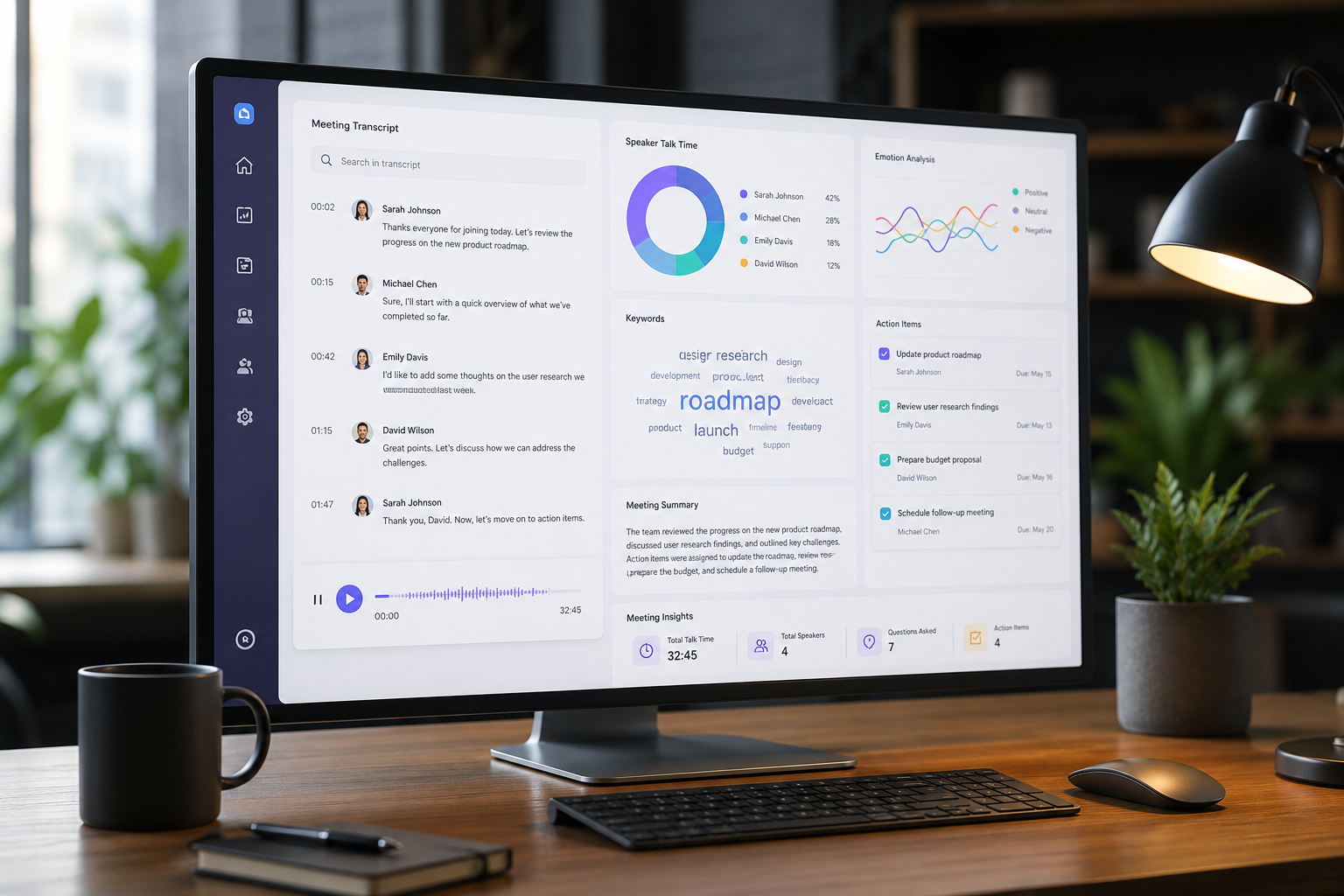
Fireflies.ai delivers around 85% to 90% real-world transcription accuracy under clean audio conditions, but its overall business value hinges on how your organization manages monthly AI credit limits and calendar join permissions.
Evaluating Fireflies.ai for capturing sales calls, archiving executive discussions, or automatically updating CRM fields requires looking beyond baseline marketing metrics. An automated meeting assistant promising top-tier transcription accuracy sounds ideal until an uninvited bot joins a sensitive client call or credit limits pause your workflow mid-month.
In this Fireflies.ai review, we analyze the platform across every core vector: transcription accuracy, plan pricing mechanics, credit limits, signature features like AskFred, team collaboration capabilities, and practical trade-offs.
What Is Fireflies.ai?
Fireflies.ai is an automated AI meeting assistant engineered to join, record, transcribe, and summarize virtual conversations across major conferencing platforms, including Zoom, Google Meet, Microsoft Teams, and Webex.
Rather than assigning team members to manually record meeting minutes, Fireflies deploys an automated bot named Fred. The bot joins calendar events, records multi-speaker audio and video, and generates a time-stamped, searchable transcript shortly after the call finishes.
Beyond primary speech recognition, Fireflies serves as a centralized conversation intelligence platform. It processes meeting content using specialized natural language processing (NLP) models to identify key topics, extract action items, track sentiment, and aggregate custom keyword mentions across calls.
How the Fireflies.ai Engine Works
- Capture: Joins Zoom, Google Meet, or Microsoft Teams meetings automatically to record video and high-fidelity audio.
- Transcribe: Converts multi-speaker speech to text with automated speaker separation and time-stamping.
- Summarize: Generates structured executive overviews, key discussion points, and assigned action items.
- Analyze: Tracks talk-time ratios, filler word frequency, overall sentiment, and topic mentions across team members.
- Integrate: Pushes completed meeting transcripts, soundbites, and tasks directly into HubSpot, Salesforce, Slack, and project management tools.
Fireflies.ai Transcription Accuracy: How Good Is It Really?
Transcription accuracy remains the fundamental benchmark for any speech-to-text tool. If an assistant misinterprets figures, scrambles technical jargon, or misattributes speakers, team members spend valuable time editing transcripts rather than acting on insights.
Across internal syncs, technical engineering reviews, and client discovery calls, Fireflies maintains strong accuracy under standard conditions while encountering predictable challenges in complex scenarios.
Clean Audio and Standard Accents (88% - 92% Accuracy)
When participants use external microphones, speak sequentially, and use standard English accents, Fireflies produces reliable, clean transcripts. Speaker separation (diarization) remains accurate, correctly attributing statements to individual team members.
Technical Jargon and Industry Acronyms (75% - 85% Accuracy)
Like most speech recognition engines, base-level Fireflies experiences errors with custom software names, internal acronyms, and niche vocabulary. Terms like 'Kubernetes cluster,' 'GraphQL endpoint,' or specific product line SKUs can result in phonetic misinterpretations.
However, Fireflies provides a Custom Vocabulary configuration on paid tiers. Pre-loading product names, brand terms, and team acronyms into account settings improves transcript precision on specialized terms.
Overlapping Speech and Background Noise (65% - 75% Accuracy)
Fireflies encounters difficulty during rapid multi-speaker discussions where participants interrupt or talk simultaneously. Background ambient noise, uncalibrated laptop microphones, and unmapped regional accents cause the engine to drop words or produce fragmented sentences.

| Meeting Scenario | Estimated Accuracy | Key Performance Factors |
|---|---|---|
| Single Speaker / Crisp Microphone | 92% - 95% | Minimal noise, clear pauses, high-quality audio input. |
| Standard Team Sync | 85% - 90% | Sequential speech, minor background noise, clear accents. |
| Technical Discussions (Un-tuned) | 75% - 82% | Complex terminology without custom vocabulary rules. |
| Cross-Talk / Poor Microphones | 60% - 70% | Simultaneous speech, room echo, low-quality audio hardware. |
Key Features Breakdown
Fireflies expands beyond audio recording by providing tools designed to structure raw conversation into actionable workflow data.
1. Smart Summaries and Super Summaries
To eliminate the need for reading full transcripts, Fireflies automatically generates structured post-meeting overviews. Standard summaries include:
- Overview: A concise executive abstract of the main conversation.
- Keywords: Frequently referenced terms, brands, and discussion topics.
- Action Items: Bulleted task lists assigned to specific meeting participants.
- Outline: Time-stamped chapter divisions that link directly to corresponding video or audio segments.
On higher subscription tiers, Super Summaries allow teams to build custom prompt templates. This ensures generated notes highlight department-specific priorities, such as sales objections or engineering bug reports.
2. AskFred (AI Meeting Copilot)
AskFred is the platform's conversational AI assistant, powered by OpenAI models. Users can query AskFred directly inside any meeting transcript to pull information or draft materials.
For example, users can request:
- "What specific concerns did the client express regarding our enterprise SLA?"
- "Draft a follow-up email outlining the deliverables promised for Friday."
- "List all commercial terms and budget figures mentioned during this call."
AskFred generates responses backed by direct quotes from the transcript, simplifying post-call administrative tasks.
3. Soundbites and Snippets
Instead of distributing hour-long video files, Fireflies allows users to highlight specific transcript text to create shareable audio or video snippets. These clips can be organized into custom playlists, making them useful for training new sales representatives with top-performing pitch examples or sharing direct customer feedback with product managers.
4. Topic Tracker and Conversation Intelligence
For team managers, Fireflies provides aggregated trend analysis across multiple conversations. Custom filters track how often specific competitors, pricing structures, or product features are mentioned across sales or support calls.
Additional speaker metrics include:
- Talk-to-Listen Ratio: Evaluates whether sales reps maintain balanced conversations.
- Speaking Pace: Measures words spoken per minute to encourage clear delivery.
- Filler Word Tracking: Identifies instances of repetitive speech pauses.
- Sentiment Analysis: Flags positive, neutral, or negative segments throughout the call.
Fireflies.ai Pricing: Understanding Plans and Credit Limits
Fireflies operates on a hybrid pricing structure that combines monthly per-seat subscription fees with an AI Credit system. Understanding this structure helps teams accurately predict monthly costs.
| Feature / Plan | Free | Pro | Business | Enterprise |
|---|---|---|---|---|
| Annual Cost (per seat/mo) | $0 | $10 | $19 | $39 |
| Monthly Cost (per seat/mo) | $0 | $18 | $29 | Annual Billing Only |
| Transcription Storage | 800 mins/seat | 8,000 mins/seat | Unlimited | Unlimited |
| Video Recording | Audio Only | 720p (2-hr limit) | Full Video (3-hr limit) | Full Video (4-hr limit) |
| Monthly AI Credits | Limited Trial | 20 Credits | 30 Credits | 50 Credits |
| CRM & API Access | None | Limited | Full Access | Full Access + SSO |
Free Plan Overview
The Free tier provides unlimited transcription access in over 100 languages, making it useful for basic trial testing. However, it includes strict structural limits:
- Storage Capacity: Capped at 800 total minutes of storage per seat across account history.
- Export Restrictions: Raw text and PDF transcript exports are disabled.
- Integration Limits: Direct sync with Slack, Salesforce, HubSpot, and Zapier is unavailable.
- Audio Focus: Video recording capabilities are excluded.
Pro Plan ($10/seat/mo Annual or $18 Monthly)
The Pro plan suits individual professionals and small teams requiring audio summaries and core integration access:
- Increases storage capacity to 8,000 minutes per seat.
- Unlocks 720p video recording up to two hours per meeting.
- Supports integrations with Slack, Trello, and core workspace applications.
- Allocates 20 AI Credits per seat each month.
Business Plan ($19/seat/mo Annual or $29 Monthly)
The Business plan is designed for active sales, recruitment, and customer success teams:
- Provides unlimited transcript storage.
- Unlocks full CRM automation for Salesforce, HubSpot, and Zoho CRM.
- Includes conversation intelligence tools, such as talk-time metrics and sentiment tracking.
- Enables unlimited custom vocabulary terms.
- Allocates 30 AI Credits per seat each month.
Enterprise Plan ($39/seat/mo Annual Only)
Tailored for larger organizations requiring strict administrative governance:
- Includes Single Sign-On (SSO), SCIM provisioning, and HIPAA compliance options.
- Provides custom data retention controls and dedicated account management.
- Allocates 50 AI Credits per seat each month.
How Monthly AI Credits Function
While baseline speech transcription and standard summary generation remain unlimited on paid tiers, premium actions—including AskFred queries, custom Super Summaries, and complex search filters—consume monthly AI credits.
When a seat exhausts its assigned monthly credit allocation, advanced AI query tools pause until the following billing cycle unless extra credit add-on packages are purchased. Teams that rely on AskFred for generating post-meeting emails after every call should factor credit usage into their operational budget.
Team Pros & Cons: Is Fireflies Right for Your Business?
Choosing Fireflies requires evaluating its core workflow advantages alongside its operational constraints.
Pros
- Comprehensive Integration Coverage: Fireflies connects natively with popular B2B platforms. Pushing meeting summaries into designated Slack channels, creating tasks in Asana or Jira, and logging call records in Salesforce or HubSpot reduces manual data entry.
- Centralized Search Across Meetings: Fireflies allows users to search across the organization's entire recorded meeting history. Searching terms like 'pricing objection' or 'security compliance' surface matching conversation segments across calls.
- Global Language Support: Supporting transcription across more than 100 languages and regional accents, Fireflies accommodates distributed teams operating globally.
- Automated Keyword Workflows: Teams can establish custom keyword triggers to automate tasks. For instance, detecting the phrase 'send contract' can automatically assign an account manager and notify an internal team channel.
Cons
- Default Calendar Joining Rules: Without adjusting account permissions upon setup, Fireflies automatically joins every scheduled calendar event. This can cause the bot to join confidential 1-on-1s or private personal appointments uninvited.
- Monthly Credit Allowances: Teams assuming paid subscriptions provide unlimited access to every AI feature may experience interruptions when AskFred queries pause due to credit depletion.
- Audio Quality Sensitivity: In environments with heavy background noise, weak hardware microphones, or multiple overlapping speakers, transcripts require manual review and editing.
- Strict Renewal Terms: Standard subscription agreements auto-renew according to schedule, requiring administrators to manage cancellation timelines proactively.
Fireflies.ai vs. Competitors: Detailed Comparison
Evaluating Fireflies against top market alternatives clarifies which tool aligns best with specific team requirements:
| Comparison Vector | Fireflies.ai | Otter.ai | Fathom | MeetGeek |
|---|---|---|---|---|
| Primary Strength | CRM automation & search | Real-time personal notes | Free individual Zoom use | Team coaching & metrics |
| Free Plan Limits | 800 mins total storage | 300 mins/mo (30-min limit) | Free individual recording | 5 hours recording/mo |
| Starting Paid Price | $10/user/mo | $10/user/mo | $15/user/mo | $15/user/mo |
| CRM Integration | Native (Salesforce/HubSpot) | Basic entry-level | Good core support | Moderate coverage |
| AI Copilot Feature | AskFred (Credit-based) | Otter AI Chat | Standard Summary AI | AI Assistant |
| Participant Visibility | Visible Bot joins call | Visible Bot joins call | Visible Bot joins call | Bot or browser extension |
Fireflies vs. Otter.ai
While Otter.ai remains popular for individual note-taking, educational settings, and live transcription, Fireflies is built for B2B team environments. Fireflies provides superior CRM field mapping, central search infrastructure, and structured sales analytics.
Fireflies vs. Fathom
Fathom offers an accessible free model for individual professionals using Zoom or Microsoft Teams. However, scaling teams often prefer Fireflies for its multi-meeting search engine, extensive integration ecosystem, and department-level conversation metrics.
How to Set Up Fireflies.ai: Step-by-Step Configuration
Follow this setup sequence to optimize transcription accuracy and maintain meeting privacy from day one:
- Configure Autojoin Rules: Navigate to Settings > Join Rules in your admin dashboard. Update the default setting to 'Join only meetings with a video join link' or 'Join only meetings I own.' This prevents the bot from entering private calendar events.
- Establish Custom Vocabulary: Open Team Settings > Custom Vocabulary. Input company names, internal acronyms, product lines, competitor names, and key industry terminology. This step improves transcription accuracy on technical terms.
- Connect Workspace Integrations: Integrate Fireflies with team communication channels like Slack or Microsoft Teams. Designate specific channels for receiving automated summaries to keep communication organized.
- Set Compliance and Privacy Rules: Review data governance configurations under account settings to align with regional standards such as GDPR or HIPAA. Ensure automated recording notifications are configured so meeting participants receive notice before recording starts.
Verdict: Is Fireflies.ai Worth Paying For?
Fireflies.ai is an effective AI meeting assistant for sales organizations, customer success teams, recruiters, and mid-market companies that rely on CRM synchronization and multi-meeting search tools. Its capacity to transform spoken conversations into structured CRM records provides measurable productivity returns.
Conversely, for individual freelancers or occasional hosts who only require basic text notes, lower-tier storage limits and credit caps may feel constraining. In those cases, utilizing lightweight free options or committing directly to the Business plan offers a clearer path forward.
At Saasbonus, we evaluate SaaS pricing models and operational tools to help organizations make informed software investments. Choosing annual billing for Fireflies.ai provides a discount of over 35% compared to standard monthly subscription rates.




