
How to Build a Custom AI Agent with LangGraph: Full Guide
The Problem with Traditional Chains
Most LLM applications break down the moment real-world complexity enters the execution path. Standard sequential chains work well for linear tasks like summarizing a paragraph or generating a static response. However, when an autonomous system needs to retry a failed API call, request human approval before executing a database mutation, or pause execution across multiple user sessions, traditional Directed Acyclic Graphs (DAGs) fail completely.
Building a reliable, custom AI agent requires cycles, persistent state management, and fine-grained control over execution flow. That is precisely why LangGraph was created.
In this guide, you will learn how to build a production-grade, stateful AI agent using LangGraph. We will move past simple toy examples and look at real architectural components: state schemas, custom nodes, conditional edges, database persistence, and human-in-the-loop patterns.
What is LangGraph and Why Use It Over Standard LangChain?
LangChain gained rapid adoption by providing abstractions for prompts, models, and retrieval pipelines. However, its core execution model was historically built around Directed Acyclic Graphs. In standard LangChain, execution moves strictly in one direction from input to output. Adding dynamic loops, conditional retries, or branching logic required awkward workarounds.
LangGraph extends the LangChain ecosystem by introducing cyclic graph computation. Built natively to support stateful multi-agent and single-agent orchestrations, LangGraph structures application logic as a state machine composed of three primary abstractions:
- State: A shared data structure that represents the internal memory and current snapshot of the agent.
- Nodes: Python functions or runnable objects that take the current State, perform work (such as querying an LLM or executing a tool), and return an updated State.
- Edges: Control flow paths that determine which Node runs next, either deterministically or based on conditional logic evaluated against the State.
Architectural Comparison: LangChain vs. LangGraph
| Architectural Feature | Standard LangChain / Chains | LangGraph |
|---|---|---|
| Flow Pattern | Linear / DAG (No native cycles) | Cyclic (Loops, recursive paths) |
| State Management | Ephemeral, passed implicitly | Explicit, persistent schema |
| Human-in-the-Loop | Difficult to pause and resume | Built-in via state checkpointing |
| Error Recovery | Hardcoded try/catch blocks | Graph-level dynamic rerouting |
| Multi-Agent Coordination | Complex, custom wrapper logic | Native sub-graph orchestration |
If you are evaluating frameworks for building production AI applications, choosing between LlamaIndex, standard LangChain, or LangGraph comes down to control. When your application requires multi-step decision-making, conditional loops, or state recovery, LangGraph is the right architectural choice.
Core Building Blocks of a LangGraph Application
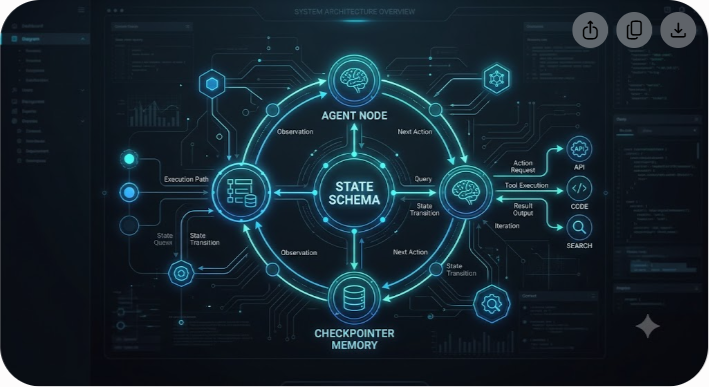
Before writing code, it is essential to understand how state flows through a LangGraph application.
1. The State Schema
Every LangGraph workflow defines a central State structure, typically typed using Python's TypedDict or Pydantic models. Every node in the graph reads from and writes to this state.
When a node returns a dictionary, LangGraph updates the state by overriding existing keys or appending to lists based on defined reducer functions (such as operator.add).
2. Nodes (The Workers)
Nodes carry out the actual work. A node is simply a function that receives the current State object, performs an action (such as executing an LLM call, fetching data from an external API, or parsing a JSON payload), and returns a dictionary containing the state fields to update.
3. Edges (The Navigators)
Edges dictate navigation between nodes. Direct edges connect Node A to Node B unconditionally. Conditional edges pass the current State into a routing function that dynamically returns the string name of the next node to execute based on evaluation logic.
4. Checkpointers (The Memory Persistence Layer)
Checkpointers write the state of the graph to a persistent backend (such as PostgreSQL, Redis, or SQLite) after every step. This provides fault tolerance, time-travel debugging, and the ability to pause execution indefinitely while waiting for human intervention.
Step-by-Step Tutorial: Building a Stateful Customer Support Agent
Let us construct a production-ready Customer Support AI Agent. This agent will inspect user requests, search a database for answers, decide whether to execute a tool, draft a response, and route the workflow to a human manager if the user expresses frustration or if refund amounts exceed a specific threshold.
Prerequisites
Ensure you have Python 3.10+ installed along with the necessary packages:
bash pip install langgraph langchain-openai langchain-core pydantic
Set your OpenAI API key in your environment:
bash export OPENAI_API_KEY="your-api-key-here"
Step 1: Define the Agent State
We start by defining the state schema. Our agent needs to keep track of conversation messages, user sentiment, refund request values, and human approval flags.

python import operator from typing import Annotated, Sequence, TypedDict from langchain_core.messages import BaseMessage
class AgentState(TypedDict):
The operator.add reducer ensures new messages are appended to history
messages: Annotated[Sequence[BaseMessage], operator.add] user_id: str refund_amount: float requires_human_approval: bool is_approved: bool
Step 2: Define Tools and System Components
Next, we define mock tools that our agent can call to perform actions, such as looking up account details or processing a refund.
python from langchain_core.tools import tool
@tool def lookup_user_account(user_id: str) -> str: """Looks up user tier and account status."""
Production code would query a PostgreSQL database or CRM API
if user_id == "usr_123": return "User Tier: Enterprise. Account Status: Active. Open Tickets: 0." return "User Tier: Free. Account Status: Active."
@tool def process_refund_payout(user_id: str, amount: float) -> str: """Executes a financial refund for the specified user.""" return f"Successfully processed refund of ${amount} for user {user_id}."
tools = [lookup_user_account, process_refund_payout]
Step 3: Implement Graph Nodes
Now, let us build the individual nodes that will process our workflow.
python from langchain_openai import ChatOpenAI from langchain_core.messages import SystemMessage, HumanMessage
model = ChatOpenAI(model="gpt-4o", temperature=0).bind_tools(tools)
def agent_node(state: AgentState): """Evaluates messages and decides whether to respond or call a tool.""" messages = state["messages"]
Add a system prompt if this is the start of the conversation
system_prompt = SystemMessage(content=( "You are an automated support assistant for Saasbonus. " "Help users resolve platform issues and process refund requests according to rules." ))
full_messages = [system_prompt] + list(messages) response = model.invoke(full_messages)
return {"messages": [response]}
def evaluate_risk_node(state: AgentState): """Inspects the state to check if human intervention is necessary.""" last_message = state["messages"][-1] requires_human = False refund_val = state.get("refund_amount", 0.0)
Check tool calls inside response
if hasattr(last_message, "tool_calls") and last_message.tool_calls: for tool_call in last_message.tool_calls: if tool_call["name"] == "process_refund_payout": amount = tool_call["args"].get("amount", 0) refund_val = amount
Financial guardrail: Requires human review if over $100
if amount > 100.0: requires_human = True
return { "requires_human_approval": requires_human, "refund_amount": refund_val }
Step 4: Define Conditional Routing Logic
We need a router function to direct execution flow based on state evaluations.
python from langgraph.graph import END
def router_logic(state: AgentState) -> str: """Determines the next step based on state fields.""" messages = state["messages"] last_message = messages[-1]
if state.get("requires_human_approval") and not state.get("is_approved"): return "human_approval_node"
if hasattr(last_message, "tool_calls") and last_message.tool_calls: return "execute_tools"
return END
Step 5: Assemble and Compile the StateGraph
With our nodes and routing rules ready, we assemble the graph using StateGraph.
python from langgraph.graph import StateGraph, START from langgraph.prebuilt import ToolNode from langgraph.checkpoint.memory import MemorySaver
Initialize the graph builder with our State schema
workflow = StateGraph(AgentState)
Add Nodes
workflow.add_node("agent", agent_node) workflow.add_node("evaluate_risk", evaluate_risk_node) workflow.add_node("execute_tools", ToolNode(tools)) workflow.add_node("human_approval_node", lambda state: {"messages": [SystemMessage(content="Routing to human supervisor.")]})
Construct Edges
workflow.add_edge(START, "agent") workflow.add_edge("agent", "evaluate_risk")
Add Conditional Edge from Risk Evaluator
workflow.add_conditional_edges( "evaluate_risk", router_logic, { "human_approval_node": "human_approval_node", "execute_tools": "execute_tools", END: END } )
Loop tool results back into the agent node

workflow.add_edge("execute_tools", "agent") workflow.add_edge("human_approval_node", END)
Setup Checkpointer for Persistent Memory
memory = MemorySaver()
Compile the Graph
app = workflow.compile(checkpointer=memory)
Advanced Patterns for Enterprise Production
Building a local prototype is straightforward, but taking a LangGraph agent into enterprise production requires handling state persistence, sub-graphs, and human intervention safely.
1. Human-in-the-Loop (HITL) with Interrupts
In enterprise software, AI agents should rarely execute high-value database writes or financial transactions without human oversight. LangGraph provides built-in support for interrupts during compilation:
python
Compile graph with a hard interrupt before the financial execution node
app = workflow.compile( checkpointer=memory, interrupt_before=["execute_tools"] )
When execution hits execute_tools, the graph pauses and serializes its state to the checkpointer. A human supervisor can inspect the pending parameters, approve or edit the state via an internal dashboard, and resume execution seamlessly using thread configuration IDs:
python config = {"configurable": {"thread_id": "session_abc123"}}
Resume execution after approval
app.invoke({"is_approved": True}, config=config)
2. Time-Travel and State Reversion
Because checkpointers save immutable snapshots after every step, developers can query thread histories, inspect previous decisions, and even rewind execution to a specific point to re-run the graph with modified inputs. This is useful for debugging edge cases and testing prompt updates.
3. Scaling State Persistence with PostgreSQL
In production, replace MemorySaver with PostgresSaver. This ensures graph states persist securely across server restarts and horizontally scaled container instances.
python from langgraph.checkpoint.postgres import PostgresSaver from psycopg_pool import ConnectionPool
DB_URI = "postgresql://postgres:password@localhost:5432/agent_db"
with ConnectionPool(conninfo=DB_URI, max_size=20) as pool: checkpointer = PostgresSaver(pool) checkpointer.setup() app = workflow.compile(checkpointer=checkpointer)
Common Pitfalls and How to Avoid Them
Even experienced engineers encounter architectural bottlenecks when moving from standard chains to graph-based agents. Here are three common issues and how to solve them:
1. Unbounded Loops (Infinite State Cycles)
If an LLM receives an unexpected tool response, it may repeatedly call the same tool in an infinite loop, depleting API tokens rapidly.
- Fix: Enforce recursion limits during invocation and implement node iteration counters inside your state schema.
python
Set a strict limit on node executions per run
app.invoke(input_data, config={"recursion_limit": 15, "configurable": {"thread_id": "1"}})
2. Overloading State Schemas
Adding raw payload outputs from dozens of external APIs into a single flat state dictionary makes debugging difficult and bloats state memory snapshots.
- Fix: Modularize your state into sub-states or separate internal operational data from customer-facing conversational history.
3. Race Conditions in Multi-Agent Configurations
When orchestrating multiple autonomous agents running concurrently within sub-graphs, race conditions can occur if two agents attempt to write conflicting keys to the root state simultaneously.
- Fix: Use specific reducer functions (like custom append logic) for shared state keys, or isolate multi-agent tasks inside isolated sub-graphs that return explicit, validated results back to the parent supervisor graph.
Frequently Asked Questions
How does LangGraph handle long-running conversations?
LangGraph handles long conversations through persistent checkpointers like PostgresSaver. By passing a unique thread_id in the configuration object, the graph reloads the exact state snapshot for that user across separate HTTP requests, ensuring conversation context persists reliably without keeping processes in memory.
Can I use LangGraph with non-OpenAI models?
Yes. LangGraph is model-agnostic. You can use Anthropic Claude, Google Gemini, open-weight models running on Ollama, or custom hosted models on platforms like Together AI. As long as the model integration returns compatible message formats, it works seamlessly inside a LangGraph node.
What is the difference between LangGraph and Autogen?
LangGraph provides fine-grained, code-first graph orchestration with explicit state management, making it ideal for deterministic, enterprise workflows. Microsoft AutoGen focuses primarily on multi-agent conversational patterns where agents converse autonomously with higher high-level abstraction.
How do I deploy a LangGraph agent to production?
LangGraph agents can be deployed inside containerized web services like FastAPI or Docker, or deployed directly using LangGraph Cloud. LangGraph Cloud offers managed infrastructure with built-in background task queues, real-time webhooks, and state persistence monitoring.
Is LangGraph suitable for real-time streaming applications?
Yes. LangGraph natively supports token streaming, node output streaming, and custom event streaming. By calling app.stream(), frontend applications can stream LLM tokens word-by-word to the end user while simultaneously tracking backend state updates.
Building Production AI Engineering Capabilities
Transitioning from basic LLM wrappers to stateful, deterministic graph architectures is essential for building production-grade AI agents. LangGraph provides the structural foundation required to manage state, recover from failures, and enforce human oversight.
At Saasbonus, we provide hands-on breakdowns, architectural comparisons, and software reviews to help engineering teams select the right tools for their infrastructure stack—whether you are evaluating LLM frameworks, vector databases, or usage-based billing engines.
Explore our developer guides to make informed architectural decisions for your engineering team.




