
Inngest vs Trigger.dev: Best SaaS Background Jobs in 2026
Inngest vs Trigger.dev in 60 Seconds
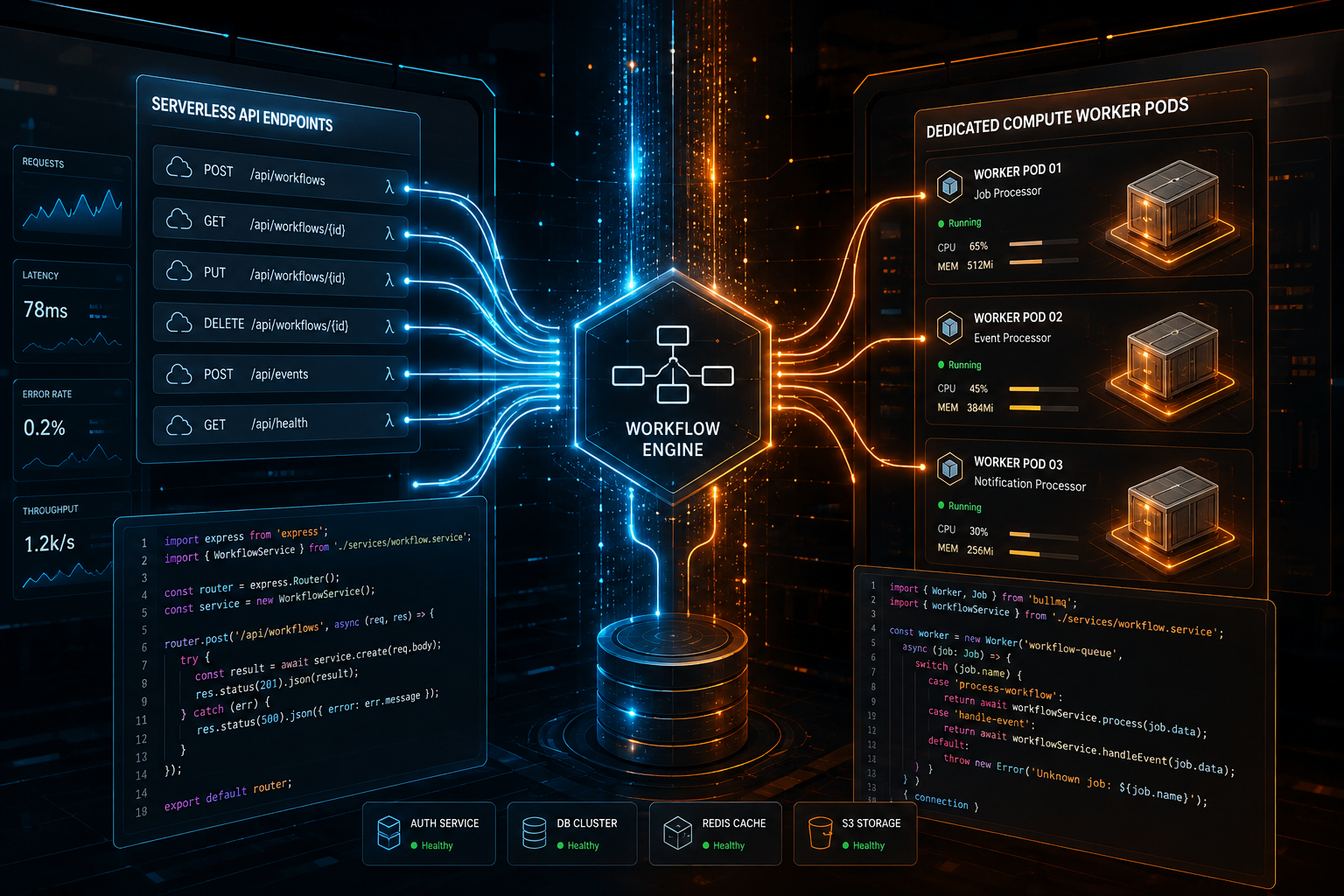
Choosing between Inngest and Trigger.dev comes down to a fundamental architectural trade-off: Do you want an event-driven control plane that orchestrates steps over your existing HTTP/serverless infrastructure (Inngest), or a specialized background compute platform built to execute long-running tasks on dedicated workers (Trigger.dev)?
Both platforms solve the core nightmare of modern Node.js application development: background jobs breaking due to API rate limits, serverless execution timeouts, complex step retries, and state persistence loss. However, they approach the execution boundary from completely opposite directions.
- Choose Inngest if you are building event-driven microservices or serverless applications (like Next.js on Vercel) where you want background logic to run directly inside your existing application endpoints via HTTP webhooks. Inngest manages the orchestration state, sleep intervals, and flow control centrally, calling back into your API routes only when a step needs to execute.
- Choose Trigger.dev if your SaaS requires long-running background compute (minutes to hours), heavy CPU or memory processing (such as video rendering, AI model inference, or bulk PDF generation), or real-time streaming updates. Trigger.dev v3 provisions dedicated compute environments, bypassing serverless HTTP timeout limits completely while giving you zero-config local developer tools.
At Saasbonus, we evaluate developer tools by testing their failure modes, setup overhead, and real-world production costs. In this comprehensive guide, we unpack the architectural mechanics, developer experience, flow control features, pricing structures, and self-hosting trade-offs of both platforms so you can make the right infrastructure commitment for your backend.
The Fundamental Problem with Traditional Background Jobs in SaaS
For over a decade, background processing in Node.js and TypeScript applications meant spinning up a Redis instance, installing BullMQ or Celery, and deploying persistent worker processes on AWS EC2, Render, or Railway. You wrote custom polling loops, manually serialized JSON state, and constructed custom retry schedules using exponential backoff logic.
When serverless platforms like Vercel, Netlify, and AWS Lambda became the standard target for modern web frameworks, this traditional architecture fractured:
- Stateless Endpoint Constraints: Serverless functions are ephemeral. A Vercel API route times out after 15 to 300 seconds depending on your subscription tier. You cannot host a long-running Redis worker inside a stateless serverless function.
- Infrastructure Overhead: Setting up a separate worker fleet on Docker or AWS ECS just to run an asynchronous email queue or process an image upload adds immense infrastructure debt for early-stage and growth-stage engineering teams.
- Lost Execution State: Standard queues lack built-in state orchestration across multi-step workflows. If step three of an onboarding sequence fails after step two sends an API request to a payment processor, recovering without duplicating side effects requires manual idempotency locks.
This gap led to the rise of Durable Execution—a paradigm where functions retain their execution state across network boundaries, long delays, process crashes, and server restarts. Both Inngest and Trigger.dev are modern durable execution engines built for TypeScript-first SaaS applications, but their runtime models differ sharply.
Architectural Comparison: How They Actually Run Your Code
To pick the right platform, you must understand where your code actually executes and how state transitions travel across the network.
Inngest: The Event-Driven Orchestration Engine
Inngest operates using an Orchestration-as-a-Service model. It does not host or execute your code on its own compute infrastructure. Instead, your application exposes an HTTP endpoint (typically `/api/inngest`) using a framework-specific SDK (Next.js, Express, Remix, Fastify, SvelteKit, or Hono).
When an event occurs in your application, your code sends an event payload to the Inngest Cloud Engine. Inngest evaluates your step function logic and fires an HTTP POST request back to your application's `/api/inngest` endpoint to execute the specific step.
Here is how the execution lifecycle flows in Inngest:
- Your app dispatches an event via `inngest.send({ name: 'user.signup', data: { userId: 123 } })`.
- Inngest records the event in its durable queue and looks up functions registered for that event.
- Inngest calls your application's `/api/inngest` webhook over HTTP to execute Step 1.
- Your application runs Step 1 and returns the result back to Inngest via HTTP response.
- Inngest persists the result. If the function contains `await step.sleep('3d')`, Inngest pauses execution state in its engine for 3 days.
- After 3 days, Inngest triggers your `/api/inngest` endpoint again to execute Step 2, passing the memoized output of Step 1.
Evaluating this architecture pattern reveals a major benefit: You never deploy separate worker infrastructure. Your jobs run wherever your primary web app runs. However, it means your steps are bound by the execution limits and cold starts of your host web framework.
Trigger.dev (v3): The Real-Time Background Compute Engine
Trigger.dev began with an orchestration approach similar to Inngest, but with the launch of Trigger.dev v3, they completely re-engineered their platform around a Dedicated Compute Worker Model.
Instead of calling back into your app via webhooks, Trigger.dev packages your background task code using a CLI build tool, compiles it, and deploys it directly to their managed background compute grid or your self-hosted infrastructure. Your primary application dispatches tasks to Trigger.dev via a lightweight SDK client, and Trigger.dev executes those tasks inside isolated, long-running Node.js containers.
Here is the execution flow for Trigger.dev:
- You write tasks inside a dedicated directory (such as `trigger/tasks.ts`).
- Running `npx trigger.dev deploy` bundles your tasks and deploys them to the Trigger.dev execution platform.
- Your primary web application calls `tasks.trigger('process-video', { videoUrl: '...' })`.
- Trigger.dev provisions a dedicated worker instance with your requested CPU and RAM configuration.
- The task executes on Trigger.dev's compute layer for seconds, minutes, or hours with zero HTTP timeout limits.
- Real-time log streams and output states stream back to your dashboard via long-lived connections.
| Architectural Attribute | Inngest | Trigger.dev (v3) |
|---|---|---|
| Execution Location | Your existing app/hosting provider (Vercel, AWS Lambda, Fly.io) | Trigger.dev managed worker grid (or self-hosted worker process) |
| Network Model | Inbound HTTP webhooks back to your app endpoints | Outbound connection from task workers to Trigger.dev cloud engine |
| Execution Time Limits | Subject to your host platform limits (e.g., Vercel 15s-300s per step) | Up to 12+ hours per task run |
| CPU / Memory Customization | Bound to your app host limits | Configurable per task (from 0.5 vCPU / 512MB RAM to multi-core/GB RAM) |
| State Memoization | Step-level memoization via HTTP responses | Native async step execution with durable checkpointing |
| Deployment Workflow | Deploys alongside your web app code seamlessly | Separate CLI build and deploy step (`npx trigger.dev deploy`) |
Developer Experience (DX) and Code Syntax
Both platforms offer top-tier TypeScript developer experiences with end-to-end type safety, autocompletion, and local development tools. However, their code abstractions feel distinct in day-to-day development.
Writing Workflows in Inngest
Inngest structures code around Events and Steps. Everything is step-memoized. If a function fails on step two, Inngest retries step two without re-running step one.
```typescript // inngest/functions/userOnboarding.ts import { inngest } from "../client";
export const userOnboarding = inngest.createFunction( { id: "user-onboarding", retries: 3 }, { event: "app/user.created" }, async ({ event, step }) => { // Step 1: Create Stripe customer const stripeCustomer = await step.run("create-stripe-customer", async () => { return await stripe.customers.create({ email: event.data.email }); });
// Step 2: Pause execution without holding server resources await step.sleep("wait-for-trial", "3 days");

// Step 3: Send check-in email await step.run("send-welcome-email", async () => { await postmark.sendEmail({ To: event.data.email, Subject: "How is your trial going?", TextBody: `Stripe ID: ${stripeCustomer.id}`, }); });
return { status: "completed", customerId: stripeCustomer.id }; } ); ```
Notice the `step.run()` wrappers. Inngest requires explicit `step.run()` calls to define memoization checkpoints. If code sits outside a `step.run()`, it re-executes every time Inngest invokes the endpoint for subsequent steps. This is a crucial detail that new Inngest developers must learn.
Writing Tasks in Trigger.dev v3
Trigger.dev v3 simplifies this pattern. Because tasks run on dedicated background workers, you can write straightforward TypeScript code without wrapping every line in step primitives, while still retaining the ability to trigger child tasks and durable delays.
```typescript // trigger/userOnboarding.ts import { task, wait } from "@trigger.dev/sdk/v3";
export const userOnboardingTask = task({ id: "user-onboarding", retry: { maxAttempts: 3, factor: 2, minTimeoutInMs: 1000, }, run: async (payload: { email: string; userId: string }) => { // Direct execution on background worker const stripeCustomer = await stripe.customers.create({ email: payload.email });
// Durable delay - releases compute resources while sleeping await wait.for({ days: 3 });
await postmark.sendEmail({ To: payload.email, Subject: "How is your trial going?", TextBody: `Stripe ID: ${stripeCustomer.id}`, });
return { status: "completed", customerId: stripeCustomer.id }; }, }); ```
In Trigger.dev, the code reads linearly. When `wait.for()` is invoked, Trigger.dev checkpoints the task state, pauses execution, freezes compute, and resumes seamlessly when the timer expires.
Local Development Experience
One of the biggest friction points in traditional queue development is replicating production queue behavior on a developer laptop.
Inngest Dev Server
Inngest solves local testing through the Inngest Dev Server—a standalone binary or Docker container started via `npx inngest-cli@latest dev`. The dev server runs locally, opens a visual UI at `localhost:8288`, scans your application endpoint (such as `http://localhost:3000/api/inngest`), and intercepts events. When you trigger an event in local development, the local Inngest engine sends local HTTP requests to your running dev server.
Pros:
- Works offline without sending data to cloud services.
- Fast feedback loops with full step visualizer.
- Allows sending test event payloads directly from the UI.
Cons:
- Requires your web application server (e.g., `next dev`) to be running simultaneously on a reachable local port.
Trigger.dev CLI and Dev Environment
Trigger.dev v3 utilizes a CLI-driven development workflow via `npx trigger.dev dev`. The CLI connects your local code editor to the Trigger.dev Cloud platform (or your self-hosted instance) over a persistent WebSocket connection.
When you edit task code locally, the CLI updates your local development environment instantly. When a task triggers, code executes locally on your machine while sending real-time log data, step timing, and state outputs back to your cloud development dashboard.
Pros:
- Zero local dependencies to install or maintain beyond the Node.js process.
- Real-time cloud logging mirrors production setup precisely.
- Easy testing of complex background tasks (video processing, heavy computations) directly on your local system.
Cons:
- Requires an active internet connection to communicate with the Trigger.dev control plane.
Flow Control: Throttling, Concurrency, Debouncing, and Batching
Production SaaS apps rarely process jobs at a steady, uniform pace. You encounter spike events: a customer uploads a 10,000-row CSV file, an external webhook fires 5,000 events in 2 seconds, or an enterprise tenant triggers a batch export that threatens to consume your entire database connection pool.
Handling these edge cases requires advanced flow control features built directly into your background job engine.
Concurrency Limits and Tenant Fairness
Both platforms support concurrency management, but their capabilities differ in scope:
- Inngest features built-in Concurrency Keys. You can limit concurrency globally, per tenant, or dynamically based on event data. For example, you can specify that a user on a Free Tier plan can execute only 2 concurrent AI generations, while an Enterprise plan user can execute 50:
```typescript { concurrency: { limit: 2, key: "event.data.tenantId" } } ```
If an event exceeds the threshold, Inngest holds it in a durable queue and processes it automatically as concurrency capacity becomes available.
- Trigger.dev v3 supports global task concurrency limits and queue-level concurrency limits. Because Trigger.dev provisions actual compute resources (CPUs and memory), concurrency controls also protect your infrastructure spending, preventing a runaway loop from spinning up thousands of concurrent container instances.
Debouncing and Throttling
- Inngest provides native Debounce and Throttle configurations directly inside the function declaration. If a user edits a document 20 times in 10 seconds, Inngest can delay function execution until edits cease for a specified interval (debounce), or allow execution only once every 60 seconds (throttle).
- Trigger.dev handles rate limiting and delay patterns through queue configurations and batching functions, though configuring dynamic event-driven debouncing requires wrapping tasks in custom logic compared to Inngest's declarative configuration.
Event Batching
Both platforms support event batching to protect downstream APIs:
- Inngest: Automatically collect up to 1,000 events over a time window (e.g., 5 seconds) before firing a single function execution with an array of events.
- Trigger.dev: Use batch triggering primitives (`tasks.triggerBatch()`) to submit multiple payloads in a single network request.
Handling Long-Running Compute, Heavy Jobs, and AI Workflows
This is where the choice between Inngest and Trigger.dev becomes crystal clear.
If your SaaS relies on heavy background compute—such as LLM fine-tuning, video encoding, automated web scraping with headless browsers, or large PDF generation—Trigger.dev v3 holds a distinct architectural advantage.
The Timeout Wall in Serverless Architecture
When using Inngest on serverless platforms like Vercel or AWS Lambda, each individual step executed by `step.run()` is still an HTTP call to your web application. If an individual step exceeds your host platform's maximum request duration limit (e.g., Vercel's 60-second execution cap on Hobby/Pro or 300-second limit on Enterprise), the host platform forcefully terminates the connection.
While you can break an Inngest workflow into multiple smaller steps, a single atomic operation cannot exceed the hosting platform's limit. Rendering a 15-minute video or running a complex Puppeteer script inside an Inngest step hosted on Vercel will hit the platform execution ceiling.

Trigger.dev's Unbounded Execution
Trigger.dev v3 operates on dedicated workers running outside HTTP request cycles. A single task can execute uninterrupted for hours. Furthermore, Trigger.dev provides configurable machine sizes directly in code:
```typescript export const renderVideoTask = task({ id: "render-video", // Configure worker machine specs per task machine: { cpu: 2, ram: 4, }, run: async (payload: { rawVideoUrl: string }) => { // Run long-running FFmpeg commands directly on worker disk const output = await processFFmpeg(payload.rawVideoUrl); return output; }, }); ```
Additionally, Trigger.dev provides native support for real-time streaming, allowing tasks to stream progress updates directly back to your frontend applications via React hooks.
Detailed Real-World SaaS Use Cases
To see how these architectural differences apply in practice, let's look at four typical SaaS engineering scenarios.
Use Case 1: Multi-Step User Onboarding Flow
Requirements: Send a welcome email immediately, wait 2 days, check if the user completed setup, and if not, send a reminder email and trigger a Slack notification to the sales team.
- Inngest: Exceptional fit. The entire flow runs declaratively using `step.sleep()` and `step.run()`. It deploys directly with your Next.js application on Vercel without requiring extra infrastructure build steps.
- Trigger.dev: Works cleanly as well, though spinning up dedicated compute for a workflow that spends 99.9% of its time sleeping is more compute isolation than simple email messaging needs.
Use Case 2: AI Agent Workflow with Retrieval-Augmented Generation (RAG)
Requirements: A user submits a query. The backend must fetch documents, generate embeddings via OpenAI, query a vector database (like Pinecone), synthesize a response using Claude 3.5 Sonnet, and stream token chunks back to the user interface in real time.
- Inngest: Handles the orchestration, retries, and API rate limiting well. However, streaming response tokens back to the client while running multi-step orchestration across HTTP routes requires complex SSE (Server-Sent Events) setups.
- Trigger.dev: Purpose-built for AI workloads. The dedicated compute worker handles long API streaming connections, while Trigger.dev's Realtime SDK allows the frontend to subscribe directly to task state changes and streams via WebSockets.
Use Case 3: CSV Import Pipeline (100,000 Rows)
Requirements: A user uploads a 50MB CSV file. The system must parse rows, validate data structures, check for duplicate records in Postgres, push clean records to a database, and email a summary report.
- Inngest: Requires chunking the CSV into smaller event batches (e.g., 500 rows per event) to prevent HTTP endpoint timeouts during parsing and database inserts.
- Trigger.dev: Reads the entire CSV stream on a worker with generous memory allocation, executes fast bulk inserts into Postgres, and completes the operation in a single background process.
Use Case 4: High-Volume Event Webhook Processor
Requirements: Ingesting thousands of incoming payment webhooks from Stripe or Shopify per second, normalizing payloads, and broadcasting internal updates.
- Inngest: Built specifically for event fan-out patterns. You emit events directly to Inngest's event bus, which handles queuing, deduplication, and fan-out execution across multiple downstream subscriber functions with tenancy throttle controls.
- Trigger.dev: Can process webhooks effectively using batch triggering, but requires writing explicit ingestion endpoints to catch incoming webhooks before routing them into background task queues.
Pricing Model Comparison
Both Inngest and Trigger.dev offer generous free tiers for early-stage applications, but their paid tiers measure usage using fundamentally different metrics.
Inngest Pricing Structure
Inngest bases its billing on Step Runs and Event Volume.
- Free Tier: Includes up to 50,000 step runs per month with basic concurrency limits.
- Pro Tier: Starts around $50 per month for 250,000 step runs, plus additional costs per thousand steps beyond the included quota.
- Key Metric: You pay for execution step count, not the wall-clock execution time of your underlying code. If a step takes 10 milliseconds or 5 seconds to run on your Vercel deployment, it counts as exactly 1 step run on Inngest.
Note: Remember that you also pay your application hosting provider (Vercel, AWS, Render) for the compute consumed during HTTP step invocations.
Trigger.dev (v3) Pricing Structure
Trigger.dev bases its billing on Compute Hours (vCPU and RAM usage) plus platform execution operations.
- Free Tier: Generous monthly compute allowance (typically includes around $10 worth of compute credits, equating to millions of lightweight task executions).
- Pay-As-You-Go / Pro: Billed per second of worker compute time, adjusted by machine size (e.g., a 0.5 vCPU / 512MB RAM worker costs significantly less per hour than a 4 vCPU / 8GB RAM worker).
- Key Metric: You pay directly for the exact compute infrastructure consumed on Trigger.dev's cloud platform.
| Pricing Dimension | Inngest | Trigger.dev |
|---|---|---|
| Primary Metric | Step executions + Event volume | Compute execution time (vCPU/RAM per second) |
| Secondary Metric | Historical log retention | Log retention & storage |
| Hidden Costs | App host compute bills (e.g., Vercel execution time) | Minimal (all background compute runs on Trigger) |
| Predictability | Very high for fixed step counts | Dependent on task duration and compute choices |
Self-Hosting Capabilities and Vendor Lock-in
For enterprise engineering teams with strict data residency, HIPAA compliance, or SOC2 requirements, self-hosting is a key factor.
Self-Hosting Trigger.dev
Trigger.dev is open-source (Apache 2.0) and explicitly designed for self-hosting. You can deploy the complete Trigger.dev platform—including the control plane, web dashboard, and worker execution engine—onto your own infrastructure using Docker Compose, Kubernetes, or cloud platforms like AWS ECS and Render.
This makes Trigger.dev an attractive choice for teams that want full control over execution environments or must process sensitive PII that cannot leave their private cloud virtual networks.
Self-Hosting Inngest
Inngest provides an open-source core engine and dev server binaries that allow running Inngest locally or in self-managed environments. However, the fully feature-complete enterprise control plane with advanced analytics, historical auditing, and multi-region cluster coordination is primarily managed via Inngest Cloud.
Vendor Lock-in Evaluation
Both platforms utilize open-source SDKs and standard TypeScript patterns, making migration manageable compared to proprietary cloud services like AWS Step Functions or GCP Workflows.
- Moving off Inngest requires stripping out `step.run()` wrappers and routing logic, then replacing them with standard queue handlers.
- Moving off Trigger.dev requires extracting your task code from `task()` primitives and pointing invocation calls to a different background queue or Docker container runner.
Summary Feature Matrix
| Feature | Inngest | Trigger.dev (v3) |
|---|---|---|
| Core Paradigm | Event-driven step orchestration | Dedicated serverless compute workers |
| Primary Language | TypeScript / JavaScript, Go, Python | TypeScript / JavaScript |
| Deployment Model | Embedded in your web app framework | Deployed via CLI to compute grid |
| Max Execution Time | Limited by app host (Vercel/Lambda) | Unbounded (Hours/Days) |
| Durable Delays (`sleep`) | Yes (`step.sleep()`) | Yes (`wait.for()`) |
| State Memoization | Explicit step wrappers (`step.run`) | Native async execution / checkpoints |
| Flow Control | Concurrency, Throttle, Debounce, Batching | Queue Concurrency, Rate Limiting, Batching |
| Real-time Streaming | Basic (requires custom SSE setup) | Native (Realtime WebSockets SDK) |
| Self-Hosting | Core engine open-source | Full platform open-source (Apache 2.0) |
| Best For | Serverless SaaS apps, workflow steps | Long compute, AI agents, video, media |
Final Recommendation: Which Should You Choose?
Both Inngest and Trigger.dev are modern, reliable durable execution tools that eliminate the pain of running legacy BullMQ / Redis worker fleets.
Choose Inngest if:
- Your stack is centered around serverless web frameworks like Next.js, Remix, or SvelteKit deployed on platforms like Vercel or Netlify.
- Your background workflows consist primarily of quick API calls, transactional emails, database updates, and multi-step delays.
- You want zero additional deployment steps—your background job logic deploys automatically with your main web application code.
- You require fine-grained, dynamic tenant throttling and event debouncing out of the box.
Choose Trigger.dev if:
- Your SaaS performs heavy computational work: AI inference, video processing, PDF rendering, web scraping, or massive dataset transformations.
- You are tired of wrestling with serverless execution limits, HTTP request timeouts, and proxy gateway restrictions.
- You want native real-time streaming to push live job progress updates directly to frontend user interfaces.
- Full self-hosting capabilities on your own Kubernetes or Docker infrastructure are a mandatory compliance requirement.
Evaluating Software Tools for Your SaaS Stack
Selecting the right background processing infrastructure early in your build cycle prevents costly engineering rewrites as your monthly active users scale. Whether you prioritize Inngest's seamless HTTP orchestration or Trigger.dev's dedicated compute grid, both platforms provide the reliability modern web applications demand.
If you are evaluating software tools, devtools, and API providers for your startup, explore SaaSbonus for detailed software comparisons, architectural reviews, and exclusive developer discounts on production-grade SaaS tools.




