
Lovable.dev Review: Can It Really Build Full-Stack Apps?
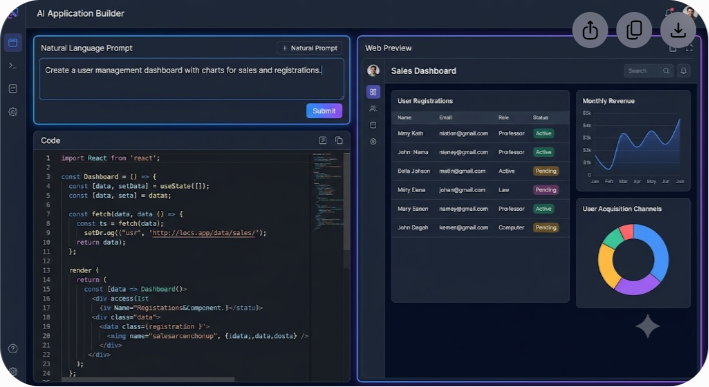
Lovable.dev can build production-grade, full-stack web applications with authentication, relational databases, and dynamic API routes directly from natural language prompts, but it requires developer intervention once your application scales beyond standard CRUD operations.
While first-generation AI code assistants acted as glorified auto-complete tools inside text editors, Lovable.dev (built by the team behind GPT Engineer) takes a fundamentally different approach. It acts as an autonomous full-stack software engineer operating inside a complete browser-based development environment. By pairing frontend UI generation with automatic Supabase database provisioning and edge function execution, Lovable attempts to bridge the gap between simple visual prototypes and real software.
In this hands-on review, we put Lovable.dev through extensive testing. We built three distinct applications—a multi-tenant B2B SaaS dashboard, an interactive marketplace with user authentication, and a real-time data tracking tool—to evaluate whether Lovable truly lives up to its full-stack claims or if it succumbs to the structural debt that plagues most AI-generated codebases.
What Is Lovable.dev and How Does It Work?
Lovable.dev is an AI-powered web application generator designed to turn conversational prompts into deployable software. Built on top of modern web standards, Lovable does not lock you into a proprietary visual editor or a closed runtime. Instead, it generates clean, human-readable code utilizing a standardized tech stack: React, Vite, TypeScript, Tailwind CSS, and Shadcn UI on the frontend, with Supabase supplying PostgreSQL databases, user authentication, storage, and serverless backends.
The Four-Step Processing Pipeline
- Natural Language Input: You describe the application feature, database requirement, or layout adjustment in plain text.
- Orchestration Engine: Lovable breaks down your request into atomic architecture steps and generates standard React and Tailwind CSS components.
- Backend Provisioning: When backend capability is needed, Lovable automatically configures database tables, schema relations, and authentication flows inside your connected Supabase instance.
- Code Generation & Version Control: Clean TypeScript code is output directly to the live preview canvas and synced to your linked GitHub repository.
The fundamental difference between Lovable and traditional no-code platforms lies in code ownership. When you build with Lovable, every line of component logic, state management, and API handling is rendered into standard TypeScript files. You can export the repository to GitHub at any point, run it locally using standard package managers like npm or pnpm, and deploy it to platforms like Vercel, Netlify, or Cloudflare Pages without platform lock-in.
When you submit a prompt in Lovable, its underlying orchestration engine parses your request into atomic architecture steps. It writes the React components, sets up state management with React Query or standard React hooks, applies styling with Tailwind CSS, and—when backend features are requested—configures database tables and Row Level Security (RLS) policies in Supabase via automated integration.
Key Features That Distinguish Lovable.dev
To understand why Lovable has gained traction among founders and product engineers, you have to look beyond simple code generation. The platform incorporates several architectural choices that streamline early-stage app construction.
1. Native Supabase Backend Integration
Most AI UI generators produce static frontends filled with hardcoded mock data. When you ask them to save data to a database or authenticate users, they output placeholder fetch requests and tell you to configure your own server. Lovable solves this by offering a native, one-click integration with Supabase.
Once connected, Lovable can:
- Create database tables with appropriate primary keys, foreign keys, and data types.
- Auto-generate Row Level Security (RLS) policies to protect sensitive records.
- Wire up user sign-up, login, password reset, and OAuth flows directly into the frontend UI.
- Manage storage buckets for user uploads like profile pictures or document attachments.
- Write Edge Functions in Deno/TypeScript for server-side logic and third-party API keys.
2. Live Interactive Canvas and Visual Editing
Lovable presents your application in a real-time preview canvas alongside the chat interface. Unlike traditional IDEs where you must parse line after line of code to spot UI bugs, Lovable allows you to click directly on elements in the visual preview to target specific components.
If a button is misaligned or an accordion component lacks spacing, you can click that exact visual element, type 'make this button full-width on mobile and change its variant to secondary', and Lovable will modify only the relevant file without rewriting the entire layout.
3. GitHub Synchronization and Version History
AI generation often suffers from regression errors, where fixing one bug breaks two previously working features. Lovable handles this through built-in checkpointing and visual Git history.
Every prompt execution creates a point-in-time snapshot. If an AI generation produces invalid TypeScript or breaks your application state, you can roll back to any previous state with a single click. Furthermore, Lovable syncs bidirectionally with GitHub repositories. You can let the AI build 80% of the foundation, push the commit to GitHub, pull it into Cursor or VS Code to write custom business logic, and push back without corrupting Lovable's internal context.
4. Figma to Code Capabilities
For design-led teams, Lovable provides native support for importing Figma assets and screen designs. By pasting a public Figma link or component design, the engine extracts visual layouts, typography systems, and color variables, transforming them into responsive Tailwind CSS structures that mirror the original design spec.

Testing Lovable.dev on Real Full-Stack Scenarios
To evaluate Lovable beyond surface-level landing pages, we ran three real-world development tests. Here is how the engine performed under actual technical stress.
Test 1: B2B Multi-Tenant Analytics Dashboard
- Goal: Build an analytics dashboard requiring user login, role-based permissions (Admin vs Member), dynamic charts, and CSV data export.
- Results: Lovable created the initial frontend layout in under two minutes using Lucide icons and Recharts components. When connected to Supabase, it automatically generated two tables: organizations and user_profiles, establishing a foreign key relationship between them. It successfully generated RLS policies allowing users to view data only belonging to their organization ID.
- Where it struggled: Complex multi-tenant edge cases required explicit manual prompting. For instance, when setting up an invite flow for new team members, Lovable initially attempted to process email invitations entirely on the client side, exposing security risks. We had to specifically instruct the platform to write a Supabase Edge Function to handle email dispatch and secure token verification.
Test 2: Two-Sided Service Marketplace
- Goal: Create a marketplace where clients post tasks and freelancers submit bids, complete with file attachments and real-time status updates.
- Results: Lovable excelled at creating user state workflows. It generated separate onboardings for clients and freelancers based on user metadata flags stored during registration. The implementation of Supabase Realtime allowed bid status changes to update instantly on the screen without manual page refreshes.
- Where it struggled: When configuring file upload limits and image compression for proposal attachments, Lovable generated basic client-side input elements but missed necessary backend bucket policies. Storage permissions had to be reviewed and adjusted manually inside the Supabase dashboard.
Test 3: Stripe Payment Integration and Subscription Gating
- Goal: Lock premium features behind a paid Stripe subscription using webhooks and edge functions.
- Results: This is where the difference between frontend-only AI tools and full-stack builders becomes clear. Lovable drafted the basic subscription management UI and created the client-side checkout triggers. When supplied with Stripe API keys through encrypted environment variable fields, it generated the Supabase Edge Function needed to listen to checkout.session.completed webhooks.
- Where it struggled: Webhook signature verification failed on the first three generation attempts due to missing raw body parsing in the Deno edge environment. Fixing this required pasting the error log directly back into the chat window so Lovable could refactor the server code.
Lovable.dev vs Competitors: A Detailed Comparison
The AI app development market has exploded with specialized tools. Choosing between Lovable, Vercel's v0, Bolt.new, Replit Agent, and Cursor depends entirely on your target architecture and coding proficiency.
| Feature / Metric | Lovable.dev | Vercel v0 | Bolt.new | Replit Agent | Cursor IDE |
|---|---|---|---|---|---|
| Primary Focus | Full-stack web apps | Component & UI generation | Full-stack WebContainers | End-to-end cloud dev | Developer IDE extension |
| Frontend Tech Stack | React, Vite, Tailwind, Shadcn | React, Next.js, Tailwind, Shadcn | Any Node.js framework | Python, Node, Go, Rust | Any codebase |
| Backend Architecture | Native Supabase integration | API routes (manual) | Node.js in WebContainers | Native cloud container | Existing backend code |
| Code Ownership | 100% Exportable (GitHub) | Copy code / Vercel deploy | Zip export / GitHub | Hosted or Git export | Local files |
| Database Handling | Postgres (via Supabase) | Mock data / Manual setup | SQLite / Client-side DB | Postgres / SQLite | Direct database access |
| Deployment Target | Any static host or Vercel | Vercel native | Netlify / Static hosts | Replit Cloud | Any infrastructure |
| Target User | Founders, PMs, Engineers | Frontend Devs, Designers | Full-Stack Developers | Non-technical & Devs | Professional Engineers |
Lovable.dev vs. Vercel v0
Vercel's v0 is exceptional at generating pixel-perfect React components using standard Tailwind CSS and Shadcn UI conventions. However, v0 focuses primarily on the frontend layer. While v0 can draft Next.js API routes, it lacks native automated database provisioning out of the box. Lovable is better suited for users who want a fully wired backend with databases, user tables, and authentication state pre-configured.
Lovable.dev vs. Bolt.new
Bolt.new operates using StackBlitz WebContainers, allowing full Node.js environments to run directly inside your browser tab. Bolt can install npm packages, run local express servers, and manage build scripts in browser memory. However, running heavy Node environments inside browser memory can lead to performance degradation on larger projects. Lovable delegates backend state to managed Supabase infrastructure, leading to cleaner architectural separation and more reliable long-term production builds.
Lovable.dev vs. Replit Agent
Replit Agent excels at building software that requires diverse language support beyond the JavaScript ecosystem—such as Python Flask backends, data scraping workers, or complex system utilities. However, for clean, modern web SaaS applications built with standard React components and responsive UI design, Lovable produces higher quality UI layouts and cleaner frontend code structures.
Understanding the Tech Stack: What Lovable Outputs
One of Lovable's greatest strengths is its commitment to mainstream, non-proprietary web technology. Below is the breakdown of the exact folder structure created when building an application on the platform:
- src/components/ - Contains reusable Shadcn UI elements and custom interface components.
- src/pages/ - Holds view routes managed by React Router.
- src/integrations/ - Configures the Supabase client and imports generated database type definitions.
- src/hooks/ - Stores custom React hooks and TanStack React Query data-fetching queries.
- src/App.tsx - Serves as the main application router and context provider wrapper.
- supabase/functions/ - Houses Deno Edge Functions for serverless backend tasks like Stripe payments and external API handlers.
- supabase/migrations/ - Contains SQL files defining database tables, columns, and security rules.
- tailwind.config.ts - Defines design tokens, color variables, and styling configurations.
- package.json - Lists standard open-source dependencies powered by Vite.
Frontend Layer
- Build Tool: Vite for instantaneous local development server boot times.
- Framework: React paired with TypeScript for static type safety.
- Routing: Client-side routing managed through standard React Router (react-router-dom).
- Styling: Tailwind CSS combined with clsx and tailwind-merge for utility class handling.
- Component System: Primitive components powered by Radix UI and visual themes built on Shadcn UI.
- Data Fetching: TanStack React Query (@tanstack/react-query) for API caching, optimistic UI updates, and loading states.
Backend Layer
- Database: Managed PostgreSQL instance hosted on Supabase.
- Security: PostgreSQL Row Level Security (RLS) policies defining read/write permissions per user session.
- Authentication: Supabase Auth utilizing JWTs stored securely in standard browser storage.
- Serverless Functions: Supabase Edge Functions executing TypeScript runtime code powered by Deno.
Because the output is standard TypeScript, any professional software engineer can pull down a Lovable-generated repository and immediately understand where files live, how components render, and how network requests execute.
Technical Limitations and Trade-Offs
Despite its impressive capabilities, Lovable.dev is not a magic wand that replaces software engineering fundamentals. Understanding its limits helps prevent frustration during production deployments.
1. The Context Window Barrier
As your application grows past 30 or 40 individual component files, AI orchestration engines face context window decay. When requesting sweeping changes across multiple interconnected files (e.g., updating a global state store that affects 15 dashboard widgets simultaneously), Lovable can occasionally hallucinate imports, reference missing variables, or overwrite custom logic written in prior prompts.
- Mitigation: Keep components modular and atomic. Instruct Lovable to build small, isolated features rather than asking for full system rewrites in a single prompt.
2. Complex Relational Database Logic
While Lovable manages single-table and standard foreign-key CRUD logic well, it can stumble on complex SQL relational logic—such as recursive CTEs, highly nested many-to-many junction tables, or intricate database triggers.
- Mitigation: Use the Supabase dashboard directly for complex schema migrations and custom SQL functions, then let Lovable interface with those functions via standard client calls.

3. Deep Third-Party Integration Gaps
If your software requires esoteric third-party APIs, legacy SOAP protocols, or complex OAuth handshakes outside of standard Google or GitHub providers, Lovable may generate outdated API endpoint signatures or incorrect payload parameters based on legacy training data.
- Mitigation: Provide exact OpenAPI specs or current documentation snippets directly into the chat prompt when requesting custom integrations.
Lovable.dev Pricing and Plans
Lovable operates on a usage-based tier system tied to message credits. Credits are consumed whenever you submit a prompt that triggers code generation, visual edits, or backend provisioning.
Free Tier
- Ideal for testing the platform interface and building simple static prototypes.
- Offers daily credit allocations that refresh every 24 hours.
- Community support via Discord and public showcase access.
Starter / Pro Tier (Approx. $20 - $40 / month)
- Designed for solo founders, side projects, and rapid prototyping.
- Provides monthly recurring credit allocations.
- Unlocks custom domain linking, public/private GitHub repository sync, and priority AI generation speed.
- Native Supabase provisioning and custom environment variable secrets management.
Team / Enterprise Tier
- Targeted at software agencies, product teams, and startups building scalable SaaS products.
- Shared workspace environments, team role management, expanded credit pools, and dedicated technical support.
- High-rate limits for rapid iterative prompting without daily caps.
For updated pricing schedules, custom enterprise tier quotas, and discount bundles, check out our curated breakdown of software deals and savings on Saasbonus.
Step-by-Step Guide: Building Your First App on Lovable.dev
If you are ready to test Lovable on your next project, follow this structured workflow to maximize code quality and minimize generation errors.
Step 1: Draft a Precise Architecture Prompt
Do not start with vague prompts like 'Build me a CRM'. Instead, provide a structured breakdown of the core layout, database requirements, and target workflow.
Sample Initial Prompt: 'Create a light-themed inventory management dashboard for a local hardware store. Include a top navigation bar with tabs for Dashboard, Inventory List, Suppliers, and Settings. On the Inventory List page, display a search bar, category filter, and a responsive data table showing Item Name, SKU, Category, Quantity in Stock, Unit Price, and Actions (Edit, Delete). Use Shadcn UI table components and Lucide icons.'
Step 2: Establish the Supabase Backend
Once the initial UI preview renders correctly, connect your Supabase account via the settings menu:
- Open the Lovable integration panel.
- Click 'Connect Supabase' and authorize your account or select an existing project.
- Prompt Lovable to create database schemas: 'Create a database table for inventory_items with columns for id, name, sku, category, quantity (integer), unit_price (numeric), and created_at. Enable RLS so authenticated users can read and write records.'
Step 3: Implement User Authentication
With the database linked, instruct Lovable to secure your application views:
- 'Add a login and signup screen using Supabase Auth with email and password.'
- 'Redirect unauthenticated users to the /login page whenever they try to access the dashboard routes.'
Step 4: Sync to GitHub and Export
Once your core feature set works in the preview canvas:
- Click the GitHub integration icon in the upper toolbar.
- Authorize repository creation and push your initial commit.
- Clone the repository locally using your terminal:
bash git clone https://github.com/your-username/your-lovable-app.git cd your-lovable-app npm install npm run dev
You now have a standard Vite React application running on your local machine, fully connected to your cloud Supabase database.
Practical Strategies for Maximizing Code Quality
Working efficiently with AI full-stack builders requires treating the prompt window like a pair-programming partner rather than an automated wish dispenser. Here are tested strategies to keep your Lovable codebase clean:
- Build Modularly, Prompt Incrementally: Never ask for five new features in a single prompt execution. Build the UI shell first, connect the database second, implement state handling third, and apply edge-case error messaging last.
- Inspect the Generated SQL: Before accepting database schema creations, check the generated migrations in the Supabase console. Ensure primary keys are correctly set to UUID and proper indexes exist on high-frequency query columns.
- Use Visual Direct Selection: Instead of writing 'change the red banner at the bottom left', click the exact element directly on the interactive canvas. This feeds the exact DOM selector and React component line number directly into the LLM context.
- Provide Documentation Snippets for APIs: When integrating third-party services like Resend, PostHog, or Stripe, paste the exact SDK initialization snippet into your chat prompt to prevent the model from using deprecated methods.
- Monitor Your RLS Policies: AI tools often default to broad permissions (like true for all operations) to ensure feature demos work immediately. Manually verify inside Supabase that RLS policies explicitly validate auth.uid() = user_id before deploying to public users.
Final Verdict: Is Lovable.dev Worth It?
Lovable.dev represents a significant step forward in the evolution of AI-driven web software creation. By focusing on clean, standard developer tooling—React, Vite, Tailwind CSS, and Supabase—it eliminates the primary downside of traditional no-code platforms: vendor lock-in and opaque proprietary runtimes.
For non-technical founders and product managers, Lovable enables the creation of functional, database-backed minimum viable products (MVPs) in hours rather than months, making user testing accessible without upfront engineering budgets.
For professional software engineers, Lovable serves as a rapid scaffolding tool. It automates repetitive setup tasks—configuring forms, styling table components, wiring basic CRUD APIs, and initializing auth workflows—freeing you to focus on complex business logic, custom infrastructure, and proprietary algorithms.
While it cannot completely replace software engineering discipline—particularly when managing complex database architectures, custom third-party webhooks, and long-term codebase scale—Lovable.dev is one of the most practical and production-ready full-stack AI app builders available today.
If you are evaluating software tools, dev platforms, or SaaS productivity stacks for your business, explore more hands-on reviews and technical guides on Saasbonus.




