
Neon vs Supabase: Serverless Postgres Comparison for SaaS
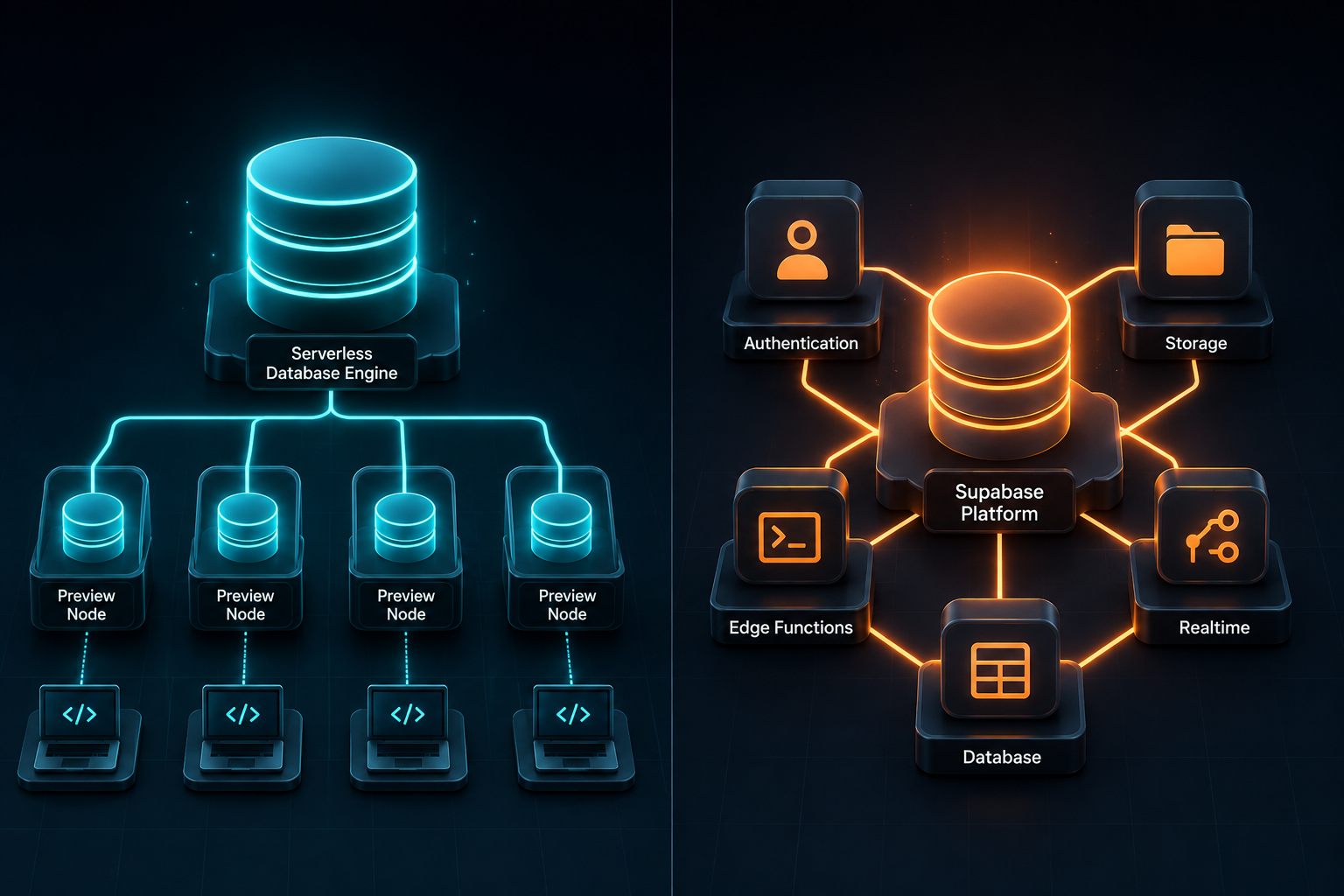
Choosing between Neon and Supabase for a modern SaaS application is not a debate over which team writes better SQL. Both platforms run standard, production-ready PostgreSQL on cloud infrastructure. The real decision comes down to architectural scope: do you want a pure, serverless database engine built for elastic compute and Git-like branching, or do you want a complete Backend-as-a-Service (BaaS) that bundles authentication, file storage, edge functions, and real-time subscriptions around your database?
If you pair Neon with standalone tools like Clerk for auth and Cloudflare R2 for file storage, you assemble a best-of-breed modular stack. If you choose Supabase, you get an all-in-one ecosystem that eliminates glue code and accelerates your initial time-to-market. Both approaches work at scale, but their trade-offs impact your development workflow, bill, and system architecture for years.
Here is a comprehensive evaluation of how Neon and Supabase perform across architecture, developer experience, connection handling, performance, multi-tenant patterns, and long-term total cost of ownership (TCO).
The Core Architectural Difference: Database vs Platform
To pick the right database, you must understand the underlying design choices of each platform. They approach cloud-native Postgres from fundamentally different perspectives.
Neon was built from scratch to solve the operational rigidity of traditional PostgreSQL. It decouples compute (the running Postgres engine that processes queries) from storage (a custom distributed, page-based storage layer). By separating these two layers, Neon allows compute nodes to scale up dynamically during traffic spikes or spin down to zero when idle—without touching the underlying persistent disk.
Supabase, by contrast, positions itself as the open-source alternative to Firebase. It wraps a standard PostgreSQL instance in an ecosystem of tightly integrated open-source microservices:
- GoTrue / Supabase Auth: Handles JWT-based user management, OAuth providers, and Row-Level Security (RLS).
- Storage: An S3-compatible object storage service managed directly via database policies.
- Realtime: An Elixir-based server that listens to Postgres Write-Ahead Logs (WAL) and broadcasts updates via WebSockets.
- Edge Functions: Deno-based serverless functions for running backend logic close to your users.
| Feature Dimension | Neon | Supabase |
|---|---|---|
| Core Identity | Pure Serverless Postgres Database | Backend-as-a-Service (BaaS) Platform |
| Storage Architecture | Decoupled storage & compute (Copy-on-Write) | Attached cloud disk volumes (Traditional Postgres) |
| Scale-to-Zero | Native, automatic (milliseconds restart) | Manual or scheduled compute pause on lower tiers |
| Database Branching | Copy-on-Write (instant, data-inclusive) | Migration-driven preview environments (data-less by default) |
| Bundled Features | Database & connection pooler only | Auth, Storage, Realtime, Edge Functions, Vectors |
| Self-Hosting Story | Experimental / complex architecture | Mature Docker Compose & Kubernetes ecosystem |
Database Branching and Developer Experience
For engineering teams that run continuous integration and ephemeral preview environments, database management during code reviews is often a major headache. This is where Neon's architecture shines.
Neon: Copy-on-Write Database Branching
Because Neon separates storage pages from compute, creating a new branch of your database does not clone your data. Instead, it uses a copy-on-write mechanism similar to Git. You can create an isolated branch of a 200 GB production database in less than two seconds.
This branch contains all production data up to the second of creation, but shares unchanged storage pages with the parent branch. As your preview deployment writes new data or runs schema migrations, Neon stores only the modified pages for that branch.
The database branching workflow follows three direct steps:
- Main Database Branch holds shared production storage (for example, 200 GB).
- Feature Branch A branches off to write modified pages (such as 15 MB) to an isolated preview URL.
- Feature Branch B branches off concurrently to write small modifications directly to a CI/CD test runner.
This makes branch-per-pull-request workflows practical for engineering teams. Every pull request gets a dedicated, fully populated database instance that shuts down automatically when the PR is closed or merged.
Supabase: Migration-Driven Branching
Supabase handles branching through a CLI-driven migration workflow. When you spin up a preview branch in Supabase, the platform provisions an empty environment and applies your database migrations sequentially. To test features against realistic data, developers must maintain seeding scripts or restore anonymized database dumps.
While this workflow maintains schema hygiene, it lacks the instant data availability and point-in-time state cloning that Neon provides out of the box.
Connection Pooling and Serverless Latency
Running PostgreSQL inside stateless environments like Vercel Functions, AWS Lambda, or Cloudflare Workers creates connection management challenges. PostgreSQL spawns a dedicated backend process for every client connection, meaning thousands of ephemeral serverless executions can quickly exhaust the database connection limit.
Neon's Serverless Driver and PgBouncer Integration
Neon addresses this in two ways:
- Built-in PgBouncer Pooling: Every Neon project includes a transaction-mode PgBouncer proxy layer by default, allowing thousands of concurrent ephemeral clients to map onto a small pool of active database connections.
- WebSocket Serverless Driver: Neon provides an npm package (@neondatabase/serverless) that routes SQL queries over WebSockets or HTTP endpoints. This avoids TCP connection setup overhead inside serverless runtimes and allows direct database queries from edge environments like Cloudflare Workers.
Supabase's Supavisor Pooler
Supabase developed Supavisor, an open-source connection pooler written in Elixir designed for high concurrency. Supavisor manages connection state across direct connections and serverless instances, easily handling tens of thousands of active clients.
When evaluating query latency, Supabase's persistent compute nodes deliver slightly lower and more predictable baseline ping times for always-on production workloads. Neon's scale-to-zero compute can introduce an initial cold start latency of 300 ms to 600 ms when waking up an idle database endpoint. For SaaS platforms with constant traffic, however, Neon's compute remains warm, eliminating cold-start delays entirely.
Multi-Tenant Architecture Patterns for SaaS
Designing a multi-tenant SaaS application requires choosing between logical tenant isolation and physical tenant isolation. Neon and Supabase support different tenant models depending on your compliance requirements.
Schema-per-Tenant vs Database-per-Tenant
For standard multi-tenant apps, both platforms handle the Row-Level Security (RLS) approach cleanly. You tag every row with a tenant_id and enforce query isolation at the database layer.
However, if your enterprise customers demand hard data isolation, you must choose between a schema-per-tenant or database-per-tenant model:
- Neon for Database-per-Tenant: Neon's lightweight storage architecture makes spinning up hundreds of isolated tenant databases cost-effective. Because idle tenant databases auto-suspend to zero compute utilization, you pay only for active tenant usage rather than provisioning dedicated compute for sleeping accounts.
- Supabase for Unified Security Policies: Supabase excels in RLS-first designs. Because Supabase Auth attaches JWT metadata directly to database sessions, writing Postgres RLS policies that verify auth.uid() or tenant claims requires zero external middleware.
Total Cost of Ownership (TCO) and Pricing Models
Comparing prices between Neon and Supabase is not an apples-to-apples exercise. Neon charges for database compute and storage, whereas Supabase charges for a bundled backend suite.
Neon Pricing Mechanics
Neon calculates costs using Compute Units (CUs) and persistent storage volume:
- Launch Plan: Starts around $19 per month, including base compute hours and storage quotas.
- Scale-to-Zero Savings: If you host multiple staging, dev, or internal environments, Neon pauses compute after 5 minutes of inactivity. You pay $0 for compute during idle periods, charged only for storage footprint.
- Modular Stack Costs: If you select Neon, you must account for third-party services like Clerk or Auth0 for authentication ($25-$100+/mo) and Cloudflare R2 or AWS S3 for object storage.
Supabase Pricing Mechanics
Supabase uses a predictable tier-based subscription combined with resource usage overages:
- Pro Plan: Starts around $25 per month, including compute, 8 GB database storage, 100 GB file storage, and 50,000 monthly active users (MAU).
- All-in-One Efficiency: For a seed-stage startup, $25 per month on Supabase covers database, auth, file storage, and real-time messaging under a single invoice.
- High-Traffic Scale: As database volume grows, compute upgrades on Supabase run on fixed monthly tier rates (e.g., $60/mo for Small compute, $110/mo for Medium compute), providing predictable monthly expenses.
Scenario Cost Comparison
- Early-Stage MVP (Intermittent Traffic): Neon costs $5–$15/mo due to scale-to-zero compute, but combined with Clerk ($25/mo), total stack cost is ~$30–$40/mo. Supabase flat-rate Pro plan costs ~$25/mo all-inclusive.
- Production SaaS Platform (Consistent Traffic): A medium-scale SaaS app using 4 vCPU, 16 GB RAM, and 100 GB storage running 24/7 averages roughly $120–$180/mo on both platforms. Once compute runs continuously, price differences shrink significantly.
When to Choose Which Platform
To make your final decision, evaluate your team's architectural preferences and existing tech stack.
Choose Neon If:
- You want a pure PostgreSQL database without platform lock-in.
- Your dev workflow relies heavily on pull-request preview environments and instant database branching.
- You run serverless architectures on Vercel, Cloudflare, or AWS Lambda and need native autoscaling.
- You plan to build a custom microservices architecture using dedicated providers like Clerk, Uploadthing, and PostHog.
- You run a multi-tenant application where hundreds of tenant databases remain idle for long stretches.
Choose Supabase If:
- You want to ship an MVP fast without spending days integrating separate auth, storage, and database services.
- You heavily utilize Postgres Row-Level Security (RLS) to manage data access policies directly inside the database.
- You need real-time data streaming over WebSockets (e.g., collaborative workspaces, chat feeds, live notification centers).
- You prefer open-source infrastructure with a clear, production-tested self-hosting option via Docker or Kubernetes.
- You prefer flat, predictable monthly platform pricing over granular usage-based billing metrics.
At Saasbonus, we evaluate developer platforms, infrastructure tools, and cloud database engines based on real-world engineering metrics. Both Neon and Supabase are top-tier choices for modern SaaS backends—your choice simply depends on whether you want the best individual database engine or a complete, cohesive backend platform.




