
PostHog vs June: Which Analytics Fits B2B SaaS?
The Core Verdict: PostHog vs June in 60 Seconds
Choosing between PostHog and June for B2B SaaS analytics comes down to a fundamental operational choice: do you want an engineering-led, open-source product operating system with raw event control, or an opinionated, out-of-the-box account analytics platform built for non-technical growth and product teams?
PostHog is an all-in-one developer platform combining event analytics, session recordings, feature flags, A/B testing, and user feedback surveys into a single stack. It gives technical teams complete control over raw data pipelines, SQL-like query interfaces (HogQL), and self-hosting options. However, setting up account-level aggregation and building clean B2B dashboards requires active data maintenance and explicit event schema design.
June is a plug-and-play B2B product analytics engine designed around companies rather than isolated user clicks. It ingests event streams from Segment, web SDKs, or existing data pipelines and automatically maps them into pre-built B2B reporting templates for account activation, feature adoption, and retention cohorts. It eliminates the need for SQL or manual dashboard building, pushing computed account metrics directly back into CRMs like HubSpot, Attio, and Salesforce.
At Saasbonus, our testing shows that early-stage B2B SaaS teams without dedicated data engineers hit meaningful answers faster with June, while developer-heavy teams that require session replays, feature flagging, and custom querying scale further with PostHog.
The Architectural Split: Developer Platform vs. Opinionated SaaS Engine
To evaluate PostHog and June accurately, you must understand that they solve product analytics from two opposing architectural philosophies.
PostHog operates as an infrastructure-level data platform built on top of ClickHouse, a high-performance columnar database. It assumes that software products are complex, multi-layered systems where telemetry data should serve engineering, product management, and growth operations simultaneously. Because PostHog treats raw events as primitive building blocks, it requires your team to define what constitutes an active user, design conversion funnels from scratch, and maintain event naming conventions as your codebase evolves.
June approaches product analytics through opinionated B2B abstraction layers. Instead of forcing you to build charts from a blank canvas, June assumes standard B2B SaaS business models: users belong to organizations, accounts go through activation stages, features are adopted by teams, and account health dictates retention. You connect an event stream, point key events to pre-defined slots in June's templates, and immediately view pre-aggregated account dashboards.
This architectural difference dictates how much engineering overhead each platform introduces into your daily operations.
Data Processing Pipelines
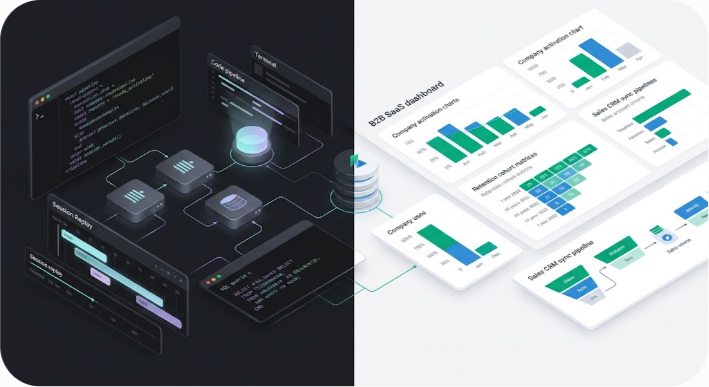
- PostHog Data Pipeline: Ingests raw event streams into ClickHouse, queries data via HogQL or custom funnels, and requires manual construction of B2B company dashboards.
- June Data Pipeline: Ingests event streams into pre-built B2B templates, performs automatic account-level rollups, and syncs computed traits directly into sales CRMs.
If your engineering team wants to own the analytics pipeline, run inline experiment flags, and inspect session recordings alongside drop-off charts, PostHog provides an integrated ecosystem. If your non-technical founders, customer success managers, and product leads need clear account-level answers without writing SQL queries or configuring custom formulas, June delivers faster time-to-value.
How Each Platform Handles B2B Account Structures
In B2B SaaS, measuring individual user behavior without account context produces misleading metrics. A single active user inside an enterprise workspace does not equal an activated company. Both tools support multi-tenant account tracking, but their data models handle group aggregation differently.
PostHog Group Analytics
PostHog handles account tracking through a feature called Group Analytics. In PostHog, events are attached to distinct user IDs by default. To track B2B workspaces, you must explicitly instrument group calls in your codebase, linking individual user IDs to a Group Key such as company_id or organization_id.
Once Group Analytics is configured, PostHog allows you to toggle your analytical scope between individual users and accounts across all reports. You can analyze funnels, retention matrices, and paths at the company level. For example, a retention cohort can measure whether a customer organization returned to your app in week four, regardless of which specific team member logged in.
However, setting up group properties in PostHog requires manual planning. If an account updates its subscription tier or seat count, you must pass those group properties alongside event payloads or via API updates to keep your breakdowns accurate.
June Native Company Rollups
June treats the Company object as a first-class citizen from day one. When you connect data to June, the system automatically prompts you to define your company identifier and user-to-company relationships. Every dashboard, chart, and alert in June is formatted at the account level by default.
June automatically aggregates individual user activity into workspace metrics, giving you clear visibility into key account metrics:

- Account Activation Rate: The percentage of signed-up companies that hit your designated activation milestone within their first 14 days.
- Workspace Power Users: Specific individuals driving usage within a target account.
- Multi-Seat Adoption: How deeply a product spreads across team members inside a single account.
- Account Churn Risk: Workspaces where aggregate usage drops below historical baselines over a 30-day window.
Because June prioritizes account rollups, non-technical team members can view company health instantly without configuring complex filter logic or group parameters.
Data Capture Strategy: Autocapture vs. Explicit Instrumentation
How data enters your analytics tool dictates both the speed of initial setup and long-term data quality. PostHog and June take fundamentally different positions on data collection.
PostHog Event Engine: Autocapture, Custom Events, and HogQL
PostHog includes a powerful frontend JavaScript library that enables autocapture out of the box. Once the snippet is installed on your web application, PostHog automatically records every pageview, button click, form submission, and DOM change without requiring manual event code for every user action.
Autocapture allows non-technical team members to retroactively create event definitions. If you decide six weeks after launch that you need to analyze clicks on a new navigation button, the data is already present in your PostHog instance.
For complex backend operations, state changes, and API calls, PostHog supports explicit server-side SDKs across Python, Node.js, Go, Ruby, and PHP. Advanced users can query raw data directly using HogQL, an SQL dialect built into PostHog that allows custom aggregations, array manipulations, and joins across event and user tables.
sql -- Example HogQL query inside PostHog to calculate account-level event volume SELECT properties.$groups.company_id AS company_id, count() AS total_actions, uniq(distinct_id) AS active_seats FROM events WHERE event = 'feature_used' AND timestamp >= now() - INTERVAL 30 DAY GROUP BY company_id ORDER BY total_actions DESC LIMIT 10
June Event Pipeline: Structured Input and Pre-Built Schemas
June does not use autocapture. It relies entirely on structured explicit event tracking sent via Twilio Segment, Freshpaint, RudderStack, or its native lightweight JavaScript and Node SDKs. June can also import historical data directly from Amplitude.
This design choice forces teams to maintain clean event instrumentation discipline. Instead of capturing millions of noisy DOM clicks, June ingests a refined set of core business events (such as Project Created, Team Member Invited, or Report Exported).
Because June depends on clean inputs, setting up the system requires mapping incoming event names to June's internal report slots during onboarding. Once mapped, June parses these events to update pre-configured reports automatically without requiring custom query construction.
| Data Dimension | PostHog | June |
|---|---|---|
| Capture Method | Frontend Autocapture + Server SDKs | Explicit SDKs + CDP Ingestion (Segment/RudderStack) |
| Custom Query Layer | Built-in HogQL (SQL-dialect) | No custom SQL layer (No-code UI) |
| Retroactive Analysis | Supported via Autocapture DOM history | Requires events to be instrumented beforehand |
| Data Hygiene Requirement | Moderate (Can clean data via Actions & Taxonomy) | High (Requires precise event naming conventions) |
| Direct Data Warehouse Sync | Imports/Exports to Snowflake, BigQuery, S3 | Ingests from Segment/CDPs; syncs traits to CRMs |
Extended Feature Ecosystem: All-in-One OS vs. Pure Product Analytics
When evaluating software cost and workflow efficiency, look beyond standard retention charts. The broader suite of product tools built into each platform directly impacts your tech stack complexity.
PostHog: The All-in-One Developer Product OS
PostHog aims to replace multiple standalone software subscriptions by bundling core development and product tools into one environment:
- Session Replay: Record full user sessions, view console logs, track network errors, and jump directly from a drop-off step in a funnel to the underlying session recording.
- Feature Flags and Dynamic Toggles: Roll out new code safely to specific user cohorts, percentage rollouts, or targeted company accounts without redeploying code.
- Native A/B and Multivariate Testing: Run experiments natively tied to event conversion metrics, backed by statistical significance calculation models.
- User Surveys and Feedback Capture: Trigger in-app popups, NPS surveys, and qualitative feedback forms directly to targeted user groups based on event behavior.
- Web Analytics: Lightweight, privacy-focused website traffic analytics that serve as an alternative to Google Analytics.
By consolidating these systems, engineering teams reduce client-side library overhead and eliminate the need to pay separately for tools like LogRocket, LaunchDarkly, and Typeform.
June: Focused B2B Growth and Customer Success Engine
June deliberately refrains from building session replays, feature flags, or experiment engines. Instead, it focuses on expanding its core B2B analytics capabilities into team workflows and revenue tools:
- Automated Slack and Teams Alerts: Send automated notifications to dedicated customer success channels when a high-value trial account hits its activation threshold or when an enterprise client shows signs of declining usage.
- Product-Qualified Lead (PQL) Scoring: Identify accounts that exhibit power-user traits, enabling sales teams to focus outreach on prospects ready for upgrade conversations.
- Native CRM Integrations: Push computed usage metrics, account activation scores, and feature adoption percentages directly into HubSpot, Attio, Salesforce, and Linear.
- Qualification Bots: Identify high-intent visitors and companies engaging with your product documentation or web pages.
While PostHog equips software engineers with tools to build and debug software, June equips sales leads, account managers, and product managers with operational data to drive B2B expansion revenue.
Integration Ecosystem and CRM Workflow Sync
For B2B SaaS companies, product usage data is most effective when it flows directly into go-to-market tools.
PostHog connects to major cloud data warehouses, including Snowflake, Google BigQuery, Amazon Redshift, and Databricks. You can ingest data from external sources using PostHog Data Pipelines or export raw ClickHouse event tables into your central storage layer. However, syncing PostHog user or group traits back into B2B sales CRMs like HubSpot typically requires setting up reverse ETL pipelines using third-party tools like Hightouch or Census.
June addresses B2B CRM integration natively. It features built-in, bi-directional sync mechanisms for HubSpot, Attio, and Salesforce. Once connected, June writes custom computed properties directly to company records in your CRM. Your account executives and sales representatives can view key product signals without leaving their CRM views:
- Active Seat Count: Total number of active team members in the last 30 days.
- Primary Feature Usage: Whether the account has enabled key add-ons or security features.
- Product Health Score: An automated account engagement score derived from core event frequency.
This native integration makes June a natural fit for product-led sales teams operating tight feedback loops between product usage and sales outreach.

Direct Feature Comparison: PostHog vs. June
To help you evaluate feature sets side by side, the following table breaks down core functionality across both platforms:
| Feature Category | PostHog | June |
|---|---|---|
| Target Persona | Software Engineers, Product Managers, Data Teams | Founders, B2B Product Managers, Growth & CS Teams |
| Primary Focus | Full-stack Product Operating System | Opinionated B2B Account Analytics |
| Default Analytics Scope | User-centric (Group Analytics optional) | Account/Company-centric by default |
| Setup Time | 1 to 3 days (Requires instrumentation planning) | Under 30 minutes (When using Segment/SDK) |
| Session Recording | Native (Includes console logs & network calls) | Not offered |
| Feature Flags | Native (Boolean, JSON, Multivariate) | Not offered |
| A/B Testing | Native statistical experimentation engine | Not offered |
| Report Creation | Fully custom (Funnels, Trends, Paths, SQL) | Pre-built B2B Templates (Activation, Retention) |
| CRM Integration | Requires Reverse ETL or Custom Webhooks | Native bi-directional sync (HubSpot, Attio, Salesforce) |
| Data Privacy & Hosting | US/EU Cloud or Self-Hosted (Kubernetes/Docker) | Cloud-managed (SOC 2 Type II, GDPR compliant) |
Pricing Models and Real Cost Scaling
Analytics pricing structures can quickly lead to unexpected bills if you select a model misaligned with your product's event volume or user growth. At Saasbonus, we closely monitor pricing models across modern software tools to help teams avoid scaling traps.
PostHog Pricing Dynamics
PostHog uses a pay-as-you-go model based on monthly event and recording volumes across distinct product modules:
- Product Analytics: First 1,000,000 events per month are free. Beyond the free tier, pricing drops in tiers starting at $0.00031 per event.
- Session Replay: First 15,000 recordings per month are free, then tiers down starting at $0.0050 per recording.
- Feature Flags & Experiments: First 1,000,000 requests per month are free, then $0.0001 per request.
- User Surveys: First 250 responses free, then $0.20 per response.
This pricing structure provides exceptional value for early-stage startups. You can access enterprise-grade analytics, session replays, and feature flagging without spending money until your application reaches significant traffic volumes. Furthermore, PostHog allows you to set strict monthly billing limits to prevent unexpected costs if event volumes spike.
However, high-frequency, telemetry-heavy B2B apps (such as collaborative design software, real-time code editors, or monitoring dashboards) can generate millions of raw frontend events monthly. Without proper event filtering, PostHog usage fees can scale rapidly.
June Pricing Dynamics
June structures its pricing around flat monthly or annual tiers based on Monthly Tracked Users (MTUs) and total tracked companies, rather than charging per raw event payload:
- Free Tier: $0 per month. Supports core report templates, basic event volume, and early account tracking for growing projects.
- Starter Plan: Approximately $149 per month. Unlocks full data integrations, higher company limits, and advanced cohort filters.
- Growth Plan: Approximately $349 per month. Adds automated Slack alerts, CRM trait sync (HubSpot, Attio), qualification bots, and API access.
- Enterprise Plan: Custom quote. Includes dedicated success support, custom SLAs, and advanced security configurations.
June's fixed-tier pricing model makes monthly software expenses predictable. A user triggering 10,000 backend actions in an account incurs the same cost as a user triggering 10 actions, provided your total MTUs remain within your tier limit.
For B2B SaaS applications with complex workflows, high event volume per seat, and dedicated account management teams, June's tier-based pricing often provides clear financial predictability.
Data Security, Privacy, and Deployment Architecture
Data governance and compliance requirements vary significantly depending on your customer base and target industries.
PostHog Compliance and Self-Hosting Options
PostHog offers flexible deployment options for security-conscious engineering teams:
- Managed Cloud: Choose between US-hosted or EU-hosted data centers to ensure compliance with regional data residency requirements.
- Open-Source Self-Hosting: Deploy PostHog directly within your own AWS, GCP, or Azure infrastructure using Docker or Kubernetes clusters. This ensures customer data, session recordings, and event logs never leave your cloud perimeter.
- Security Standards: PostHog maintains SOC 2 Type II certification, GDPR compliance, and offers strict Data Processing Agreements (DPAs).
Self-hosting PostHog is ideal for B2B platforms operating in highly regulated fields like healthcare (HIPAA compliance), finance, or defense, where exporting user telemetry to third-party SaaS vendors is prohibited.
June Security Model
June operates as a fully managed, multi-tenant cloud service:
- Hosting Infrastructure: Hosted on secure AWS environments utilizing enterprise-grade encryption for data in transit (TLS 1.3) and data at rest (AES-256).
- Compliance: SOC 2 Type II certified and fully GDPR compliant, offering standard data deletion endpoints and privacy controls.
- Data Storage: June stores aggregated metrics and mapped event streams necessary to render B2B reports, relying on upstream vendors like Segment for raw payload storage.
Because June is a managed service without a self-hosted distribution, enterprise buyers requiring fully air-gapped or on-premises analytics will naturally favor PostHog.
Concrete Decision Scenarios: Which Tool Should You Pick?
To simplify your software evaluation process, here are clear recommendations based on your product architecture, team makeup, and growth stage.
Choose PostHog If:
- Engineering leads the analytics strategy: Your technical team wants complete control over data schemas, custom event pipelines, and SQL-like query interfaces.
- You want to eliminate tool sprawl: You want to consolidate session replay, feature flags, A/B testing, and user surveys into a single platform.
- You need to capture every interaction retroactively: You prefer frontend autocapture so you can analyze user paths without deploying code changes for every event.
- You have strict data residency or self-hosting mandates: You must host analytics infrastructure within your own private cloud or enforce strict EU data boundaries.
- You want a generous free tier: You are an early-stage startup looking to leverage enterprise analytics, flags, and recordings at zero cost until you reach scale.
Choose June If:
- You need out-of-the-box account analytics fast: You want clean visibility into company activation, feature adoption, and retention curves within minutes, without writing custom queries.
- Non-technical teams drive growth: Your founders, product managers, and customer success leads need accessible dashboards without relying on data engineers.
- Your sales motion relies on Product-Qualified Leads (PQLs): You want to push engagement metrics and health scores directly into HubSpot, Attio, or Salesforce to trigger sales workflows.
- You already use a Customer Data Platform (CDP): You route event data through Segment or RudderStack and want an opinionated B2B analytics layer on top.
- You prefer predictable subscription pricing: You want fixed monthly costs based on user volume rather than paying per raw event.
Summary Recommendation
PostHog and June represent two distinct, highly effective approaches to product analytics. PostHog gives developer teams complete flexibility, broad tooling, and deep event-level control across the software lifecycle. June provides B2B growth teams with instant account clarity, structured reporting templates, and seamless CRM integrations.
By evaluating your team's technical capacity, workflow requirements, and long-term data strategy, you can select the analytics platform that best supports your product's growth trajectory.




