
SaaS Customer Onboarding Checklist: Drive Retention
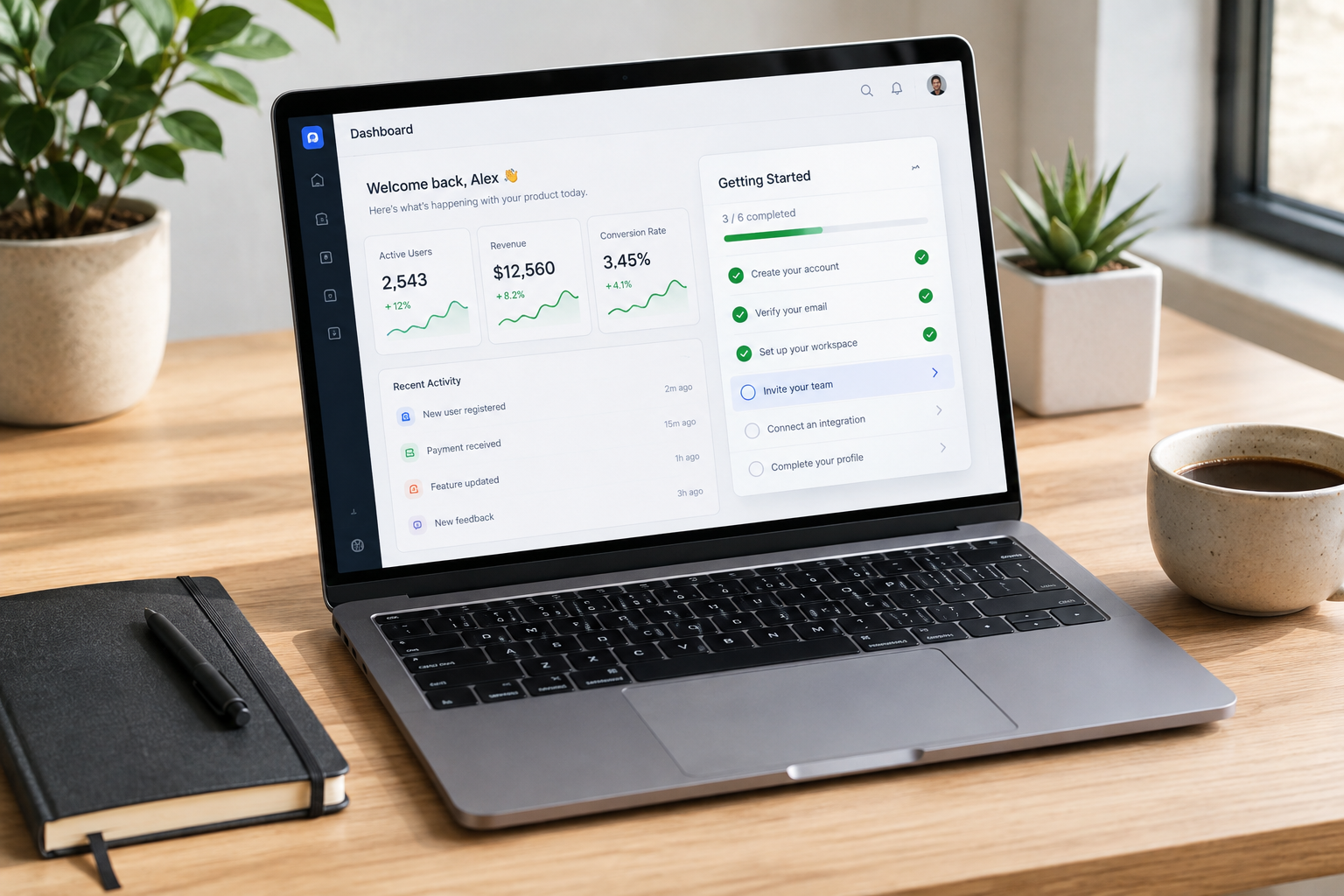
A SaaS customer onboarding checklist should help a new customer reach useful product value as quickly as possible. The strongest checklists do not try to teach every feature. They identify the few actions that matter most, guide users through those actions, and remove unnecessary work along the way.
That distinction matters because signing up is not the same as adopting a product. A customer can create an account, verify an email address, and even start a trial without ever reaching the point where your software becomes useful to them. Good onboarding closes that gap.
A practical SaaS customer onboarding checklist usually starts with one clear activation milestone, breaks the journey into a small number of actions, adapts those actions to the user's role or goal, and connects in-app guidance with timely email follow-up. It should also be measurable. If users consistently stop at the same step, the checklist gives your team a clear place to investigate.
This guide explains how to build that system from the ground up, with examples for self-serve SaaS and B2B products, common mistakes to avoid, useful onboarding metrics, and a framework you can adapt to your own product.
What Is a SaaS Customer Onboarding Checklist?
A SaaS customer onboarding checklist is a structured set of actions and milestones that guides a new user from their first interaction with a product toward a meaningful outcome. The checklist can appear inside the product, in an onboarding email sequence, in a customer success playbook, or across several of these channels.
The important part is not the format. It is the purpose.
A useful checklist answers a simple question: "What does this customer need to do next to get value from the product?"
That is different from a feature tour. A feature tour might introduce the dashboard, settings, navigation, integrations, reports, permissions, and other capabilities. A checklist should be much more selective. It should focus on the actions that move the customer toward successful product use.
For example, imagine a project management platform. A new user may eventually need to learn about custom fields, reporting, permissions, templates, automations, and integrations. Those features can wait. During the first session, the most useful path might be to create a project, add a few tasks, invite a teammate, and complete one task.
The checklist should reflect that sequence rather than the entire feature set.
Checklist vs. Onboarding Workflow
These terms are related, but they are not identical.
An onboarding workflow is the broader system that manages the customer's early experience. It can include signup questions, product configuration, in-app guidance, emails, customer success calls, training, documentation, support, and follow-up.
The checklist is one component of that system. It gives the customer a visible set of actions and gives your team a repeatable structure for moving users toward activation.
A good onboarding workflow can exist without a visible checklist, but a checklist is often useful because it makes the next action obvious.
Why Most SaaS Onboarding Checklists Fail
The problem with many onboarding checklists is not that they lack information. It is that they contain too much information at the wrong time.
A new customer does not need a complete education in your product before they can experience its value. They need enough context to take the next useful action.
Several problems show up repeatedly.
Too Many Tasks at Once
A checklist with twenty or thirty items may look comprehensive, but it can create more friction than it removes. Users have to decide where to start, which tasks matter most, and whether completing the entire list is worth their time.
A shorter list creates a clearer path. If a task is not important during the first stage of adoption, move it to a later phase or remove it from the initial checklist.
Confusing Setup With Value
Some setup tasks are necessary. Others are simply convenient for the company.
For example, asking a user to configure notification preferences before they have completed a core workflow may not help them understand the product. Collecting optional profile information before the first meaningful action can create the same problem.
Ask for information when it is necessary to complete the next useful step. Defer everything else when possible.
Treating Every User the Same
An administrator, manager, contributor, analyst, and invited viewer can have very different onboarding needs.
If an administrator needs to configure a workspace and invite a team, an end-user may only need to complete one task. Giving both users the same checklist creates unnecessary work for one of them.
Measuring Completion Instead of Activation
A user can complete every checklist item and still fail to adopt the product. This happens when the checklist measures activity rather than value.
Completion rate is useful, but it should not be the final success metric. The stronger question is whether checklist completion is associated with meaningful product use, such as completing a core workflow, returning to the product, inviting relevant teammates, or reaching a defined business outcome.
Using Static Guidance for Dynamic Problems
Users do not always progress in the same order. One person may connect an integration first. Another may invite a teammate before creating their first project.
A rigid checklist can feel broken when it assumes one perfect sequence. Where the product allows it, make tasks respond to completed actions rather than forcing users through an artificial order.
Step 1: Define Your Core Activation Milestone
Before writing checklist items, define what successful early adoption looks like.
This is your activation milestone. It should represent a meaningful product outcome, not merely an account setup event.
For a scheduling platform, activation might involve connecting a calendar and publishing a working booking page. For an email marketing platform, it could involve importing contacts and sending a test campaign. For a customer support platform, it might mean connecting a support inbox and responding to a real or test ticket.
The exact milestone depends on the product. There is no universal activation event for SaaS.
How to Find the Right Activation Event
Start with your existing customers rather than guessing.
Look at users who became retained customers and compare their early product behavior with users who stopped using the product. Search for actions that consistently appear before successful adoption.
Useful questions include:
- Which actions do retained customers complete during their first few sessions?
- Which features do successful customers use before they become regular users?
- How long does it typically take for a new customer to reach a meaningful outcome?
- Which actions are common among users who churn early?
- Does activation differ by customer segment, role, plan, or use case?
Do not assume that the most frequently used feature is automatically the activation event. A feature can be popular without being essential to long-term value.
Your activation milestone should have a clear relationship with the customer's reason for buying the product.
Step 2: Map the Critical Path to Value
Once the activation milestone is clear, work backward from it.
Ask what the customer must do before reaching that milestone. Then remove anything that is optional, administrative, or better handled later.
A practical SaaS customer onboarding checklist often fits into three broad phases: setup, activation, and expansion.
| Onboarding Phase | Primary Goal | Example Actions | Typical Timing |
|---|---|---|---|
| Setup | Remove essential access and configuration barriers | Verify account, connect required data, invite relevant teammate | First session or Day 1 |
| Activation | Complete the core product workflow | Create first project, publish first campaign, resolve first ticket | Day 1 to Day 7 |
| Expansion | Build repeat usage and deeper adoption | Add integrations, automate recurring work, invite more users | Day 7 to Day 30 |
These phases are not fixed rules. A simple consumer SaaS product may reach activation within minutes. A complex B2B platform may require several days or a guided implementation process.
The point is to match the onboarding structure to the product's actual time to value.

Example: Project Management SaaS
Suppose your product helps teams manage software projects.
A first-session checklist might include:
- Create the first project.
- Add three or more real tasks.
- Invite the people who will work on the project.
- Assign the first task.
- Move one task through the workflow.
Advanced reporting and integrations can come later. The customer first needs to experience the basic collaboration loop.
Example: CRM Software
For a CRM, the critical path might be different:
- Import or create the first contacts.
- Add a deal or opportunity.
- Assign an owner.
- Record an interaction.
- Move the opportunity to the next stage.
The checklist should help the customer see the CRM working with real business data. A tour of every settings page will not do that.
Step 3: Write Action-Oriented Checklist Items
Every checklist item should tell the user what to do. It should also make the reason for doing it reasonably clear.
Compare these examples:
- Weak: Learn how to manage workspace preferences.
- Strong: Create your first project workspace.
- Weak: Explore team collaboration features.
- Strong: Invite one teammate to your project.
- Weak: Understand reporting.
- Strong: Create your first weekly performance report.
The stronger versions describe observable actions. That makes them easier to complete and easier to measure.
Keep the First Checklist Short
For an initial in-app checklist, three to five meaningful tasks is a useful starting point. You can test different lengths, but avoid adding tasks simply because they are available.
A customer should be able to look at the checklist and understand the path within a few seconds.
If the product genuinely requires more work, group tasks into phases. Do not present every implementation requirement at once.
Show Progress Without Creating Pressure
Progress indicators can help users understand how far they have moved through onboarding. They work best when the underlying tasks are genuinely useful.
Do not design progress mechanics that encourage users to complete low-value actions simply to reach one hundred percent. The number should reflect meaningful progress toward product adoption.
Step 4: Combine In-App Guidance With Email
An effective onboarding strategy rarely relies on a single channel.
The in-app checklist should guide the customer while they are using the product. Email can bring them back when they leave, answer common questions, and provide context for the next step.
These channels should support each other rather than repeat the same message.
A Simple Welcome Email Sequence
A basic automated onboarding email sequence might look like this:
| Timing | Email Goal | Example Message |
|---|---|---|
| Immediately after signup | Confirm the next step | Start with the core setup required for activation |
| Day 1 | Encourage the first meaningful action | Complete the first workflow using real data |
| Day 3 | Address likely friction | Explain the step where new users commonly stall |
| Day 5 to 7 | Reinforce value | Show what the customer can accomplish after activation |
| Later stage | Encourage expansion | Introduce an integration or advanced workflow that fits their use case |
The exact timing should follow customer behavior. A user who has already completed the core workflow should not receive an email telling them to do it again.
Behavioral triggers are more useful than a rigid sequence when your product supports them.
Deep-Link Users to the Right Place
If an email asks a customer to complete a particular setup task, send them directly to the relevant product screen when possible.
Do not make the customer read an email, open the application, search through the navigation, and remember what they were supposed to do. Remove those unnecessary steps.
Step 5: Personalize the Checklist by User Persona
B2B SaaS products often have several stakeholders involved in adoption. The person who purchases the software may not be the person who uses it every day.
A short signup question can provide enough information to personalize the initial experience. Ask what the user is trying to accomplish or what role they have in the organization.
For example, a CRM could distinguish between a sales manager, sales representative, operations user, and administrator.
The manager might see tasks focused on pipeline setup, reporting, and team configuration. A sales representative might see tasks focused on contacts, opportunities, and follow-up activities. An administrator may need security settings, permissions, and integrations.
The goal is not to create dozens of onboarding paths. Start with the most important differences.
Personalize by Goal When Possible
Role is useful, but the customer's goal can be even more informative.
Two sales managers might use the same CRM for different reasons. One may want better pipeline visibility. Another may want to improve follow-up consistency.
A question such as "What do you want to accomplish first?" can help route users toward a more relevant starting point.
This approach also keeps the onboarding experience focused on outcomes rather than product terminology.
Step 6: Build a SaaS Customer Onboarding Checklist Template
A reusable template makes it easier to standardize onboarding across teams and customer segments.
Use this structure as a starting point:
| Checklist Area | Question to Answer | Example |
|---|---|---|
| Customer goal | What outcome does the customer want? | Generate qualified leads |
| Activation milestone | What proves early value? | Launch the first campaign |
| Required setup | What must happen first? | Connect a sending domain |
| Core action | What should the customer do? | Create and send a test campaign |
| Success signal | What shows progress? | Campaign reaches intended recipients |
| Follow-up | What happens if the user stalls? | Send contextual help email |
| Expansion | What should happen after activation? | Connect CRM integration |
This structure can also support a customer success onboarding playbook. Customer-facing teams can use the same milestones when managing accounts manually, while product teams use them to build in-app experiences.
Separate Required and Recommended Tasks
Not every task deserves equal weight.
Mark required actions clearly through language and sequencing rather than filling the interface with warnings. Recommended tasks can appear after the core workflow is complete.
For example, connecting a billing system may be required for an administrator but irrelevant to an invited contributor. The checklist should reflect that difference.
Step 7: Account for Product-Led and Sales-Led Onboarding
The right onboarding model depends partly on how customers enter your product.
A self-serve trial usually needs fast, low-friction product-led onboarding. The user may be evaluating several products at once, so the first session needs to demonstrate value quickly.
A high-touch B2B implementation may involve discovery calls, data migration, configuration, training, security reviews, and stakeholder alignment. In that case, the customer-facing checklist can extend beyond the application itself.
Product-Led Growth Onboarding
For product-led growth, prioritize actions that let the user experience value without waiting for a sales or customer success representative.
That can include:
- Guided setup.
- Sample data where appropriate.
- Contextual help.
- A small number of activation tasks.
- Automated reminders based on behavior.
- Clear upgrade or collaboration paths when relevant.
The product should answer the customer's immediate questions before asking them to schedule a call.
B2B Customer Onboarding Strategy
For larger customers, the onboarding checklist should include ownership and dependencies.
A useful implementation plan may specify the customer owner, internal owner, required data, technical dependencies, target milestone dates, training requirements, and acceptance criteria.
That does not mean every customer needs a complex project plan. Use the lightest process that can reliably move the account toward successful adoption.
Step 8: Design for the First-Time User Experience
Your onboarding checklist cannot compensate for a confusing product interface.
Before adding another tooltip or email, examine the actual workflow. If users repeatedly struggle to find the button needed to complete a task, the product experience may need improvement rather than another explanation.
Review the first-time user experience from the customer's perspective.
Ask:
- Is it obvious what the product does after signup?
- Is the first useful action easy to find?
- Does the interface explain unfamiliar terms when they appear?
- Can the customer use realistic data quickly?
- Are required fields truly necessary at that point?
- Can users recover easily if they make a mistake?
- Does the product show what happens after each completed action?
Good onboarding is partly a product design problem. A checklist is most effective when the underlying workflow is already understandable.
Step 9: Use Product Tours Carefully

Product tours can be useful, but they are often overused.
A tour that points out every navigation item may give users a sense of progress without helping them accomplish anything. Users can also forget instructions they receive before they have a reason to use the feature.
Use tours when a short explanation removes genuine confusion. Use checklists when the customer needs to complete a sequence of meaningful actions.
For example, a brief explanation of how a reporting filter works may be useful when the user first opens the report. A five-screen tour of every reporting feature is probably unnecessary during the first session.
Context matters more than coverage.
Step 10: Measure the Right Onboarding Metrics
Building the checklist is only the beginning. You need analytics to understand whether it actually improves adoption.
Track metrics at both the checklist level and the customer outcome level.
Checklist Start Rate
Measure the percentage of eligible users who interact with the checklist. A low start rate may indicate that users do not notice it, do not understand its purpose, or do not need it.
Do not automatically solve a low start rate by making the checklist more prominent. First determine whether the checklist is relevant to the users who are seeing it.
Step Completion Rate
Track completion for each individual step.
If most users complete the first two tasks but few finish the third, investigate the third task. It may require information the user does not have, contain confusing instructions, expose a product usability issue, or ask for too much effort too early.
Step-level data is often more useful than a single overall completion percentage.
Time to Activation
Measure how long it takes eligible users to reach the activation milestone.
The goal is not necessarily to make every customer activate immediately. Some products have legitimate implementation requirements. Instead, look for avoidable delays and compare time to activation across segments and onboarding paths.
Activation Rate
Track the percentage of new users who reach the defined activation milestone within a relevant period.
This is one of the most important metrics because it connects onboarding activity with product value.
Retention After Activation
Compare retention for users who reach activation with those who do not. Also examine whether faster activation is associated with stronger retention.
Correlation does not prove that the checklist caused better retention. Activated users may already have stronger intent. Use experiments when you need to establish whether a specific onboarding change causes an improvement.
Product Adoption
For mature onboarding programs, track whether users continue using the core workflow after the initial activation event.
A customer who sends one test campaign is not necessarily an adopted customer. Look for repeated use of the behavior that represents ongoing value.
Common Mistakes to Avoid
Mistake 1: Making Setup the Whole Experience
Account configuration matters, but setup alone does not prove value. Move customers toward the core workflow as soon as practical.
Mistake 2: Adding Every Feature to the Checklist
Your onboarding checklist is not a product catalog. Advanced features can be introduced after the customer understands the basic workflow.
Mistake 3: Using Internal Language
Customers may not understand terms that are obvious to your product team. Replace internal labels with language that describes the customer's action or outcome.
Mistake 4: Sending the Same Email to Everyone
A user who has already activated should not receive the same reminder as someone who has not started setup. Use behavioral triggers where possible.
Mistake 5: Hiding Important Help Behind Documentation
Documentation is valuable, but do not send users away from the product for every small question. Provide contextual explanations where they are needed.
Mistake 6: Treating Checklist Completion as the Goal
The goal is successful product use. Completion is only a proxy.
Mistake 7: Never Revisiting the Checklist
Products change, customer expectations change, and onboarding data reveals new friction. Review the checklist regularly and remove steps that no longer contribute to activation.
How to Improve a SaaS Onboarding Checklist Over Time
Treat onboarding as an optimization process rather than a one-time project.
Start by identifying the largest point of friction. Do not change ten things at once if you cannot tell which change helped.
For a difficult setup step, test a simpler version. For a confusing instruction, rewrite the copy. For a task that requires too much effort, look for a product change that removes the requirement. For users who leave before activation, test a more relevant email or a better in-app reminder.
Run Focused Experiments
A useful onboarding experiment has a clear hypothesis.
For example: "If we move workspace configuration after the first core workflow, more new users will reach activation during their first session."
Then define the primary metric before running the test. Depending on the change, that could be activation rate, time to activation, task completion, or trial conversion.
Avoid declaring success because more people completed the checklist. If activation stayed flat, the change may not have improved the customer's actual experience.
Interview Users Who Stalled
Analytics can tell you where users stopped. Interviews can help explain why.
Speak with people who abandoned onboarding, especially those who appeared interested but did not reach activation. Ask what they expected to happen, what confused them, what they were trying to accomplish, and what prevented them from continuing.
Their answers often reveal friction that product analytics cannot show on its own.
A Practical SaaS Customer Onboarding Checklist
Use the following as a starting framework and adapt it to your product's activation event.
Before Signup
- Define the primary customer goal.
- Identify the activation milestone.
- Map the minimum steps required to reach it.
- Identify the most important user segments.
- Decide which information is essential during signup and which can wait.
First Session
- Confirm the customer's goal when appropriate.
- Complete only the setup required for the first meaningful workflow.
- Guide the user toward the core action.
- Provide contextual help at points of likely confusion.
- Make the next step obvious after the first successful action.
First Week
- Monitor whether the user reaches activation.
- Send behavioral follow-up when the user stalls.
- Introduce one relevant feature that supports the core workflow.
- Provide help for common implementation questions.
- Identify accounts that need human assistance.
First Thirty Days
- Encourage repeat use of the core workflow.
- Introduce relevant integrations or advanced features.
- Review adoption signals.
- Address unresolved setup issues.
- Confirm whether the customer is achieving the outcome that motivated the purchase.
This structure is flexible. A simple SaaS product may compress the entire process into a few sessions, while an enterprise implementation may extend across several weeks or months.
When to Use a Customer Success Onboarding Playbook
A customer success onboarding playbook becomes more useful as account complexity increases.
For low-touch customers, much of onboarding can happen automatically through the product and email. For high-value or technically complex accounts, customer success teams may need to coordinate implementation, training, stakeholder communication, and adoption reviews.
A playbook should define what happens at each important milestone, who owns the next action, what evidence indicates progress, and what to do when an account stalls.
The same activation framework should still apply. Human involvement should reduce friction rather than add meetings for their own sake.
How Onboarding Affects Trial Conversion
Improving SaaS trial conversion is not simply about sending more reminders before a trial ends.
Users are more likely to consider paying when they have experienced meaningful value and understand how the product fits their workflow. That makes activation a central part of the trial experience.
Instead of asking, "How can we get more trial users to click the upgrade button?" ask, "How can we help more qualified trial users reach the point where the product solves the problem they came to solve?"
That shift changes the onboarding strategy. You focus on product value first and conversion second.
What a Strong Onboarding Checklist Looks Like
A strong checklist is short enough to understand, specific enough to act on, and flexible enough to account for different customer needs.
It does not attempt to explain every feature. It does not force users through irrelevant configuration. It does not measure success only by the number of completed boxes.
Instead, it connects each action to a meaningful customer outcome.
The best checklist for your SaaS product may be very different from the best checklist for another company. That is why copying another company's onboarding flow rarely works without modification.
Start with your own activation data, customer interviews, and product workflow. Then build the smallest onboarding path that reliably helps the right users reach value.
Final Takeaways
A SaaS customer onboarding checklist works best when it is built around customer outcomes rather than internal processes.
Start by defining the activation milestone. Map the shortest realistic path to that milestone. Keep the first checklist focused, use action-oriented language, and personalize it where customer roles or goals differ.
Connect in-app guidance with relevant email follow-up, but do not overwhelm customers with messages. Track step completion, time to activation, activation rate, retention, and ongoing product adoption. When users stall, investigate the underlying reason instead of simply adding more instructions.
Most importantly, treat onboarding as part of the product experience. A checklist can guide customers, but the product itself should make successful use feel straightforward.
When you need deeper guidance on SaaS tools, customer success workflows, onboarding software, and product-led growth systems, explore the hands-on software reviews and guides at Saasbonus. The goal is simple: help you choose and use the right tools with less guesswork.




