
How to Automate Enterprise SaaS Billing with Metronome
Why Enterprise SaaS Billing Breaks at Scale
Most{ "seo_title": "Automate Enterprise SaaS Billing with Metronome Guide", "meta_title": "Automate Enterprise SaaS Billing with Metronome", "meta_description": "Learn how to automate enterprise SaaS billing with Metronome. Ingest usage data, build custom rate cards, and streamline Stripe invoices effortlessly.", "tagline": "Architecting scalable, real-time usage-based infrastructure for modern enterprise software.", "slug": "automate-enterprise-saas-billing-metronome", "keywords": [ "automate enterprise saas billing metronome", "metronome usage based billing", "enterprise saas billing architecture", "metronome stripe integration", "real time usage metering saas", "metronome billing tutorial", "usage based pricing engine", "metronome rate cards enterprise", "saas revenue recognition automation", "metronome API billing", "enterprise billing platform comparison", "how to set up metronome billing", "saas custom enterprise contracts billing", "usage events ingestion pipeline", "metronome vs orb billing", "metronome vs togai", "metronome invoice generation", "hybrid billing models enterprise saas", "metronome billing setup guide", "scalable saas metering architecture" ], "blog": "## Why Enterprise SaaS Billing Breaks at Scale
Enterprise software companies rarely start with a billing platform failure—they start with a growing pile of technical billing debt. When managing your first ten customer accounts, manual invoice creation and basic payment processor scripts feel like reasonable temporary compromises. Engineering teams write a few batch jobs to aggregate log files, calculate overages by hand, and trigger manual monthly invoices.
However, moving upmarket to secure enterprise clients transforms your underlying financial mechanics. Large buyers do not accept static, per-seat monthly subscriptions billed to a corporate credit card. Instead, enterprise sales deals require custom hybrid structures: annual minimum spend commitments, prepaid balance drawdowns, tiered usage thresholds, multi-tenant caps, regional price adjustments, and strict overage penalties.
Hardcoding this financial ruleset directly into legacy subscription tools like Stripe Billing or Chargebee introduces severe development bottlenecks. Traditional billing platforms expect static catalog items and basic event counters rather than high-throughput stream processing. As a result, software teams spend up to a third of every sprint updating billing logic, troubleshooting usage discrepancies, and auditing custom enterprise invoices.
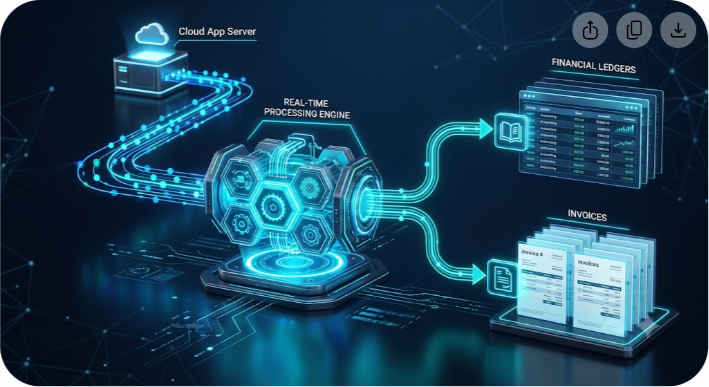
Metronome solves this structural challenge by acting as a dedicated billing engine for usage-based, hybrid, and custom enterprise SaaS contracts. Placed between your application telemetry pipelines and your accounting ledgers, Metronome decouples usage metering from payment collection. This architecture lets engineering and finance teams launch, modify, and automate complex enterprise agreements without rewriting core application code.
Decoupling Ingestion, Rating, and Invoicing
To build a resilient billing pipeline, software architects must split billing operations into three distinct architectural layers: ingestion, rating, and invoicing.
In legacy billing systems, these three responsibilities are tightly coupled inside a single database. When an end user performs an action, the application increments a static counter or triggers an immediate charge. In an enterprise usage-based environment, this monolithic architecture fails to scale across three operational areas:
- Ingestion (The Metering Layer): Modern applications emit millions or billions of telemetry logs hourly, tracking API requests, compute duration, storage volume, or active user tokens. The ingestion pipeline must accept raw events at high volume with zero application latency, guaranteeing idempotent event delivery.
- Rating (The Rules Engine): Rating converts raw usage events into precise monetary debts. The engine answers a continuous question: What does this specific event cost for this specific customer on this date under their active contract terms? Rating logic must evaluate volume discounts, custom price tiers, prepaid commitment balances, and promotional credits in real time.
- Invoicing (The Ledger Layer): Invoicing aggregates rated usage, computes local taxes, adds recurring base fees, applies payment terms (such as Net 30), and transmits calculated totals to payment gateways or ERP systems like Stripe, NetSuite, or QuickBooks.
Metronome functions as the central Rating and Contract Engine. Raw telemetry events stream directly into Metronome through high-throughput webhooks or message queues. Metronome deduplicates events, applies customer-specific contract terms, and maintains real-time customer balances. At the end of each billing cycle, Metronome transmits finalized line items directly to Stripe or NetSuite for payment collection.
| Pipeline Stage | Responsible System | Core Operational Task |
|---|---|---|
| Usage Ingestion | Application Telemetry & Kafka | Captures raw user events continuously with idempotent IDs. |
| Rating & Contracts | Metronome Engine | Evaluates usage against contract rules, tiers, and drawdowns. |
| Invoice Ledger | Stripe / NetSuite | Renders PDF invoices, collects payments, and updates general ledgers. |
By separating event collection from financial rating logic, modifying a pricing tier or offering custom enterprise discounts never requires database schema migrations or core application redeployments.
The Anatomy of an Enterprise Metronome Setup
Configuring Metronome for automated enterprise billing relies on four foundational primitives: Events, Billable Metrics, Products & Rate Cards, and Contracts.
| Metronome Primitive | Function & Purpose | Enterprise Example |
|---|---|---|
| Events | Raw, immutable JSON payloads capturing user actions in real time. | Payload logging event_type: compute_run, duration_ms: 45000, user_id: usr_123. |
| Billable Metrics | Aggregation logic applied to raw events to compute quantifiable usage. | SUM(duration_ms) / 3600 filtered by event_type == compute_run. |
| Products & Rate Cards | Product catalog defining standard items and default pricing schedules. | $0.15 per Compute Hour; $0.05 per API call after 100,000 requests. |
| Contracts | Customer-specific rate overrides, minimum commitments, drawdowns, and terms. | $100,000 annual commitment; 20% compute discount; Net 30 invoicing. |
Understanding how these primitives connect enables you to design an automated end-to-end billing workflow.
Step 1: Ingesting Usage Events via the Metronome API
Automating your billing infrastructure begins at the telemetry layer by sending usage events to Metronome's /ingest API endpoint. Metronome accepts JSON payloads over HTTP POST. Every event payload submitted to Metronome must contain four core attributes:
- transaction_id: A unique string generated by your application for exact event deduplication.
- customer_id: Your internal customer identifier mapped inside Metronome.
- event_type: The unique name of the user action or event being logged.
- timestamp: An ISO 8601 formatted timestamp recording when the action occurred.
json { "transaction_id": "evt_9876543210_prod_abc123", "customer_id": "cust_enterprise_acme_corp", "event_type": "cloud_compute_job_completed", "timestamp": "2026-08-05T14:30:00Z", "properties": { "cpu_cores": 16, "memory_gb": 64, "duration_seconds": 3600, "region": "us-east-1", "cluster_id": "cluster_prod_01" } }
Best Practices for High-Volume Ingestion
- Generate Deterministic Transaction IDs: Distributed systems occasionally experience network retries. Metronome discards incoming events with duplicate transaction_id values within a 31-day rolling window. Format these identifiers consistently by combining internal database record UUIDs with event names.
- Buffer Telemetry via Message Queues: Avoid firing synchronous HTTP requests to Metronome's API within critical application execution paths. Publish event payloads asynchronously to message queues such as Apache Kafka, AWS SQS, or Redis, then stream them to Metronome in batches using worker services.
- Preserve Metadata inside Properties: Record descriptive properties even if you do not bill for them today. Storing attributes like region, cluster_id, or environment allows finance teams to introduce new billable parameters in future enterprise deals without altering your historical event schemas.

Step 2: Defining Aggregations with Billable Metrics
After ingesting raw events into Metronome, you transform them into Billable Metrics. A Billable Metric defines how Metronome extracts and aggregates numerical properties from raw event records.
Metronome supports several core aggregation functions:
- SUM: Combines numeric property values across a billing period (for example, total gigabytes consumed).
- COUNT: Calculates total occurrences of specific events (for example, total API requests processed).
- MAX: Identifies peak values reached during a billing window (for example, peak concurrent seats or maximum cluster nodes).
- UNIQUE COUNT: Tracks distinct values over time (for example, unique monthly active users).
To calculate billable Compute Hours from the JSON payload above, Metronome extracts duration_seconds and divides it by 3,600 to produce fractional hours:
- Metric Name: Compute Hours Used
- Event Selection: cloud_compute_job_completed
- Aggregation Function: SUM(properties.duration_seconds)
- Conversion Formula: / 3600
- Group By Dimensions: properties.region (enables regional pricing adjustments)
Because Metronome processes aggregation rules continuously, customers can review their accrued usage immediately within product dashboards rather than waiting for nightly batch jobs.
Step 3: Setting Up Rate Cards and Enterprise Contracts
Once raw metrics are defined, you establish your pricing rules. Metronome separates standard public product pricing from custom enterprise contracts using Rate Cards and Contracts.
Standard Rate Cards vs. Custom Enterprise Contracts
A Rate Card serves as your core product catalog, establishing default pricing schedules for public tiers (such as $0.10 per Compute Hour or $0.05 per API request). An Enterprise Contract overlays custom negotiated terms directly onto the Rate Card for a specific customer account.
Metronome handles four common enterprise contract structures directly:
- Commitments (Prepaid and Postpaid): Enterprise accounts often purchase upfront annual commitments (such as a $120,000 annual commit). As the customer consumes resources monthly, Metronome draws down from this prepaid balance in real time. If usage exceeds $120,000, Metronome applies pre-configured overage rates automatically.
- Tiered Volume Discounts: You can configure volume or block pricing models across custom usage bands:
- 0 to 10,000 hours: $0.10 / hour
- 10,001 to 50,000 hours: $0.08 / hour
- 50,001+ hours: $0.05 / hour
- Custom Price Overrides: If a customer negotiates a custom $0.04 flat rate for storage based on high volume, you avoid creating one-off SKU items in your accounting software. Instead, you define a targeted rate override directly within that customer's Metronome Contract.
- Scheduled Plan Changes: Enterprise contracts often include pre-planned rate updates (for example, Year 1 billed at $0.10/hr with a $50,000 commitment; Year 2 billed at $0.08/hr with a $100,000 commitment). Metronome allows teams to schedule contract modifications on target dates, eliminating manual renewal management.
Step 4: Integrating Metronome with Stripe and Enterprise ERPs
Metronome manages event rating and customer balance tracking while delegating payment processing, tax calculation, and general ledger posts to payment gateways and ERP platforms. Stripe handles card/ACH processing, while NetSuite or QuickBooks manages corporate accounting.
+-----------------------------------------------------------------------+
| METRONOME |
| |
| +------------------+ +-------------------+ +------------------+ |
| | Raw Event Stream |-->| Real-Time Rating |-->| Contract Engine | |
| +------------------+ +-------------------+ +------------------+ | +-----------------------------------|-----------------------------------+ | (End of Billing Cycle) | +-----------------------+-----------------------+
| | v v +-----------------------+ +-----------------------+
| STRIPE INVOICING | | NETSUITE / ERP |
| - Auto-Charge ACH/CC | | - Revenue Recognition|
| - PDF Generation | | - General Ledger |
| - Stripe Tax Sync | | - AR Reconciliation | +-----------------------+ +-----------------------+
Syncing Metronome with Stripe
Metronome maintains a native integration with Stripe to automate monthly payment collection:
- Customer Mapping: When onboarding an enterprise account, map the metronome_customer_id to the matching stripe_customer_id (cus_xxxxxxxx).
- Cycle Closure: At the end of a billing period (such as midnight on the last day of the month), Metronome aggregates rated usage, applies commitments, calculates overages, and finalizes the period balance.
- Line Item Delivery: Metronome uses the Stripe API to attach itemized line items directly to the customer's open draft invoice in Stripe.
- Payment Processing: Stripe calculates local sales tax (via Stripe Tax), renders the final invoice PDF, and automatically charges the payment method on file or sends a Net 30 payment link.
- Settlement Sync: Upon receiving a payment_intent.succeeded webhook from Stripe, Metronome updates the billing period status to fully settled.
Application Event Automation via Webhooks
Beyond billing ledgers, your main software application must respond dynamically to account balance updates. Metronome emits webhooks to notify your systems of key contract events:

- commitment.balance_low: Fires when a customer consumes 80% or 90% of their prepaid balance. Use this event to trigger automated account manager alerts or display in-app usage notices.
- invoice.finalized: Fires when a period invoice closes. Use this payload to sync billing data into analytics warehouses like Snowflake, ClickHouse, or BigQuery.
- credit.expired: Fires when promotional enterprise credits expire.
javascript app.post('/webhooks/metronome', async (req, res) => { const { type, data } = req.body;
if (type === 'commitment.balance_low') { const customerId = data.customer_id; const percentRemaining = data.percent_remaining;
console.log(`Alert: Customer ${customerId} has ${percentRemaining}% of commitment balance remaining.`);
// Send automated notification to Sales or Customer Success teams await notifyAccountTeam(customerId, percentRemaining); }
res.status(200).send({ received: true }); });
Advanced Metronome Automation Patterns
With event ingestion and Stripe line-item syncing operational, you can deploy advanced Metronome features to address complex operational edge cases.
1. Embedded Customer Usage Dashboards
Usage-based pricing models can create budget uncertainty for enterprise clients without clear visibility into ongoing spend. Metronome offers Customer Portal APIs that allow engineering teams to embed real-time spend visualizers directly into SaaS applications.
Instead of querying production databases to calculate monthly totals, your user interface requests data directly from Metronome's /customers/{id}/current-usage endpoint. This returns an itemized breakdown of current period spend, remaining prepaid commitments, and projected end-of-month costs. Providing this visibility reduces end-of-month billing disputes.
2. Historical Backfills and Data Corrections
System issues happen. A software deployment bug might accidentally omit telemetry events for three days or report inflated compute times due to unhandled retry loops.
In standard billing setups, correcting historical raw data risks corrupting ledger history. Metronome resolves this through built-in adjustment workflows:
- Retroactive Event Ingestion: You can submit missing historical events with original timestamps up to 30 days in the past. Metronome recalculates rated balances for affected billing periods without creating duplicate charges.
- Transaction Range Voiding: If an application bug generates inaccurate events, you can issue a void command targeting specific transaction_id sets or timestamp windows. Metronome automatically reverses the associated rated usage.
3. Multi-Tenant and Regional Account Hierarchies
Global enterprise customers frequently require parent-child billing setups. A multinational corporation might demand separate usage tracking for its US, European, and Asian divisions while requiring a single consolidated monthly master invoice for headquarters.
Metronome natively supports Customer Hierarchies. You create child customer accounts for each regional division to track usage independently while mapping them to a master parent account for commitment drawdowns and unified invoicing.
Platform Comparison: Metronome vs. Orb vs. Custom Stripe Building
When evaluating usage-based billing infrastructure, software engineering teams typically weigh three implementation approaches: building custom metering scripts on top of raw Stripe APIs, implementing Metronome, or deploying Orb.
| Architectural Feature | Custom Stripe Integration | Orb | Metronome |
|---|---|---|---|
| Primary System Focus | Standard subscription engine with basic counters. | Usage-based billing optimized for developer workflows. | Infrastructure-focused billing engine built for enterprise scale. |
| High-Volume Telemetry | Limited. API rate limits require pre-aggregating usage internally. | Strong. Native stream processing and real-time aggregations. | Excellent. Engine designed for high event throughput with strict SLAs. |
| Complex Enterprise Contracts | Requires hardcoded logic inside core application code. | Moderate. Supports common commitments and usage tiers. | Advanced. Comprehensive support for enterprise drawdowns and custom clauses. |
| Ongoing Maintenance Overhead | High. Requires continuous maintenance by internal engineers. | Low maintenance following initial schema configuration. | Low maintenance after establishing ingestion pipelines. |
| Auditability | Low. Difficult to trace finalized invoices back to raw events. | High. Clear event-to-invoice data lineage tracking. | Exceptional. Cryptographic audit trails for event rating and usage. |
Building custom billing tools on top of standard payment APIs often appears cost-effective initially. However, considering the engineering expense of maintaining rate calculators, supporting historical adjustments, and managing enterprise contracts, dedicated billing engines like Metronome offer significantly better long-term efficiency.
Pitfalls to Avoid When Automating Enterprise Billing
While Metronome automates rating mathematics and contract logic, common design mistakes can still introduce integration friction. Avoid these key implementation errors:
1. Binding Event Property Names to UI Text Labels
Avoid using human-readable display strings within event payload properties. For example, use standardized snake_case identifiers like storage_bytes_used instead of "Storage Space Used". Let Metronome convert raw keys into client-facing display labels on invoices and customer portals.
2. Ignoring Latency and Out-of-Order Telemetry
In distributed architectures, an event generated at 11:59 PM on the final day of the month might arrive at Metronome's API at 12:02 AM due to network queue delays. Ensure your ingestion pipelines rely on the event payload's internal timestamp rather than the API arrival time. Configure Metronome's Grace Period settings (typically 24 to 72 hours) to allow late-arriving events to be rated in the correct billing cycle before finalizing invoices.
3. Neglecting Revenue Recognition Requirements
Finance teams must adhere to accounting standards such as ASC 606 and IFRS 15 regarding revenue recognition timing versus cash collection. Upfront annual commitments cannot be recognized as immediate earned revenue upon invoice collection; they must be recognized proportionally over time as the platform is consumed.
Ensure engineering teams coordinate with accounting early during implementation to confirm that Metronome event timestamps and commitment drawdown reports map accurately into your ERP system's revenue recognition modules.
Getting Started with Metronome Automation
Automating enterprise SaaS billing is an essential architectural decision that affects how quickly your company can launch products, test new pricing strategies, and close enterprise deals.
Deploying Metronome as your dedicated metering, rating, and contract engine decouples core application microservices from billing logic. Engineering teams remain focused on delivering core features, while finance and sales teams gain the flexibility to structure complex enterprise contracts without requiring ongoing developer support.
To automate your billing infrastructure:
- Review your application telemetry logs to identify clean, distinct event triggers for core value metrics.
- Configure standard Metronome Billable Metrics to aggregate incoming event streams accurately.
- Integrate the Metronome API into your event pipelines using asynchronous processing queues.
- Connect Metronome to Stripe or your ERP platform to automate end-of-period invoicing.
If you are evaluating enterprise software platforms or analyzing usage-based billing tools, explore our technical reviews and architecture guides at Saasbonus to choose the right technology for your stack.




