
SaaS Billing Errors: Reduce Them With Reconciliation
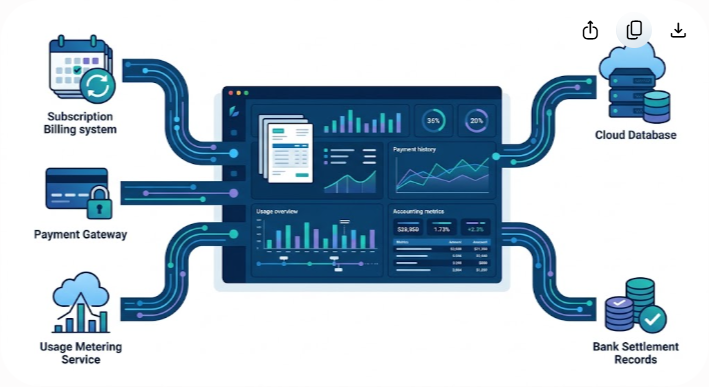
SaaS billing errors are usually a systems problem, not an accounting problem. When product usage, subscription data, invoices, payments, settlements, and accounting records live in different systems, even a small mismatch can turn into an undercharge, overcharge, failed collection, or difficult month-end adjustment.
The practical answer is automated reconciliation. Instead of asking finance teams to compare exports after the fact, a reconciliation workflow continuously compares records across the billing stack, identifies exceptions, and gives the right team enough context to fix them.
That doesn't mean every SaaS company needs a large financial automation platform on day one. A simple subscription business may be able to reconcile effectively with the reporting and controls already available in its billing and accounting systems. The need for dedicated automation grows as transaction volume, usage-based pricing, currencies, payment methods, and system complexity increase.
This guide explains where SaaS billing errors come from, how reconciliation works, how to audit your current process, what to automate first, and what to look for when evaluating reconciliation software.
The Real Cost of SaaS Billing Errors
A billing discrepancy can look insignificant when viewed as a single invoice. The bigger issue is repetition. If the same pricing, usage, integration, or settlement problem affects hundreds of accounts every month, the financial impact can become material.
The cost also isn't limited to the invoice amount. A disputed charge can trigger support work, account-management involvement, credits, refunds, collection delays, manual accounting entries, and extra review during the financial close.
Revenue Leakage
Revenue leakage occurs when a company delivers a product or service but doesn't successfully bill or collect the amount it is entitled to under the customer agreement.
In SaaS, common causes include missed usage events, incorrect seat counts, failed plan-change synchronization, expired discounts that remain active, invoices that aren't collected, and differences between billing and payment records.
Consider a simple example. A customer starts the month with 50 seats and adds 20 more halfway through the billing period. If the product correctly records 70 active seats but the billing system continues charging for 50, the business has delivered additional service without invoicing for it. The individual discrepancy may be small. Repeated across many customers, it becomes a revenue-leakage problem worth investigating.
Customer Trust and Churn Risk
Customers expect invoices to match their contracts and actual usage. A billing error doesn't automatically cause churn, but repeated mistakes create unnecessary friction and can weaken confidence in the vendor.
Overbilling is particularly sensitive because the customer has to spend time proving that the invoice is wrong. Underbilling creates a different problem: the company may discover the discrepancy later and have to decide whether to issue a catch-up invoice, absorb the difference, or renegotiate the adjustment.
Good reconciliation reduces both situations by catching discrepancies before they become customer-facing problems.
Operational Overhead
Billing issues rarely stay inside the finance department. A typical exception may involve several teams:
- The customer reports an incorrect invoice or payment issue.
- Customer support or an account manager collects the relevant account details.
- Finance checks the invoice, subscription record, payment processor, and application data.
- An analyst determines whether the issue came from pricing, usage, tax, payment processing, or synchronization.
- Finance or billing issues a correction, refund, credit, or collection action.
- Accounting records any required adjustment.
- Someone documents the root cause and decides whether another customer could have the same problem.
The real efficiency gain from reconciliation isn't simply replacing spreadsheet work. It's reducing the number of exceptions that reach humans without enough context to resolve them quickly.
Audit and Close Pressure
Billing and revenue records often feed financial reporting, so inconsistencies can surface during the monthly or quarterly close. Under ASC 606 and IFRS 15, revenue recognition depends on the applicable contracts, performance obligations, transaction price, and timing of transfer of control or service delivery. Billing data is important, but an invoice isn't automatically the same thing as recognized revenue.
A reliable reconciliation process helps finance teams establish a clear relationship between source transactions, billing records, payments, settlements, and accounting entries. That makes investigation easier when balances don't agree.
Why Manual SaaS Reconciliation Breaks Down
Spreadsheets aren't inherently bad. For a small SaaS business with a limited number of plans and a low transaction volume, a carefully controlled spreadsheet can be perfectly reasonable.
The problem starts when the business outgrows the assumptions behind the spreadsheet.
A finance analyst may begin with a monthly export from Stripe, another from the subscription platform, and another from the accounting system. The files are then joined using formulas, manually reviewed, and adjusted when the totals don't match.
That process becomes difficult to control when the company introduces usage-based pricing, multiple payment methods, international currencies, complex discounts, mid-cycle changes, multiple legal entities, or a growing number of integrations.
1. Pricing Becomes More Complex
SaaS pricing is often no longer a simple monthly fee. A single contract can contain a base platform charge, seats, usage, overages, implementation fees, add-ons, credits, promotional pricing, and contractual minimums.
Each pricing dimension introduces another place where data can disagree.
2. Transaction Volume Increases
A growing SaaS company may process thousands or millions of individual usage events, payment attempts, refunds, credits, and subscription changes. Humans can review exceptions, but they shouldn't have to inspect every successful transaction manually.
Automation is most valuable when it moves the team from checking everything to investigating what doesn't match.
3. Data Lives Across Multiple Systems
A typical SaaS revenue stack can include an application database, CRM, subscription platform, payment processor, tax service, usage-metering system, bank account, and general ledger.
Each system has its own identifiers, timestamps, status values, and data model. A customer may be active in the application while the billing platform shows a past-due invoice. A payment processor may show a successful payment while the bank settlement arrives later and includes processing fees.
Those records aren't necessarily wrong. They are describing different stages of the same financial event.
4. Time Zones and Currencies Complicate Matching
International SaaS businesses need to account for differences in transaction timestamps, settlement dates, currencies, exchange rates, and reporting periods.
A payment can occur on one date, settle on another, and appear in a bank statement using a different reference or currency conversion. A reconciliation process must understand those differences rather than treating every mismatch as an error.
5. Manual Adjustments Become Hard to Track
Billing teams often make legitimate manual changes. The problem is control. If an invoice is manually credited, discounted, or edited without a clear reason and approval trail, the next person reviewing the account may struggle to understand why the balance changed.
Automation should make these adjustments more visible, not simply automate them without controls.
Common Types of SaaS Billing Errors
Before choosing a reconciliation tool, identify the types of discrepancies that actually occur in your business. The right controls depend on your pricing model and revenue workflow.
1. Proration and Mid-Cycle Change Errors
Proration becomes necessary when a customer changes plans, seats, or add-ons during an active billing period. The billing system has to apply the correct pricing for the time each service level was active.
For example, a customer might move from a $100 monthly plan to a $500 monthly plan halfway through the billing cycle. Depending on the billing system and contract terms, the invoice may include a credit for unused time on the old plan and a charge for the remaining time on the new plan.
Problems arise when the application and billing platform use different effective dates, quantities, rounding rules, or plan definitions.
What to reconcile: subscription change events, effective timestamps, quantities, plan prices, credits, and invoice line items.
2. Uncaptured Usage
Usage-based billing depends on accurate event collection. If product telemetry records API calls, storage consumption, messages, seats, or another billable metric, those events must reach the metering and billing systems reliably.

An event can be lost, duplicated, delayed, or associated with the wrong account. Any of these conditions can produce an incorrect invoice.
What to reconcile: source usage events, accepted metering events, billable quantities, invoice quantities, and contract limits.
3. Payment and Settlement Mismatches
An invoice can be correct even when the amount deposited into the bank is different. Payment processor fees, refunds, disputes, foreign-exchange effects, and settlement timing can all create differences between the invoice amount and the bank deposit.
The goal of reconciliation is to explain those differences rather than automatically treating them as billing errors.
What to reconcile: invoice amount, payment transaction, processor fees, refunds, disputes, settlement batch, and bank deposit.
4. Failed or Delayed Collections
A failed payment can leave the billing system, customer account, and accounting records temporarily out of sync. A dunning workflow may retry the payment while the customer remains active, pauses service, or enters a past-due state according to the company's policies.
A good control checks that the customer's billing status reflects the actual payment state and that collection activity follows the contract and business rules.
What to reconcile: invoice status, payment attempt status, retry status, customer subscription status, and accounts-receivable balance.
5. Discount and Credit Errors
Promotional pricing can create problems when discounts have unclear start and end dates or when a credit is applied more than once.
A discount that was intended for the first three months of a contract should not quietly continue into later renewals. Likewise, a manual credit should have a documented reason and approval path.
What to reconcile: contract discount terms, billing rules, invoice adjustments, credit notes, and approval records.
6. Tax Calculation Differences
Sales tax, VAT, and other transaction taxes depend on factors such as customer location, product classification, exemption status, and applicable tax rules. Tax calculations can also change when customer or business information changes.
Reconciliation should identify differences between the tax expected from the applicable rules and the amount actually included on the invoice. Tax reconciliation is a control activity; it doesn't replace professional tax advice or the underlying tax engine.
What Is Automated Reconciliation in SaaS?
Automated reconciliation is the use of software, integrations, and predefined matching rules to compare related financial records across systems and identify exceptions.
In a SaaS environment, those records might include product usage, subscription changes, invoices, payment transactions, processor settlements, bank deposits, and accounting entries.
The basic idea is straightforward: records that should agree are matched automatically, while records that don't meet the defined rules are sent to an exception queue for review.
The Main Components
Data ingestion: Connects the relevant billing, payment, product, bank, and accounting systems through APIs, files, webhooks, or other supported data feeds.
Matching rules: Determines how records should be connected. Rules may use invoice IDs, payment IDs, customer IDs, amounts, dates, currencies, subscription IDs, or combinations of these fields.
Exception management: Separates unmatched or suspicious records from transactions that passed the defined checks. Each exception should include enough context for an analyst to investigate it.
Audit history: Records what happened during reconciliation, including the original values, matching result, adjustment, reviewer, and resolution where applicable.
Accounting integration: Sends approved results or journal data into the accounting system when the workflow supports automated posting.
Manual vs. Automated Reconciliation
The difference isn't simply that one approach uses Excel and the other uses software. The bigger difference is how the organization handles transaction volume, controls, exceptions, and timing.
| Feature | Manual Reconciliation | Automated Reconciliation |
|---|---|---|
| Processing | Periodic exports and spreadsheet reviews | Scheduled or continuous data processing |
| Matching | Human review and spreadsheet formulas | Configurable programmatic rules |
| Exception handling | Often mixed into the main review | Exceptions can be isolated into dedicated queues |
| Scalability | Becomes harder as transaction volume grows | Better suited to high-volume transaction streams |
| Audit trail | Depends on spreadsheet and process discipline | Usually includes system-level history and logs |
| Multi-source matching | Possible but labor-intensive | Designed to compare multiple connected sources |
| Error detection | Often discovered during close | Can be detected closer to the transaction event |
| Human role | Reviews large portions of the data | Focuses primarily on exceptions and approvals |
| Cost | Lower tooling cost but higher manual effort | Higher tooling cost with potential labor savings |
Automation isn't automatically better for every company. If the billing stack is simple and transaction volume is low, manual controls may still be efficient. The business case becomes stronger when reconciliation consumes substantial staff time or recurring discrepancies have a measurable financial impact.
How Automated SaaS Billing Reconciliation Works
A reliable reconciliation workflow usually follows a sequence of data collection, matching, exception handling, resolution, and reporting.
Step 1: Collect Data From the Revenue Stack
Start with the systems that participate in the financial transaction. Depending on the business, this may include:
- Application or product database
- Usage-metering platform
- Subscription and billing system
- Payment processor
- Tax platform
- Bank or payment settlement data
- Accounts-receivable system
- General ledger
Don't connect every available system just because an integration exists. Start with the systems required to answer the reconciliation questions that matter most.
Step 2: Normalize the Records
Different platforms often use different field names and formats. One system may call the customer identifier customer_id, while another uses an account number. Dates may use different time zones, and currencies may be represented differently.
A reconciliation layer should normalize these fields before attempting to match records.
This step is easy to underestimate. Poorly normalized data can make a sophisticated reconciliation tool produce poor results.
Step 3: Match Related Transactions
The matching engine applies rules that reflect how the business actually operates.
A simple payment-to-invoice rule might require the invoice ID and currency to match. A bank-settlement rule may allow the deposited amount to differ from the payment total because processor fees are expected.
Common matching criteria include:
- Invoice ID or payment ID
- Customer or account identifier
- Transaction amount
- Currency
- Transaction date or settlement date
- Subscription ID
- Usage period
- Processor reference
The best rule is not necessarily the strictest rule. It is the rule that distinguishes legitimate differences from genuine exceptions without creating an unmanageable number of false positives.
Step 4: Classify Exceptions
When a record doesn't match, classify the reason.
Examples include:
- Missing invoice
- Unbilled usage
- Duplicate usage event
- Unexpected credit
- Payment failure
- Settlement timing difference
- Processor fee variance
- Currency mismatch
- Tax discrepancy
- Subscription status mismatch
- Unknown transaction
Classification turns a generic "unmatched" report into an actionable work queue.
Step 5: Investigate and Resolve
Finance or billing operations reviews the exception and determines the correct action. That might mean correcting a usage record, issuing a credit, retrying a payment, updating a customer record, or fixing an integration.
The system should preserve the original record and document the resolution rather than silently overwriting the source data.
Step 6: Update Accounting Records
Once an exception is resolved, the appropriate accounting records can be updated according to the company's accounting policies and system configuration.
This is where billing reconciliation and revenue recognition need to be kept conceptually separate. Reconciliation confirms that related records agree or explains why they differ. Revenue recognition determines when revenue should be recognized under the applicable accounting framework.
5 Steps to Reduce SaaS Billing Errors
Automation works best when it is built on a clear process. Buying a reconciliation tool before understanding the existing failure points can simply automate a messy workflow.
1. Run a Billing Audit
Review a representative period of recent billing activity. Three months can be a useful starting point, although the right period depends on transaction volume and billing cycles.
Compare data from the application, subscription platform, payment processor, bank, and general ledger. Then categorize the differences.
Look specifically for:
- Unbilled usage
- Incorrect seat counts
- Unexpected plan changes
- Duplicate charges
- Failed payments
- Unapplied cash
- Processor settlement differences
- Repeated credits or refunds
- Discount expiration problems
- Manual invoice adjustments
Don't stop at the total discrepancy. Identify the underlying pattern.
2. Standardize Customer and Transaction IDs
Automated matching becomes much easier when systems share stable identifiers.
Where practical, establish consistent customer, account, subscription, invoice, payment, and usage-event identifiers across the revenue stack. Document which system owns each identifier and how it maps to other systems.
Avoid relying on customer names or email addresses as the primary matching key when stronger identifiers are available. Names can change, emails can be shared or updated, and formatting differences can create false mismatches.
3. Strengthen Usage Metering
If the business charges based on consumption, the usage pipeline deserves the same attention as the invoice system.

Use controls for event validation, deduplication, late-arriving events, rejected events, and unexpected usage volumes. Establish a clear process for handling events that arrive after an invoice has already been issued.
For example, a sudden tenfold increase in API usage may be legitimate, but it may also indicate a telemetry problem, duplicate events, or a customer configuration issue. A threshold-based alert gives the team a chance to investigate before the billing cycle closes.
4. Automate the Highest-Value Reconciliations First
You don't have to automate every financial control at once.
Start with the reconciliation that creates the most risk or consumes the most manual effort. For many SaaS businesses, that may be payment-to-invoice reconciliation or usage-to-invoice reconciliation.
Once that workflow is stable, expand to bank settlement, accounts receivable, credits, refunds, and accounting integration as needed.
5. Create Clear Exception and Approval Rules
Automation should make ownership obvious. Define who reviews each type of exception, what evidence is required, and which changes need approval.
Useful controls include:
- A variance threshold for automatic matching or review
- Alerts for unexpected invoice amounts
- Alerts when application and billing subscription statuses disagree
- Approval requirements for manual credits above a defined amount
- Alerts for unusually large usage changes
- A documented process for resolving unapplied cash
- Regular review of reconciliation rules and failed integrations
The goal is not to eliminate human judgment. It's to reserve human judgment for cases that actually need it.
Choosing SaaS Billing Reconciliation Software
There isn't one ideal reconciliation platform for every SaaS company. The right choice depends on the billing model, transaction volume, existing systems, accounting requirements, and internal engineering resources.
Subscription Billing Platforms
Platforms such as Stripe Billing, Chargebee, and Recurly provide subscription management, invoicing, payment workflows, and reporting capabilities. For businesses with relatively straightforward billing models, these features may cover much of the required operational control.
Before assuming built-in reporting is sufficient, map the complete flow from product usage to invoice to payment to settlement to accounting. The important question is whether the platform can reconcile the records you actually need to compare.
Usage-Based Billing Platforms
Usage-driven businesses may need specialized metering and billing infrastructure. Platforms such as Lago and Orb focus on usage-based billing workflows and can be relevant when product events are a major part of invoice calculation.
The key evaluation point is how reliably usage events are captured, validated, aggregated, and connected to customer billing records.
Revenue and Financial Automation Platforms
Larger SaaS organizations may need dedicated financial automation or revenue-management systems that integrate billing and payment data with accounting platforms such as NetSuite.
These tools can be useful when finance teams need stronger controls around reconciliation, close processes, revenue schedules, journal entries, or audit support.
Questions to Ask Vendors
Before selecting a tool, ask vendors to demonstrate your actual workflow rather than a generic product tour.
Ask:
- Can the platform connect to our billing system, payment processors, bank data, and accounting platform?
- How does it handle multiple currencies and settlement timing differences?
- Can we create matching rules for our specific transaction types?
- How does it handle unmatched and duplicate records?
- Can we see the source data behind every exception?
- How are manual adjustments documented and approved?
- Does it support usage-to-invoice reconciliation?
- Can it handle refunds, disputes, credits, and partial payments?
- What happens when an API integration fails or data arrives late?
- How does the platform preserve an audit history?
- Can approved results be posted to our accounting system?
- How much engineering work is required to maintain the integrations?
A strong vendor should be able to explain how the system handles an exception, not just how it processes a successful transaction.
Common SaaS Reconciliation Mistakes
Even a well-designed automation project can fail if the underlying controls are weak.
Automating Before Fixing the Data Model
If customer identifiers are inconsistent and source data is unreliable, automation may produce thousands of false exceptions. Standardize the data model first where possible.
Treating Every Difference as an Error
A bank deposit may legitimately differ from an invoice because of processor fees or settlement timing. A payment may also settle on a different date from the original transaction.
Reconciliation rules need to understand expected differences rather than flagging everything that isn't an exact numerical match.
Using Customer Names as Primary Keys
Names and email addresses are useful reference fields, but they aren't always reliable transaction identifiers. Use stable IDs whenever possible.
Ignoring Failed Integrations
A reconciliation dashboard can look clean simply because yesterday's data never arrived. Monitoring the data pipeline itself is therefore part of the control environment.
Track feed freshness, failed API calls, missing files, rejected records, and unexpected drops in transaction volume.
Confusing Billing With Revenue Recognition
An invoice represents a billing event. Revenue recognition follows the applicable accounting rules and contract terms. A reconciliation process can provide accurate source data without deciding the accounting treatment of every contract.
Measuring Only the Number of Exceptions
A lower exception count isn't always an improvement. A rule may simply be too permissive and allowing incorrect matches through.
Measure both exception volume and exception quality. Review whether resolved exceptions were genuinely understood and whether the same root cause keeps returning.
A Practical SaaS Billing Reconciliation Example
Suppose a SaaS company sells a platform subscription with a monthly base fee and charges separately for API usage.
The product database records usage events. A metering service aggregates those events. The subscription platform calculates the invoice. Stripe processes the payment, and the bank receives the eventual settlement. The accounting system records the financial activity.
Without reconciliation, each system can appear correct on its own while the complete chain contains a gap.
A stronger workflow compares the records at each important stage:
| Reconciliation Point | Source A | Source B | What to Check |
|---|---|---|---|
| Usage | Product telemetry | Metering platform | Events, quantities, duplicates, missing records |
| Billing | Metering platform | Invoice | Billable quantity, price, period, discounts |
| Payment | Invoice | Payment processor | Amount, currency, payment status |
| Settlement | Processor | Bank | Settlement amount, fees, date, currency |
| Accounting | Billing and payments | General ledger | Posted amounts, accounts, period, adjustments |
Imagine the product records 1,000 billable API units, but the metering service receives only 950. The invoice may be technically correct according to the metering data while still being incomplete relative to the product's source records.
The reconciliation process should flag the 50-unit difference before the finance team assumes the invoice is complete.
The root cause might be a delayed event feed, a rejected event, a duplicate-prevention rule, or an incorrect account mapping. The important point is that reconciliation identifies the break in the chain so the team can investigate it.
How to Measure Whether Reconciliation Is Working
A reconciliation project needs operational metrics. Otherwise, it's difficult to tell whether automation is actually improving financial operations.
Useful measures include:
Exception Rate
Track the percentage of transactions or records that require manual review. A declining rate can indicate that matching rules and source data are improving.
Exception Resolution Time
Measure how long it takes to investigate and resolve a discrepancy. Faster resolution usually means the exception contains better context and ownership is clear.
Repeated Exception Rate
Track how often the same root cause appears again. A billing team that repeatedly fixes the same integration issue is treating symptoms rather than fixing the underlying problem.
Unapplied Cash
Monitor payments or bank deposits that cannot yet be associated with the appropriate customer or invoice. Persistent unapplied cash can point to weak payment references, data mapping issues, or process gaps.
Billing Adjustments
Track credits, refunds, manual invoice changes, and write-offs. These aren't necessarily bad, but unusual increases can indicate pricing or billing-system problems.
Reconciliation Coverage
Document which revenue flows are actually reconciled. A company may have excellent payment reconciliation while having no control over usage-to-invoice accuracy.
A useful dashboard should make that coverage visible.
When Should a SaaS Company Automate Reconciliation?
There isn't a single ARR threshold that determines when automation becomes necessary. Transaction complexity and operational risk matter just as much as revenue.
Automation is worth evaluating when finance teams regularly spend significant time downloading and comparing files, when billing discrepancies are recurring, when usage-based pricing makes manual checking difficult, or when multiple payment and accounting systems need to agree.
It can also become important during periods of rapid growth. A reconciliation process that works for 500 customers may become difficult to maintain at 5,000 customers even if the underlying billing model hasn't changed.
For a small SaaS business, the first step may simply be better identifiers, documented controls, and scheduled reports. For a larger organization, a dedicated reconciliation platform may provide a meaningful reduction in manual work and better exception visibility.
Key Takeaways for SaaS Finance Teams
- SaaS billing errors often originate at the boundaries between product, billing, payment, settlement, and accounting systems.
- Revenue leakage can result from missed usage, incorrect quantities, pricing changes, failed collections, discounts, credits, or integration failures.
- Automated reconciliation compares related records and directs genuine mismatches to an exception workflow.
- Manual spreadsheets can remain appropriate for simple businesses, but their operational burden grows with transaction volume and billing complexity.
- Stable customer, subscription, invoice, payment, and usage identifiers make automated matching more reliable.
- Usage-based businesses should reconcile product events and metered quantities before relying on invoice totals.
- Payment-to-invoice reconciliation and processor-to-bank settlement reconciliation answer different questions and should be treated separately.
- Reconciliation supports financial controls but doesn't replace revenue-recognition judgments under ASC 606 or IFRS 15.
- The best automation projects start with the highest-value reconciliation and expand as the process matures.
- Measure exception rates, resolution time, recurring root causes, unapplied cash, billing adjustments, and reconciliation coverage to understand whether the process is improving.
Build a More Reliable SaaS Billing Workflow
Reducing SaaS billing errors isn't about adding another dashboard and hoping the numbers look cleaner. It starts with understanding how a transaction moves through the business and identifying where information can be lost, duplicated, delayed, or changed.
Once those points are clear, automation can take over the repetitive comparison work. Finance teams can spend less time hunting through exports and more time resolving exceptions, improving controls, and understanding the business.
The right software depends on the workflow. A company with straightforward subscriptions may get enough control from its existing billing and accounting platforms. A business with usage-based pricing, multiple processors, international transactions, or complex revenue operations may need a dedicated reconciliation or financial automation platform.
If you're comparing SaaS billing, subscription management, revenue recognition, or financial operations software, use independent product reviews and detailed comparisons to evaluate the trade-offs before committing to a platform. Saasbonus provides software-focused research and comparisons designed to help SaaS teams make those purchasing decisions with a clearer view of the tools involved.




