
SaaS Contract Lifecycle Management: 2026 Guide
What Is SaaS Contract Lifecycle Management?
SaaS contract lifecycle management (CLM) is the process of managing a software agreement from the first draft through negotiation, approval, signature, ongoing obligations, renewal, and termination. It gives legal, finance, procurement, sales, IT, and operations teams a reliable way to know what was agreed, who owns the agreement, what it costs, and what needs to happen next.
That matters because a SaaS contract isn't just a PDF once it has been signed. It can control recurring charges, user limits, usage-based fees, renewal dates, price increases, service levels, security obligations, data handling, and termination rights for months or years.
For a SaaS company selling software, CLM helps teams move contracts through review faster and turn signed commercial terms into revenue and renewal actions. For a company buying SaaS, it provides visibility into vendors, spend, usage, renewal deadlines, and contractual obligations.
The practical goal is simple: make contract terms usable after signature, not just searchable before it.
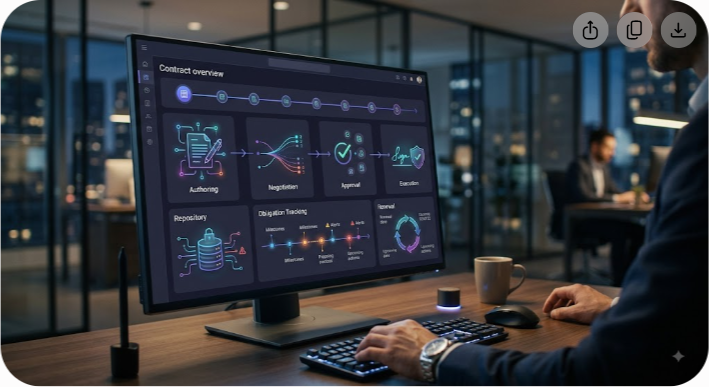
A typical SaaS contract lifecycle has six stages: authoring, negotiation, approval and execution, storage, post-signature management, and renewal or termination. The exact workflow varies by company, but the underlying discipline is the same: capture the important terms, assign ownership, and act before deadlines become problems.
The 6 Stages of the SaaS Contract Lifecycle
A strong SaaS contract lifecycle doesn't end when someone signs the agreement. Each stage creates information or obligations that the next stage needs. Treating the process as one continuous workflow prevents the common problem of having a signed contract that nobody actively manages.
1. Authoring and Template Creation
The lifecycle usually starts with an approved template rather than a blank document. Legal and commercial teams establish standard language for the agreements they use most often, such as master services agreements (MSAs), order forms, service level agreements (SLAs), statements of work (SOWs), and data processing addendums (DPAs).
Good templates do more than save drafting time. They establish a baseline for acceptable commercial and legal terms. Sales representatives know which discounts they can offer, procurement knows which clauses require review, and legal teams can focus their attention on genuine exceptions instead of rewriting standard language.
Templates should still be reviewed periodically. Pricing models change, privacy requirements evolve, products add new capabilities, and the company's risk tolerance can shift. A template that was appropriate two years ago may no longer reflect how the business actually operates.
2. Negotiation and Redlining
Negotiation is where the standard contract meets the customer's or vendor's requirements. The parties may revise payment terms, liability limits, renewal language, security obligations, service levels, termination rights, data processing provisions, or usage definitions.
For B2B SaaS agreements, a few areas deserve particular attention:
- Auto-renewal language and the notice period for cancellation.
- Payment terms, including invoicing schedules and late-payment provisions.
- Subscription quantities, usage metrics, minimum commitments, and overage rules.
- Annual price increases and any caps on those increases.
- Service credits, uptime commitments, and support obligations.
- Data ownership, portability, retention, and deletion requirements.
- Liability caps, indemnification, insurance, and security obligations.
- Termination rights, including termination for convenience or material breach.
Uncontrolled redlining creates unnecessary delays. A better CLM process uses an approved clause library and clearly defined fallback positions. That lets business teams handle routine changes while sending genuinely high-risk deviations to legal.
3. Approval and Execution
Once the commercial terms are settled, the agreement moves through internal approvals. The approval path should reflect the actual risk and value of the contract rather than sending every document to every department.
For example, finance may review unusual billing terms, procurement may approve vendor spend, security may review data-handling requirements, and legal may approve material changes to liability or indemnification language. A high-value customer agreement may also require executive approval.
The final contract is then executed through an electronic signature process or another legally appropriate signing method. The important operational step comes immediately afterward: the signed agreement needs to become an active business record.
A signed customer contract may need to trigger billing, provisioning, implementation, and revenue operations. A signed vendor contract may need to trigger purchase orders, user provisioning, security reviews, and payment schedules. The exact actions depend on the organization, but the handoff should be explicit.
4. Centralized Storage and Contract Repository
After execution, the agreement should move into a central, searchable repository. Keeping final contracts in personal downloads folders, email threads, or disconnected shared drives makes it difficult to determine which version is authoritative.
A SaaS contract repository should capture both the document and its important metadata. Typical fields include:
- Vendor or customer name.
- Contract type and business owner.
- Effective date and expiration date.
- Renewal date and cancellation notice deadline.
- Billing frequency and payment terms.
- Total contract value and recurring value where applicable.
- Seat quantities, usage limits, or minimum commitments.
- Price escalation provisions.
- Key service-level commitments.
- Data processing or security requirements.
- Termination and data-export obligations.
Metadata is what turns a document archive into an operational system. A repository can store thousands of PDFs, but the real value comes from being able to answer questions such as which contracts renew in the next 90 days, which vendors have uncapped price increases, or which customer agreements contain unusual payment terms.
5. Post-Execution Obligation Tracking
The period after signature is where many CLM programs lose momentum. The contract is filed away, but nobody checks whether the parties are meeting their obligations.
For SaaS buyers, post-signature management can include checking actual usage against purchased seats, reviewing service performance, confirming invoices against contracted rates, and tracking security or compliance commitments.
For SaaS sellers, it can include monitoring customer entitlements, implementation milestones, support obligations, usage thresholds, pricing schedules, and commitments that affect expansion or renewal opportunities.
Not every obligation needs an automated system. The important point is to identify obligations that have a financial, operational, legal, or customer-impacting consequence and give each one an owner and deadline.
6. Renewal, Expansion, or Termination
Renewal management should begin before the cancellation deadline, not on the contract expiration date.
Suppose a software agreement expires on December 31 and requires 60 days' written notice of non-renewal. December 31 is not the decision deadline. The company needs to make its renewal decision early enough to deliver the notice by the contractual deadline, while leaving time for internal review and negotiation.
A useful renewal process typically includes:
- Confirm the contract's notice period and renewal mechanics.
- Review actual usage and business requirements.
- Identify unused licenses, unnecessary features, and duplicate tools.
- Compare current pricing with available alternatives and market options.
- Decide whether to renew, renegotiate, reduce scope, expand, or terminate.
- Complete the required notice and approval steps.
- Update the repository with the new agreement, amendment, or termination record.
The key is to make the decision before the contractual deadline becomes urgent.
Buy-Side vs. Sell-Side SaaS CLM
SaaS CLM means different things depending on which side of the contract you're managing. A SaaS vendor is primarily concerned with selling and renewing customer agreements. A SaaS buyer is more concerned with controlling spend, risk, usage, and vendor commitments.
| Operational Focus | Sell-Side SaaS CLM | Buy-Side SaaS CLM |
|---|---|---|
| Primary Goal | Move customer contracts through the sales process and protect recurring revenue. | Control software spend, reduce risk, and prevent unwanted commitments. |
| Primary Users | Sales Operations, Legal, Account Management, Revenue Operations. | Procurement, Finance, IT, Security, Internal Legal Teams. |
| Key Metrics | Sales cycle time, contract value, approval time, renewal rate. | Software spend, license utilization, renewal exposure, contract compliance. |
| Core Integrations | CRM, CPQ, billing, revenue operations, e-signature. | ERP, AP, SSO, expense management, procurement, e-signature. |
| Primary Risk | Approval delays, inconsistent terms, unauthorized discounts, missed renewals. | Auto-renewals, unused licenses, uncontrolled purchases, unfavorable terms. |
Sell-Side SaaS Contract Management
For a SaaS vendor, CLM connects commercial activity with the contract that ultimately governs the customer's relationship with the company.
The process should make it easy to move from an approved opportunity to a compliant agreement without losing important information between sales, legal, finance, and customer success. Contract terms such as billing frequency, discounts, committed quantities, renewal dates, and usage limits should be visible to the teams responsible for delivering and billing the service.
Renewal management is equally important. A customer agreement that quietly reaches its renewal date represents a missed opportunity for both sides. The vendor needs enough lead time to review usage, understand customer needs, prepare commercial options, and resolve issues before the renewal conversation becomes urgent.
Buy-Side SaaS Contract Management

For a SaaS buyer, the central question is different: What are we committed to paying, why are we paying it, and when can we change or stop it?
Procurement and finance teams need a complete view of vendor agreements, while IT and department owners need to understand who actually uses the software. A contract repository can provide the legal record, but effective buy-side CLM also connects that record to spend and usage information.
This is especially useful when an organization has many departments buying software independently. Without a shared process, two teams may purchase overlapping products, an employee may create a subscription without procurement's knowledge, or an unused application may renew simply because nobody knew the cancellation deadline.
Why Traditional Document Management Falls Short
A shared folder is useful for storing contracts. It isn't a complete contract management system.
The difference is that document storage answers where is the contract? CLM should also answer what does the contract require, who owns it, and what happens next?
1. Auto-Renewal Deadlines Get Buried
Auto-renewal provisions can create a serious financial problem when the cancellation window isn't tracked separately from the contract's expiration date.
For example, an agreement might expire on June 30 but require written notice 60 days earlier. If the responsible team only receives a reminder on June 30, the reminder is effectively useless. The contract may already have renewed.
A useful CLM process records the notice deadline as its own field and sends reminders early enough for the business to evaluate the agreement before taking action.
2. Usage and Pricing Rules Are Easy to Miss
Many SaaS contracts use pricing models that are more complicated than a fixed annual subscription. Charges can depend on seats, transactions, API calls, storage, contacts, active users, or other usage measures.
A PDF repository doesn't tell finance that a team is approaching a contracted threshold. It simply stores the document containing the relevant clause.
This is why contract data becomes more valuable when connected to billing, finance, identity, procurement, or product-usage systems. The integration doesn't have to be fully automatic in every organization. Even a regular usage review can prevent unpleasant surprises.
3. Shadow IT Creates Blind Spots
SaaS purchasing can happen outside formal procurement channels. A department may subscribe to a tool with a corporate card, an employee may start a trial and later enter payment details, or a team may sign up for a specialist service without realizing another department already uses a similar product.
The result is fragmented ownership and incomplete contract visibility.
A buy-side CLM process should therefore connect contracts with vendor records, payment information, application ownership, and where practical, identity or usage data. The objective isn't to prevent every employee from trying new software. It's to make sure the organization knows what becomes a recurring financial and operational commitment.
What Poor SaaS Contract Management Can Cost
There is no single reliable percentage that applies to every company for SaaS contract waste. Claims that organizations universally lose a fixed percentage of their software budget are too broad to be useful.
The financial impact is better understood through specific failure modes.
Missed Renewal Deadlines
A missed cancellation window can force a company to continue paying for another contractual term. The cost depends on the contract value, renewal period, and termination language, but the underlying problem is preventable: the company failed to act before a known deadline.
Unused or Excess Licenses
A company may purchase 500 seats during a period of rapid hiring and later use only 320. If the agreement doesn't allow easy reductions, the unused capacity can continue to generate cost until the next renewal or adjustment window.
Usage reviews before renewal can expose these gaps and give procurement a factual basis for renegotiation.
Duplicate Applications
Overlapping tools can appear gradually. Marketing buys one platform, product buys another, and a regional office uses a third. Each purchase may have seemed reasonable at the time, but the combined portfolio can contain substantial functional duplication.
Contract visibility makes these overlaps easier to identify because teams can see vendors, renewal dates, spend, owners, and business purposes in one place.
Unfavorable Commercial Terms
A contract can become expensive even when the base subscription price looks reasonable. Automatic price increases, minimum commitments, paid add-ons, overage rates, and restrictive termination provisions can materially change the total cost of ownership.
CLM helps teams surface these terms before renewal rather than discovering them while reviewing an invoice.
How to Implement a SaaS CLM Process
You don't need to buy a large CLM platform on day one. The first objective is to establish a reliable process and clean contract data. Software can automate that process once the organization understands what it needs.
Step 1: Audit Existing Agreements
Start with an inventory rather than a software purchase.
Collect active MSAs, order forms, amendments, SOWs, DPAs, renewal notices, and other documents that affect commercial or operational commitments. Look beyond the legal team's folders. Finance records, accounts-payable systems, corporate card statements, procurement records, and department-level storage may reveal subscriptions that aren't represented in the official contract repository.
For each agreement, record whether the contract is active, expired, pending renewal, or missing documentation.
Step 2: Extract the Contract Metadata That Matters
Don't try to capture every sentence as structured data. Focus on fields that support decisions and workflows.
Useful fields include:
- Vendor or customer name.
- Internal contract owner.
- Contract type.
- Effective and expiration dates.
- Renewal date and cancellation notice deadline.
- Contract value and recurring charges.
- Billing frequency and payment terms.
- Seat quantities or usage commitments.
- Overage rates and usage thresholds.
- Price escalation provisions.
- Termination rights.
- Data export and deletion obligations.
- Security or compliance requirements.
The right fields will differ by company. A company with usage-based infrastructure contracts may need detailed consumption thresholds, while a small business buying basic productivity software may need only cost, owner, renewal date, and notice period.
Step 3: Standardize Templates and Clauses
Create approved templates for common contract types and document the clauses that require legal review.
A clause library is particularly useful during negotiation. Instead of allowing every salesperson or procurement manager to invent alternative language, the organization can define acceptable fallback positions.
For example, legal may establish a standard renewal notice period and one or two approved alternatives. A business user can then select an approved option rather than reopening the entire legal review for a routine negotiation point.
Step 4: Build Renewal Alerts Around the Notice Deadline
The most important renewal alert is tied to the date by which the company must act, not simply the date the contract ends.
Consider a contract that expires on December 31 with a 60-day cancellation requirement. The organization should treat November 1 as the contractual decision deadline and start its internal review well before then.
A practical schedule might look like this:
| Timing | Recommended Action |
|---|---|
| 120 days before notice deadline | Confirm ownership and start the contract review. |
| 90 days before notice deadline | Review usage, spend, business requirements, and alternatives. |
| 60 days before notice deadline | Begin commercial discussions or prepare termination notice. |
| Notice deadline | Submit the required renewal or non-renewal notice. |
| Contract end date | Complete the renewal, transition, or termination process. |
The dates should always be calculated from the actual contract language. Some agreements use different notice periods or special renewal mechanics.
Step 5: Connect CLM to Business Systems
Contract data becomes more useful when it is connected to the systems that act on it.
Common integrations include:
- CRM: Connect customer contracts with accounts, opportunities, and renewal records.
- Billing and ERP: Match contracted prices, billing schedules, and payment terms with financial records.
- Procurement: Connect purchase requests and vendor records with executed agreements.
- SSO and identity systems: Compare licensed users with active accounts where the software supports this type of analysis.
- E-signature: Keep signature status and executed documents connected to the contract record.
- Ticketing or workflow systems: Assign operational obligations and follow-up tasks to accountable teams.
The goal isn't to integrate every system. Start with the connections that eliminate the most manual work or reduce the highest-risk errors.
Key Features to Look For in SaaS CLM Software
If the contract portfolio has become too large or complex for manual management, CLM software can automate much of the process. The right feature set depends on whether the organization is primarily managing customer contracts, vendor contracts, or both.
Contract Repository and Search
The foundation is a centralized repository that stores executed agreements, amendments, and related documents. Search should work across both metadata and, where supported, the text of contracts.
The system should make it easy to identify contracts by vendor, owner, expiration date, renewal status, value, or contract type.
AI-Assisted Contract Data Extraction

Many modern CLM platforms can analyze uploaded contracts and identify fields such as effective dates, expiration dates, renewal clauses, governing law, payment terms, and liability provisions.
This can reduce the manual effort involved in migrating an existing contract archive. However, extracted data should be reviewed according to its importance. AI-assisted extraction is useful for accelerating review, but a critical contractual deadline shouldn't be trusted solely because a system populated a field automatically.
Clause Libraries and Version Control
A controlled clause library helps legal teams maintain approved language and fallback positions. Version control is equally important because users need to know which template or clause version was approved at a particular point in time.
Workflow and Approval Rules
A useful workflow engine routes contracts according to conditions such as contract value, risk level, department, geography, or deviation from standard terms.
For example, a standard low-value agreement may need only procurement approval, while a large contract containing non-standard liability language may require legal and executive review.
Electronic Signature Integration
E-signature support reduces the gap between final approval and execution. Whether signing is native or handled through an integration, the CLM system should preserve the executed version and update the contract status without requiring duplicate manual entry.
Renewal and Obligation Management
This is one of the most important areas for SaaS buyers. The system should support renewal reminders, notice deadlines, task ownership, and escalation when a decision hasn't been made.
For more mature organizations, obligation management can also cover service commitments, pricing changes, implementation milestones, data deletion requirements, and other post-signature actions.
Reporting and Portfolio Visibility
Managers should be able to answer practical questions without opening individual PDFs. Examples include:
- Which contracts renew in the next 90 days?
- Which agreements contain automatic price increases?
- Which vendors account for the largest share of software spend?
- Which contracts have no assigned business owner?
- Which customer agreements contain non-standard commercial terms?
- Which subscriptions have high licensed capacity but low usage?
Good reporting turns contract management from an administrative task into an operating discipline.
Common SaaS Contract Pitfalls and How to Avoid Them
Even organizations with experienced legal and procurement teams can miss details in recurring software agreements. The following issues deserve special attention.
Pitfall 1: Uncapped or Poorly Defined Price Increases
A contract may permit annual increases without a meaningful cap, or it may refer vaguely to the vendor's future list price. That can make future costs difficult to predict.
Better approach: Negotiate a clear ceiling on increases where possible and define exactly when the increase applies. Make sure the pricing language covers renewals, additional seats, add-ons, and usage-based charges where relevant.
Pitfall 2: Pricing Metrics That Don't Match Actual Usage
A company may commit to a pricing metric that sounded reasonable during procurement but becomes expensive as the business changes. The reverse can also happen: a minimum commitment may leave the company paying for capacity it doesn't use.
Better approach: Model the expected contract metric under conservative, expected, and high-growth scenarios. Ask what happens if usage falls, grows quickly, or changes to a different product tier.
Pitfall 3: Weak Data Ownership and Exit Terms
Terminating a SaaS relationship isn't only a commercial decision. The organization may need to export customer records, reports, files, configurations, logs, or other business data before access ends.
Better approach: Define data ownership, export formats, assistance during transition, retention periods, and deletion requirements in the original agreement. Don't assume the vendor's standard exit process will match your operational needs.
Pitfall 4: Treating the Spreadsheet as the Process
A spreadsheet can be an excellent starting point. The problem begins when nobody owns its updates, dates are entered inconsistently, or critical contract terms remain buried in separate documents.
Better approach: Establish a clear owner, required fields, update rules, and renewal workflow. Move to dedicated CLM software when the volume, risk, or complexity justifies automation rather than because a particular contract count is universally considered too high.
Pitfall 5: Failing to Track Amendments
The original contract isn't always the agreement that governs the current relationship. Amendments, order forms, renewals, pricing schedules, and statements of work can change important terms over time.
Better approach: Link amendments and related documents to the master contract and make the current commercial position easy to understand. Otherwise, teams may make decisions using an outdated version of the agreement.
Pitfall 6: No Clear Business Owner
Legal may own the document while finance owns the payment and IT owns the application. If nobody owns the business decision, a renewal can still slip through.
Better approach: Assign a business owner for every active SaaS agreement. That person doesn't need to perform every CLM task, but they should be accountable for confirming whether the organization still needs the service and what should happen at renewal.
A Practical SaaS CLM Checklist
Before considering a SaaS contract lifecycle process complete, make sure the organization can answer these questions for every important agreement:
- Where is the executed contract and its latest amendment?
- Who is the internal owner?
- When does the current term end?
- When must the company give notice to avoid renewal?
- What is the current financial commitment?
- What pricing or usage metrics affect future charges?
- How many seats or units are included?
- What happens if usage exceeds the contracted amount?
- Can the vendor increase prices, and under what conditions?
- What are the termination rights?
- What happens to company data after termination?
- Which teams need to act before renewal?
- Does actual usage justify the current subscription?
- Are there overlapping contracts or applications?
- When should the next review begin?
If several of these questions cannot be answered without searching through emails or opening multiple documents, the contract process probably needs more structure.
SaaS CLM vs. Procurement Software vs. Document Management
These categories overlap, but they solve different problems.
| Capability | Document Management | Procurement Software | SaaS CLM |
|---|---|---|---|
| Store contracts | Yes | Usually | Yes |
| Search contract documents | Yes | Usually | Yes |
| Contract drafting and negotiation | Limited | Sometimes | Yes |
| Clause management | Limited | Limited | Yes |
| Approval workflows | Basic | Yes | Yes |
| Renewal tracking | Basic reminders | Often | Core capability |
| Contract obligation tracking | Limited | Limited | Yes |
| Vendor purchasing workflow | No | Core capability | Sometimes |
| Customer contract workflow | Limited | Usually no | Common in sell-side CLM |
| Contract metadata reporting | Basic | Spend-focused | Contract-focused |
A company may need more than one of these systems. Procurement software can manage the purchasing process, while CLM manages the agreement itself. A document management platform can store files, while CLM adds structured metadata, workflows, approvals, and lifecycle events.
The best architecture depends on the organization's existing systems and where the largest operational gap exists.
How to Measure SaaS CLM Performance
Implementing CLM software doesn't automatically improve contract management. Teams should measure whether the process is actually reducing delays, missed deadlines, and unnecessary work.
Useful metrics include:
- Average contract cycle time from request to signature.
- Time spent in legal or approval queues.
- Percentage of active contracts with complete metadata.
- Percentage of contracts with an assigned business owner.
- Number of renewals reviewed before the notice deadline.
- Value of subscriptions reduced or terminated after usage reviews.
- Number of contracts with missing or outdated amendments.
- Frequency of invoices that don't match contracted terms.
- Percentage of contracts using approved templates or clauses.
For sell-side organizations, add measures such as approval turnaround time, contract cycle time, renewal performance, and the frequency of non-standard terms.
For buy-side organizations, focus more heavily on renewal exposure, utilization, spend visibility, contract compliance, and the ability to identify duplicate or unnecessary software.
When Should You Move From Manual Tracking to CLM Software?
There isn't a universal contract count at which every company needs dedicated CLM software. The right point depends on contract complexity, risk, number of stakeholders, renewal frequency, and the cost of manual administration.
Manual tracking may be perfectly reasonable for a small business with a limited number of straightforward agreements. A centralized repository plus a well-maintained tracker and calendar can work if ownership is clear and the process is followed consistently.
Dedicated CLM software becomes more compelling when:
- Multiple departments create or manage contracts.
- Contract volume is growing quickly.
- Renewal deadlines are difficult to track manually.
- Legal teams spend too much time locating documents or answering status questions.
- Contracts contain complex usage, pricing, or compliance terms.
- The business needs integrations with CRM, ERP, procurement, or identity systems.
- Management needs portfolio-level reporting.
- Contract amendments and versions are becoming difficult to reconcile.
The decision should be based on operational pain rather than a specific number of contracts.
How SaaS CLM Supports Revenue and Cost Control
Contract management has a direct connection to both revenue and expenses, but the connection looks different on each side of the market.
For SaaS vendors, accurate contract data helps finance and revenue teams bill customers according to agreed terms. It can also support renewal planning, identify expansion opportunities, and reduce the risk of unauthorized discounts or inconsistent commercial terms.
For SaaS buyers, the same discipline helps control recurring spend. Renewal reviews can identify unused licenses, duplicate applications, unfavorable pricing changes, and services that no longer match business requirements.
The common thread is visibility. A contract only creates value when the organization can understand its terms and act on them.
How Saasbonus Helps You Evaluate SaaS Software
Choosing the right software is part of building a reliable SaaS operations stack. The wrong tool can create another system to maintain instead of solving the original problem.
At Saasbonus, we publish independent reviews and comparisons of B2B software across areas such as billing, revenue recognition, customer success, finance, operations, and infrastructure. The goal is to help teams compare products based on practical requirements rather than relying on feature lists alone.
When evaluating CLM or related SaaS management tools, consider the contract problems you actually need to solve. A small procurement team may need reliable renewal tracking and a searchable repository. A larger SaaS company may need sophisticated approval workflows, CRM and billing integrations, clause controls, obligation management, and detailed reporting.
Start with the workflow. Then choose the software that supports it.
Key Takeaways
SaaS contract lifecycle management is more than storing signed agreements. It is a structured way to manage the commercial and operational information contained in those agreements from creation through renewal or termination.
The most important principles are straightforward:
- Track the lifecycle, not just the document. A signed contract still has deadlines, obligations, pricing rules, and renewal decisions attached to it.
- Separate renewal dates from cancellation deadlines. The date by which you must act is often more important than the contract expiration date.
- Capture meaningful metadata. Dates, owners, costs, usage limits, price increases, and termination terms should be easy to find.
- Connect contract data to business systems. CRM, billing, ERP, procurement, and usage information can make contract terms actionable.
- Assign ownership. Every important contract needs someone responsible for the business decision at renewal.
- Review usage before renewing. Actual adoption provides a stronger basis for renewal and negotiation decisions than assumptions about future needs.
- Use automation where it reduces real risk. Start with the deadlines, approvals, and repetitive tasks that are causing the most problems.
A mature SaaS CLM process doesn't make contracts disappear into a system. It makes the important parts of those contracts visible when the business needs to make a decision.




