
SaaS Customer Data Pipeline: How to Build One Right
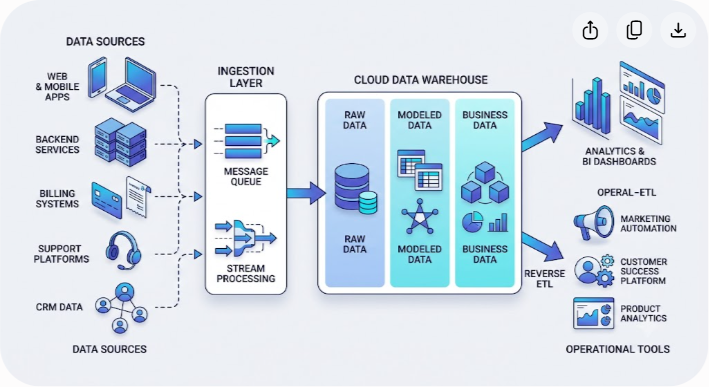
A SaaS customer data pipeline is the system that brings product activity, account records, billing events, support interactions, and other customer signals into one reliable analytical flow. The goal isn't simply to collect more data. It's to make sure the right data arrives with enough context, quality, and history to support decisions across product, sales, finance, marketing, and customer success.
A practical SaaS customer data pipeline usually has five parts: data ingestion, buffering and routing, warehouse storage, transformation and modeling, and activation through operational tools. The exact technologies can vary, but the design principles stay remarkably consistent.
This guide explains how to build that pipeline, starting with event design and source collection and ending with customer health scores, reverse ETL, monitoring, and governance. It also covers ETL versus ELT, CDPs versus custom pipelines, warehouse choices, common implementation mistakes, and the situations where buying managed infrastructure makes more sense than building it yourself.
Why SaaS Companies Need a Customer Data Pipeline
Early-stage SaaS companies can get surprisingly far with a production database and a handful of SQL queries. A PostgreSQL or MySQL database might contain users, subscriptions, workspaces, and account status, so it's tempting to treat it as the source for every report.
That approach becomes harder to maintain as the product and customer base grow. Your application database is designed to serve transactions, not to answer large analytical queries across years of behavioral history. Product events may live in an event-tracking platform, subscription information in a billing system, support conversations in a help desk, and sales activity in a CRM.
There is another problem: operational databases tend to describe the current state of an object. A customer may be on an enterprise plan today, but that record doesn't necessarily tell you which features they used last quarter, when their usage changed, whether support volume increased before an expansion, or what happened before they downgraded.
A customer data pipeline creates a separate analytical path for that history. It collects events and records from multiple systems, preserves them in a warehouse, standardizes their meaning, and turns them into models that other teams can actually use.
The result isn't automatically a perfect single source of truth. A pipeline only becomes trustworthy when the underlying definitions, identifiers, transformations, and ownership rules are clear. Good architecture gives you the foundation; good governance makes the foundation dependable.
What a SaaS Customer Data Pipeline Looks Like
A useful way to think about the architecture is as a series of layers. Data starts in customer-facing and operational systems, passes through collection and transport, lands in analytical storage, gets transformed into business models, and can then flow back into tools used by customer-facing teams.
- Data ingestion: Collect product events, server-side events, database changes, webhooks, and third-party SaaS data.
- Buffering and routing: Absorb bursts, retry failed deliveries, and route events to the appropriate destinations.
- Warehouse storage: Preserve raw source data and provide a central analytical environment.
- Transformation and modeling: Clean, deduplicate, join, and aggregate the raw data into useful models.
- Activation: Send selected metrics and customer attributes back to CRMs, marketing systems, customer success tools, and other operational applications.
The layers don't have to map one-to-one to products. A managed platform might combine ingestion, routing, and delivery in one service. A larger engineering organization might operate those layers independently. What matters is that each responsibility is understood and observable.
ETL vs. ELT vs. Reverse ETL
Traditional ETL means extracting data, transforming it before storage, and then loading the transformed result into a destination. ELT reverses the last two steps: data is extracted, loaded into the warehouse in a relatively raw form, and transformed there.
Modern SaaS data stacks often favor ELT because cloud warehouses can handle substantial transformation workloads without requiring a separate preprocessing layer for every source. Keeping raw data also makes it easier to rebuild models when business definitions change.
Reverse ETL addresses the opposite direction. Instead of moving operational data into the warehouse, it takes modeled data from the warehouse and sends selected fields back to operational systems.
| Architecture Stage | Primary Objective | Typical Latency | Example Tooling |
|---|---|---|---|
| Ingestion | Capture application events and third-party data | Seconds to hours | RudderStack, Segment, Airbyte, Fivetran |
| Buffering and routing | Absorb bursts and handle retries | Milliseconds to minutes | Apache Kafka, Amazon Kinesis, Redpanda, Pub/Sub |
| Warehouse storage | Centralize raw and modeled data | Query dependent | Snowflake, BigQuery, Databricks |
| Transformation | Turn source data into trusted business models | Scheduled or continuous | dbt, SQL, warehouse-native jobs |
| Activation | Sync warehouse data to operational tools | Minutes to hours | Hightouch, Census, other reverse ETL tools |
There is no requirement to make every layer real time. A billing reconciliation table might only need hourly or daily freshness, while product usage used for an in-app experience may need much lower latency. Design freshness around the business requirement rather than treating real time as a goal in itself.
Step 1: Design a Stable Customer Event Schema
The most important work often happens before you choose a pipeline vendor. If your event definitions are inconsistent, better infrastructure will simply move inconsistent data faster.
Start by deciding what constitutes a customer, user, account, workspace, subscription, and event in your system. Establish stable identifiers for each one and document how those identifiers relate.
For a B2B SaaS product, a useful event might include:
| Field | Purpose | Example |
|---|---|---|
| event_name | Identifies the action | report_exported |
| event_id | Supports deduplication | 8f2c... |
| occurred_at | Records when the action happened | 2026-08-22T14:32:00Z |
| user_id | Identifies the individual | usr_123 |
| account_id | Identifies the customer account | acct_456 |
| workspace_id | Identifies the product workspace | ws_789 |
| source | Identifies where the event originated | backend |
| properties | Stores event-specific context | format=csv |
| schema_version | Tracks changes to the event contract | 2 |
The exact fields will vary by product. The important part is consistency.
Identify Events and User Attributes
An identify event associates a user with a stable identifier and a set of relevant attributes. Depending on your architecture, these attributes might include role, account membership, signup date, plan, or locale.
Be selective about what you send. An event pipeline shouldn't become an excuse to copy every field from your application database into every analytical destination. Classify sensitive fields, document ownership, and collect only what supports a legitimate business or product purpose.
Track Product Events
Track events represent actions taken in the product. Good events describe meaningful behavior rather than every possible UI interaction.
For example, report_exported is generally more useful for product analysis than a generic button_clicked event with a button label buried in a property. Similarly, workflow_published gives you a clearer signal of feature adoption than several unrelated interface events.
Choose a naming convention and enforce it across web, mobile, and server implementations. report_exported, Report Exported, and exportReport may all describe the same behavior, but allowing all three creates unnecessary cleanup work downstream.
Model B2B Accounts Explicitly
B2B SaaS needs an account-level identity model. A person can belong to a company, a company can contain multiple workspaces, and a user can sometimes belong to more than one organization.
Capture those relationships explicitly instead of trying to infer them later from email domains or other unreliable signals. Account-level identifiers are essential when calculating usage, retention, expansion, or health scores.
This is also where many pipelines get into trouble. A user ID and an account ID are not interchangeable. If the pipeline doesn't preserve both, it becomes difficult to distinguish individual behavior from customer-level behavior.
Step 2: Collect Data from Every Important Source
A complete customer view rarely comes from one application. Your ingestion layer should cover the systems that contain material customer signals, while keeping each source's authority clear.
Client-Side Tracking
Browser and mobile SDKs are useful for capturing actions that happen in the interface: page views, feature interactions, navigation, and other behavioral events.

They also have limitations. Browser privacy controls, network failures, ad blockers, and application crashes can prevent events from arriving. For that reason, client-side tracking should not be the only source for events that affect money, entitlements, or other critical business state.
Client-side data is particularly useful when you need to understand how people interact with a product. Treat it as behavioral evidence, not as an unquestionable record of every business transaction.
Server-Side Tracking
Server-side tracking is appropriate for events that your backend can verify. Examples include a successful API operation, a completed file export, an entitlement change, a subscription update, or a completed workflow execution.
Because the backend controls the business operation, it can produce a more authoritative event. A frontend click on an upgrade button doesn't prove that a subscription changed. A confirmed subscription update from the billing system or backend does.
A strong pipeline often uses both approaches: client events for interaction context and server events for business-critical outcomes.
Billing, Support, Sales, and Marketing Sources
Customer context also lives in third-party systems. Common sources include:
- Billing: Stripe, Chargebee, Recurly, and similar systems can provide invoices, payments, subscription changes, refunds, and failed-payment events.
- Customer support: Zendesk, Intercom, and similar platforms can provide tickets, conversations, response times, and support outcomes.
- Sales and CRM: HubSpot, Salesforce, and related systems can provide account ownership, opportunities, lifecycle stages, and sales activity.
- Marketing: Marketing automation and attribution systems can contribute campaign, lead, and conversion information.
Use managed connectors where they reduce maintenance, or build custom ingestion when the source is unusual, business-critical, or poorly supported by existing connectors. In either case, land source data in a staging area before applying business logic.
Step 3: Add Buffering and Reliable Delivery
Pipelines often fail at the boundaries between systems. A destination can become temporarily unavailable, a deployment can introduce an error, or a traffic spike can produce more events than a downstream service can process immediately.
A buffer separates the rate at which events arrive from the rate at which they can be processed. Messaging systems such as Kafka, Amazon Kinesis, Google Cloud Pub/Sub, or Redpanda can serve this role depending on your infrastructure and operating requirements.
The queue isn't there simply to make the architecture look more sophisticated. It provides practical protection against transient failures and gives you a place to manage retries, ordering requirements, and backpressure.
What to Configure
At minimum, define:
- Retry behavior: Decide how failed deliveries are retried and when they should stop retrying.
- Dead-letter handling: Preserve messages that repeatedly fail so they can be inspected instead of disappearing.
- Idempotency: Make sure a retried event doesn't create duplicate business records.
- Retention: Set a retention period appropriate for recovery and replay needs.
- Ordering: Decide whether event order matters for each stream. Not every workload requires strict global ordering.
- Monitoring: Track queue depth, processing latency, delivery failures, and retry rates.
Don't assume that a queue guarantees delivery by itself. Reliable pipelines depend on the behavior of every component from the producer through the final destination.
Step 4: Choose and Structure the Data Warehouse
The warehouse is where raw source data becomes useful analytical data. For many SaaS companies, Snowflake, Google BigQuery, and Databricks are reasonable choices. ClickHouse can be attractive when extremely fast analytical queries over high-volume event data are a primary requirement.
The best warehouse isn't determined by a feature checklist alone. Consider your team's SQL skills, existing cloud environment, expected data volume, workload patterns, governance requirements, and operational experience.
Snowflake
Snowflake is a strong fit for organizations that want managed analytical infrastructure and flexible separation of compute and storage. It is widely used for structured and semi-structured analytical workloads.
Google BigQuery
BigQuery is a serverless analytical warehouse that can be particularly convenient for teams already working heavily within Google Cloud. Its SQL interface and support for nested and semi-structured data make it practical for event-oriented workloads.
Databricks
Databricks is worth considering when analytics, data engineering, machine learning, and lakehouse workloads need to coexist. It can be more infrastructure and platform than a small SaaS team needs, but it can make sense for organizations with broader data engineering requirements.
ClickHouse
ClickHouse is designed for fast analytical workloads and is particularly well suited to large event datasets. It can be an excellent choice for product analytics and telemetry-heavy systems, but operating a self-managed database introduces responsibilities that managed warehouses may reduce.
Step 5: Organize Raw, Clean, and Business Data
A simple layered model helps separate ingestion concerns from business logic. One common approach is the Medallion Architecture, using bronze, silver, and gold layers.
Bronze: Raw Source Data
Bronze data should preserve what arrived from the source with minimal interpretation. Keep source identifiers, ingestion timestamps, payloads, and metadata that help you trace a record back to its origin.
Raw storage makes reprocessing possible when transformation logic changes. It also gives engineers a reference point when a downstream metric suddenly looks wrong.
Silver: Clean and Conformed Data
The silver layer is where you parse source records, normalize timestamps, standardize types, remove duplicates, resolve identities, and apply source-specific cleanup.
This is also a good place to establish common models such as users, accounts, subscriptions, invoices, support tickets, and product events. A shared account model can then connect systems that use different identifiers.
Gold: Business Models
Gold models are designed around questions the business needs to answer. Examples include daily active accounts, feature adoption, customer health, expansion opportunities, revenue retention, and churn indicators.
Avoid putting every calculation into one enormous table. Smaller, clearly defined models are easier to test and explain. If a metric matters to executives or customer-facing teams, its definition should be documented alongside the model that calculates it.
Step 6: Transform Raw Events into Useful Metrics
Raw telemetry is not the same thing as insight. Billions of individual events may be valuable for investigation, but most teams need derived models that answer recurring questions without scanning raw data from scratch every time.
Transformation frameworks such as dbt can help organize SQL models, dependencies, tests, and documentation. The tool matters less than the discipline around the transformations.
Build Metrics Around Business Questions
Start with the decisions the data needs to support. For example:
- Which accounts are actively using the product?
- Which features are driving adoption?
- Which customers have experienced a meaningful drop in usage?
- Which accounts are approaching a usage or contract threshold?
- Which customers have unresolved support issues alongside declining product activity?
Then define the inputs and calculation rules for each metric.
Example: Account Health Score
A health score might combine several signals, such as product engagement, breadth of feature adoption, payment status, support activity, and recent changes in usage. There isn't a universally correct formula.
For example, a team might assign weighted components to recent product activity, core-feature adoption, unresolved support issues, and payment status. The weights should reflect the company's own evidence and be reviewed as the model proves more or less useful.
Avoid presenting a health score as an objective measurement of customer sentiment. It's a decision-support model. If the underlying signals are weak, the score will be weak too.
Example: Churn Indicators
A churn model can start with observable signals rather than pretending to predict churn perfectly. A sustained decline in meaningful product activity, repeated payment failures, reduced breadth of usage, or unresolved support problems may each deserve attention.
Use historical outcomes to test whether these signals actually correlate with retention in your customer base. Don't assume that a pattern observed in another SaaS company applies to yours.
Step 7: Put Warehouse Data Back to Work with Reverse ETL

A warehouse becomes much more valuable when trusted data reaches the people and systems that act on it.
Reverse ETL takes selected warehouse models and syncs them into operational applications. A customer success team might see a health score in its CRM, a marketing system might receive an onboarding status, or an internal application might use an account's product tier to tailor an experience.
The key word is selected. You don't need to synchronize your entire warehouse into every application. Define which fields each destination needs, how frequently they need to change, and which system remains authoritative for each attribute.
Practical Reverse ETL Use Cases
Customer success prioritization: Sync account health, recent usage changes, and open support issues into the CRM so customer success teams can prioritize accounts without manually checking several systems.
Lifecycle messaging: Send product adoption or onboarding milestones to a marketing platform so messages can respond to actual customer behavior rather than generic time-based campaigns.
Usage-based operations: Aggregate verified usage events in the warehouse and send the resulting usage totals to a billing or operational system when the business process requires it.
Sales context: Give account teams access to meaningful product usage signals alongside opportunity and contract data, while keeping sensitive or unnecessary event-level details out of the CRM.
The warehouse should remain the analytical source for these derived metrics. Operational tools are destinations for action, not substitutes for the underlying data model.
Common Mistakes When Building a SaaS Customer Data Pipeline
Good infrastructure can still produce bad analytics if the data model and operating practices are weak. These are the problems worth catching early.
1. Letting Event Names Drift
If one team calls an event signup_completed, another uses user_signed_up, and a third emits account_created, downstream analysts have to determine whether those events mean the same thing.
Create an event dictionary, assign ownership, document required properties, and introduce a review process for new or changed events.
2. Treating Client-Side Events as Business Truth
A frontend event can tell you that someone attempted an action. It may not prove that the action succeeded.
For billing, provisioning, permissions, and other critical operations, emit server-side events from the system that actually confirms the state change.
3. Building Too Many Point-to-Point Integrations
Connecting every source directly to every destination creates a maintenance problem. When an API changes, several independent integrations may need to be updated.
A central warehouse and well-defined models reduce this coupling. Not every integration needs to pass through the warehouse, but analytical data should have a clear central path.
4. Ignoring Identity Resolution
A customer might have a user ID in the application, a contact ID in the CRM, a customer ID in the billing system, and an account ID in the warehouse. If those relationships aren't documented, joins become fragile.
Maintain explicit identity mappings and define which system owns each identifier.
5. Collecting Sensitive Data Without a Clear Need
Customer pipelines can easily become repositories for information that shouldn't be there. Don't ingest passwords, payment card numbers, authentication secrets, or other highly sensitive information simply because an event payload can technically contain them.
Use data classification, access controls, encryption, retention rules, and deletion procedures appropriate to your obligations. Privacy requirements vary by jurisdiction and business model, so involve qualified legal or privacy professionals when making compliance decisions.
6. Skipping Data Quality Tests
A pipeline can be technically healthy while the data is wrong. A source may start sending null account IDs, duplicate events, unexpected event names, or timestamps in a different format without causing an obvious infrastructure failure.
Test the data itself. Useful checks include uniqueness, accepted values, null rates, row-count changes, freshness, referential integrity, and schema changes.
7. Treating Real Time as a Requirement for Everything
Real-time infrastructure can be expensive and operationally complex. Many business reports don't need second-level freshness.
Define a service level for each dataset. A customer-facing recommendation might need seconds or minutes. A finance reconciliation process might be perfectly effective when refreshed hourly or daily.
How to Monitor a Customer Data Pipeline
Monitoring should cover both infrastructure and data quality. A green server doesn't mean the customer data is correct.
Track at least these dimensions:
| Area | Example Signal | Why It Matters |
|---|---|---|
| Ingestion | Event volume | Detect missing or unexpectedly high traffic |
| Delivery | Failed and retried events | Identify destination or network problems |
| Freshness | Time since latest source record | Detect stale pipelines |
| Schema | New or missing fields | Catch breaking source changes |
| Quality | Null and duplicate rates | Detect malformed or repeated data |
| Transformation | Model failures | Prevent stale downstream metrics |
| Activation | Sync failures | Ensure operational teams receive updates |
Set alerts around meaningful thresholds rather than every small fluctuation. A brief variation in event volume may be normal; a sustained drop to zero from a high-volume production source deserves immediate investigation.
Security, Privacy, and Data Governance
Customer data pipelines cross many systems, so access control should be designed rather than added after the first incident.
Start by classifying the data you collect. Separate ordinary product telemetry from personal information and highly sensitive information. Restrict access to raw data more tightly than access to aggregated business models when appropriate.
Use encryption in transit and at rest, least-privilege access, secrets management, audit logging, and defined retention periods. Build deletion and correction processes that account for both source systems and downstream analytical copies.
Governance also means documenting definitions. If finance defines an active customer differently from product, both definitions can be valid, but the difference must be visible. Otherwise, teams can produce conflicting reports from the same warehouse and both believe they're correct.
Building vs. Buying a SaaS Customer Data Pipeline
The build-versus-buy decision depends on your team's engineering capacity, data volume, compliance requirements, source complexity, and need for customization.
When a Managed Platform Makes Sense
Managed ingestion and customer data platforms can be a good fit when you need to connect many common sources quickly and don't want to operate the underlying delivery infrastructure yourself.
Products such as Segment, RudderStack, Fivetran, and similar services can reduce the work involved in SDK management, connector maintenance, retries, authentication, and destination delivery. They can be especially useful when the team's primary goal is to get reliable data into a warehouse without building an ingestion platform from scratch.
The trade-off is cost, vendor dependency, and sometimes less control over how data is collected or processed. Review pricing against your actual event volume and growth rather than assuming the entry-level price will remain representative.
When Custom Infrastructure Makes Sense
A custom stack can be justified when you have unusual data requirements, very high event volume, strict infrastructure constraints, specialized latency needs, or a team capable of operating the platform.
Open-source and cloud-native components can provide considerable flexibility. But software licenses aren't the whole cost. Engineers still need to maintain deployments, upgrades, observability, security, retries, connector logic, and incident response.
The right comparison is therefore not "vendor cost versus free open source." Compare the total operating cost and the value of the engineering time involved.
A Practical Hybrid Approach
Many SaaS teams don't need to choose one side completely. A hybrid architecture can use a managed ingestion service for common third-party sources, a warehouse for centralized storage, dbt or SQL for modeling, and custom services only where the business requires them.
This approach keeps custom engineering focused on the parts that differentiate the company instead of recreating commodity infrastructure.
A Practical Implementation Checklist
Before putting a customer data pipeline into production, verify the following:
- Define the canonical identifiers for users, accounts, workspaces, subscriptions, and events.
- Document the event naming convention and required properties.
- Separate client-side behavioral tracking from server-side business events.
- Identify every system that contains material customer information.
- Decide which sources need real-time, near-real-time, hourly, or daily freshness.
- Establish a raw landing layer before applying business transformations.
- Implement deduplication and idempotency for retried events.
- Build conformed models for users, accounts, subscriptions, and product events.
- Add data quality tests and freshness monitoring before depending on the metrics operationally.
- Define access controls, retention rules, and procedures for sensitive data.
- Build business metrics from documented definitions rather than ad hoc dashboard queries.
- Activate only the warehouse fields that operational teams actually need.
- Test failure scenarios, including source outages, destination failures, malformed payloads, and duplicate events.
- Document who owns each source, model, metric, and destination.
Key Takeaways
A SaaS customer data pipeline isn't just a collection of connectors. It's a data system with contracts, identifiers, transformations, quality controls, and clear ownership.
Start with the data model before choosing the tools. Capture meaningful product behavior, keep business-critical events server-side, and preserve raw source data so you can reprocess it later. Use buffering when reliability and burst handling require it, and choose warehouse technology based on actual workload and team constraints.
Once the foundation is stable, turn raw events into models that answer real business questions. Account health, product adoption, usage trends, retention signals, and operational metrics are more valuable than an enormous event table that nobody trusts.
Finally, close the loop with reverse ETL when operational teams need warehouse-derived information in the tools where they already work. A well-designed pipeline doesn't just make analytics easier. It gives the rest of the company dependable customer context without forcing every team to stitch together data by hand.




